
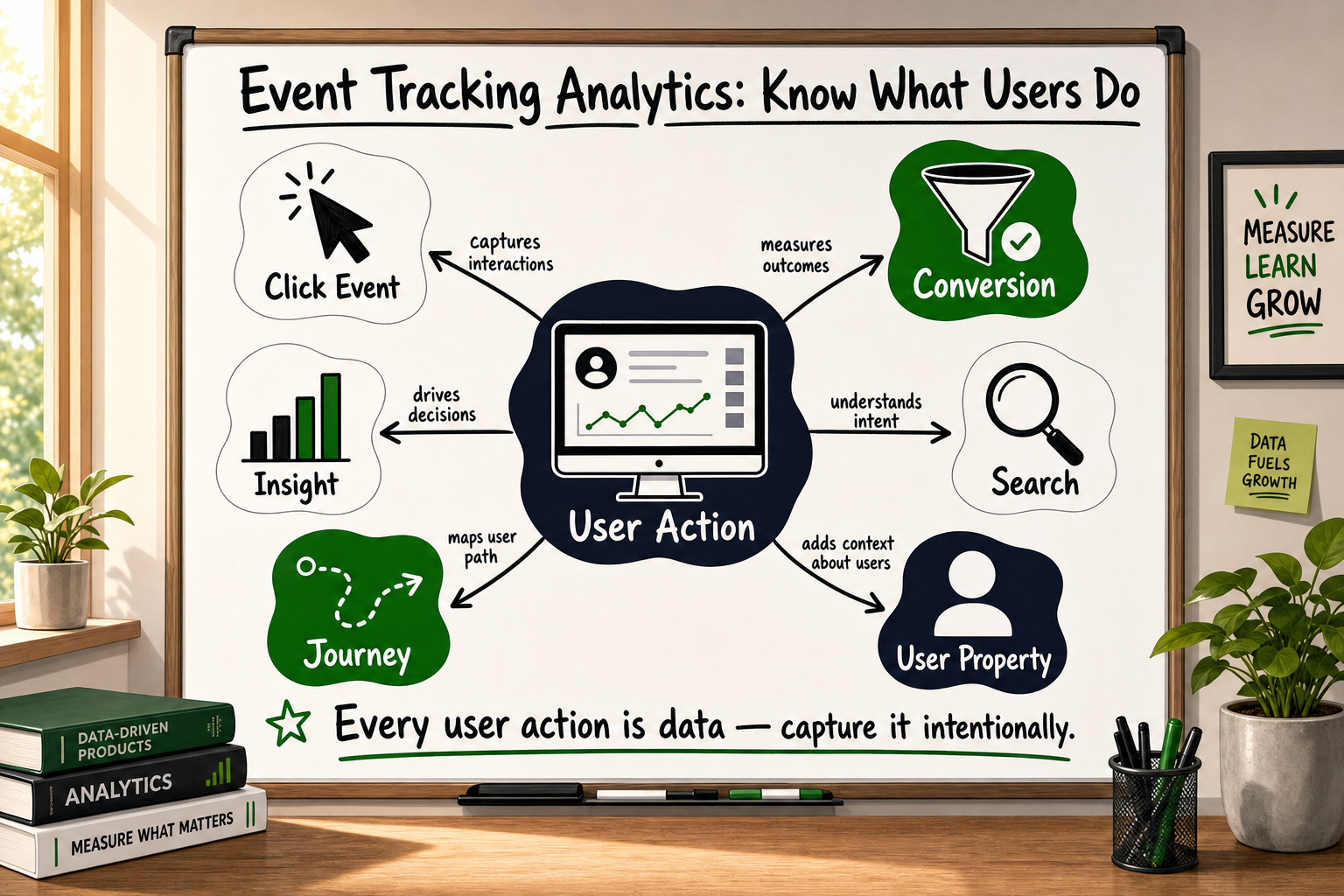
If you have installed Google Analytics and feel like you are still flying blind, you are not alone. Most early-stage products have some analytics running — but the data is either incomplete, misinterpreted, or answering the wrong questions entirely. Understanding event tracking analytics before you commission a setup is the single highest-leverage thing a non-technical founder can do to get useful data from day one.
This guide explains the core concepts in plain English: what events are, how they are structured, what to track first, why your data may already be incomplete, and how to brief a technical partner so you get a measurement stack that actually serves your growth decisions.
What Event Tracking Actually Means (And Why Pageviews Aren't Enough)
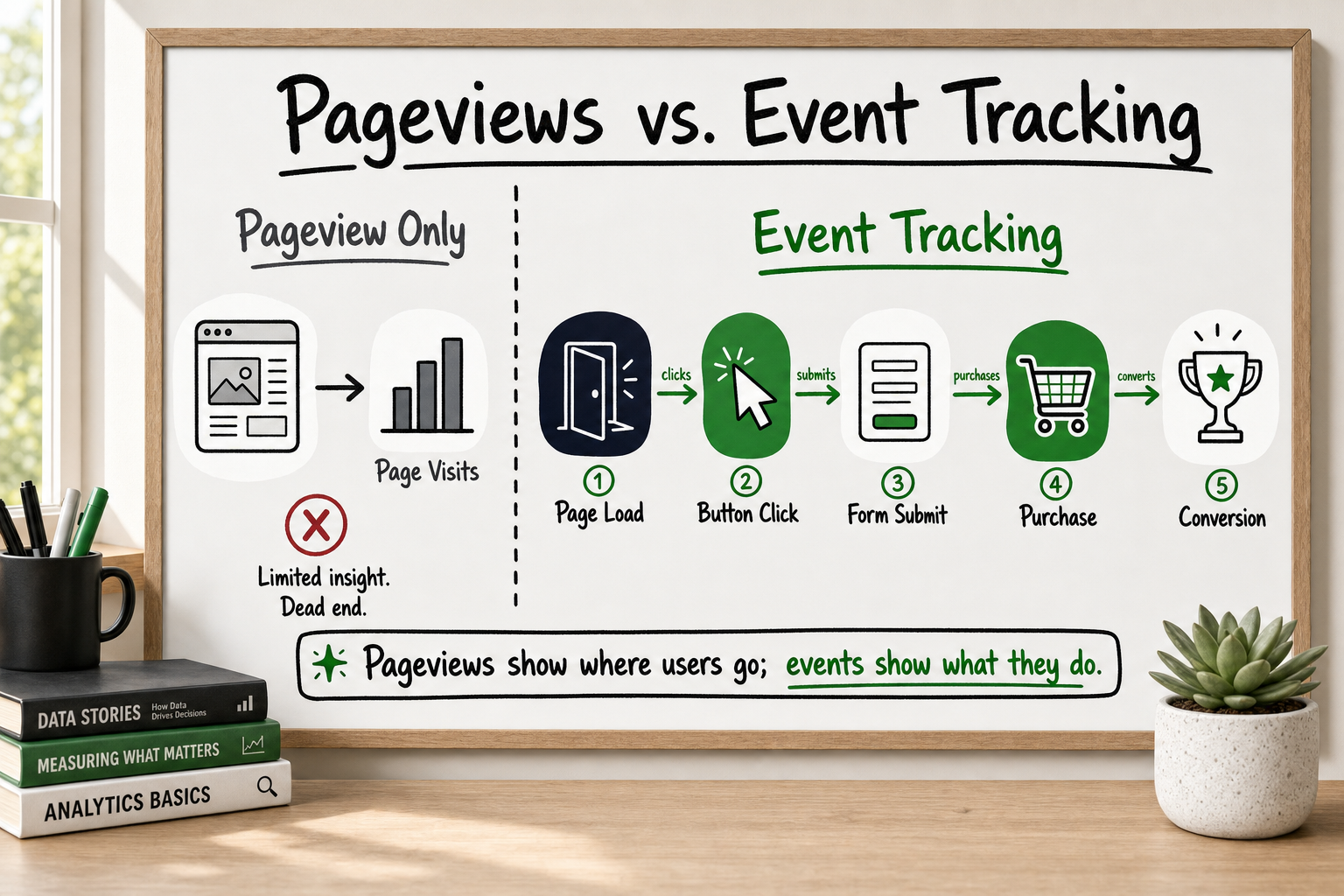
Pageviews tell you where people went — events tell you what they did
A pageview records one thing: a URL was loaded in a browser. It tells you that a human (or a bot) visited /pricing. It does not tell you whether they read the page, clicked the primary call-to-action, started filling in a form, or left after two seconds.
Think of it like running a retail shop with a door counter. You know how many people walked in. You have no idea which shelves they browsed, which products they picked up, or why they left without buying. That is pageview analytics.
Event tracking changes this. An event is a record of a specific user action — a button click, a form submission, a video play, a file download, a scroll depth threshold crossed. Each event captures what happened, when it happened, and optionally who it happened to and what context surrounded it.
Every meaningful user action can become a data point
In GA4 — Google's current analytics platform — everything is treated as an event, including pageviews [Source: Google Analytics Developer Documentation]. The difference is between the events GA4 collects automatically (pageviews, scroll depth, outbound clicks) and the custom events you define to reflect the specific actions that matter to your business model.
For a SaaS product, a meaningful custom event might be trial_started. For a marketplace, it might be first_listing_published. For an eCommerce store, it might be add_to_cart with a parameter capturing the product category. These events are the raw material of every growth decision you will make.
What Is a Webhook? Plain-English Guide for Founders
The Anatomy of an Event: Properties, Parameters, and Why They All Matter
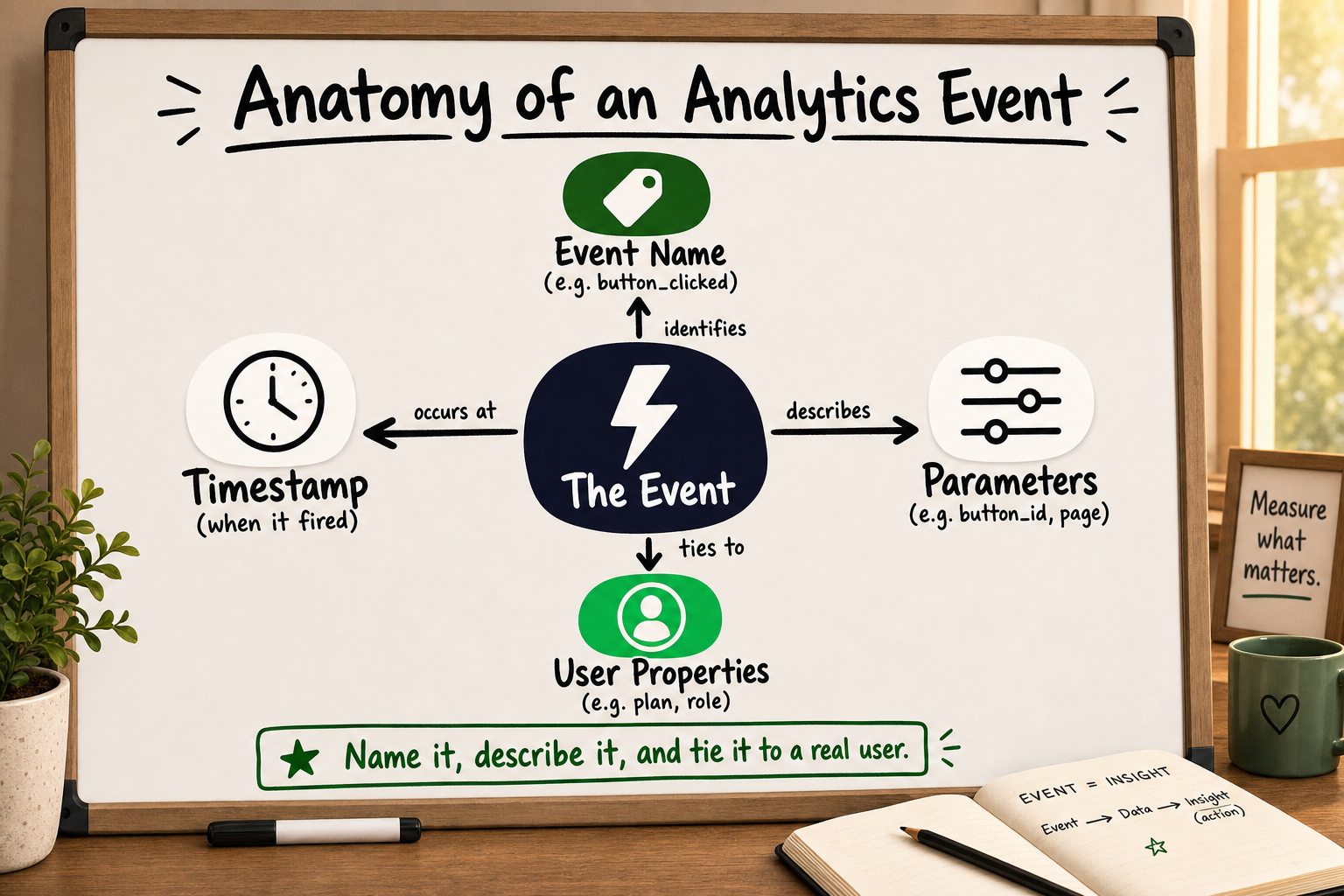
Event name: the action label
The event name is a short, consistent string that describes what happened. Good naming conventions use snake_case and describe the action in past tense: signup_completed, checkout_started, video_played. Inconsistent naming — SignUp, sign_up, Signup Complete used interchangeably — is one of the most common causes of fragmented, unusable data.
Event parameters: the context around the action
Parameters are the key-value pairs that travel alongside the event name and give it meaning. Without parameters, an event tells you that something happened. With parameters, it tells you what kind of thing happened and in what context.
For example, a signup_completed event with parameters like these:
plan_type: 'pro'referral_source: 'google_ads'time_to_signup_seconds: 47
…gives your product team three immediately actionable dimensions from a single user action. You can now ask: do paid users convert faster? Does the 'pro' plan attract traffic from a particular channel? Would a shorter signup flow lift conversions?
Without those parameters, you know someone signed up. With them, you can run experiments.
User properties: who triggered the event
User properties attach persistent attributes to a user across sessions — things like account_type, subscription_tier, or company_size. These allow you to segment your event data by user characteristics, not just by what action was taken. For B2B SaaS products in particular, this is where behavioural analytics starts to become genuinely useful.
How to Build a Tracking Plan Before Writing a Single Line of Code
Start with business questions, not data points
The most expensive analytics mistake founders make is asking a developer to "set up GA4" without defining what questions the data needs to answer. The result is a generic implementation that captures pageviews and maybe a few auto-tracked events — but nothing specific enough to inform a product or growth decision.
A tracking plan starts with your top three to five business questions. Not "what events should we track" but:
- Where in the signup flow do users drop off?
- Which acquisition channel produces users who activate within 48 hours?
- What action predicts that a free trial user will convert to paid?
Every event on your tracking plan should map directly to one of those questions. If it does not, it goes on the backlog.
Map events to the stages of your funnel
A practical way to structure a tracking plan is to follow the classic acquisition → activation → retention → revenue → referral framework and ask: what user action would tell us this stage is working?
| Funnel Stage | Example Event | Key Parameter | |---|---|---| | Acquisition | session_started | utm_source | | Activation | first_value_action | feature_used | | Retention | session_day_7 | session_count | | Revenue | subscription_started | plan_type | | Referral | invite_sent | channel |
The minimum viable tracking plan for an early-stage product
For a pre-Series A product, a minimum viable tracking plan typically covers eight to twelve events with two to four parameters each. It documents the event name, the trigger condition (what the user does), the parameters sent, and the business question it answers. This document becomes the brief for your developer or analytics partner.
Our internal analytics audit template — used during client onboarding — identifies 12 common GA4 configuration errors that cause between 40% and 60% data loss [VERIFY]. The majority of those errors trace back to starting implementation without a written tracking plan.
CRM Automation Explained: What to Automate and What Not To
Client-Side vs Server-Side Tracking: What Every Founder Should Understand
How client-side tracking works and where it breaks
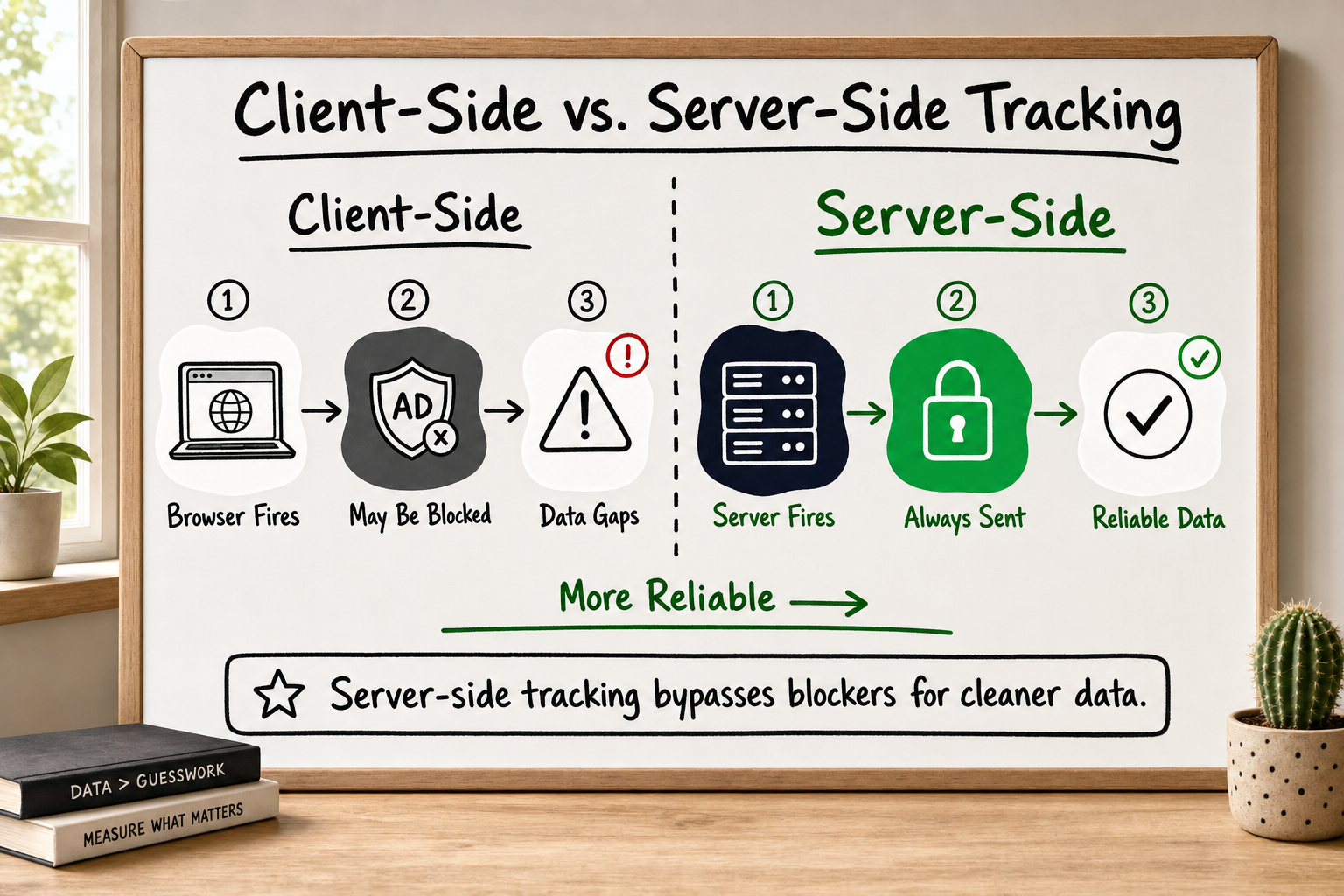
Most analytics setups use client-side tracking: a JavaScript snippet runs in the user's browser and sends event data directly to GA4, Meta, or another platform. It is easy to implement via Google Tag Manager and requires no server infrastructure.
The problem is that it depends entirely on the browser cooperating. Ad blockers — used by an estimated 30–40% of desktop users [VERIFY] — block tracking scripts at the network level. Apple's Intelligent Tracking Prevention (ITP) on Safari strips the cookies that client-side tools rely on to identify returning users. iOS privacy changes have further reduced the signal available to advertising platforms.
The result: platforms that rely on client-side data alone are typically seeing 40–60% incomplete data on their paid media campaigns [VERIFY]. You are making budget decisions on a fraction of your actual conversions.
What server-side tracking fixes — and what it costs
Server-side tracking moves the data collection step to your own server. Instead of the browser sending an event directly to Google or Meta, your server receives the event, validates it, and forwards it to the analytics or advertising platform via a server-to-server API — such as the Meta Conversions API (CAPI) [Source: Meta for Developers — Conversions API] or the GA4 Measurement Protocol [Source: Google Analytics Developer Documentation].
Because the data flows from server to server, ad blockers and browser privacy restrictions cannot intercept it. The data completeness improvement can be substantial.
The trade-off is complexity. Server-side tracking requires a backend endpoint, careful event deduplication (so the same conversion is not counted twice from both browser and server), and ongoing maintenance. It is not an afternoon's work — but for any product spending meaningfully on paid media, it is no longer optional.
When you need both
For most growth-stage products, the answer is a hybrid approach: client-side tracking for behavioural and UX events where occasional data loss is acceptable, and server-side tracking for conversion events where accuracy drives budget decisions. This is particularly important for any product running Meta or Google Ads campaigns.
What Is a Webhook? Plain-English Guide for Founders
The Events Every Early-Stage Product Should Track From Day One
Acquisition events: where users come from
These events establish the link between your marketing spend and the users it produces. At minimum, capture session_started with UTM parameters intact, and signup_initiated to measure the drop-off between landing and intent.
Activation events: the moment value clicks
Activation is the event where a user first experiences the core value of your product. This varies by product — for a marketplace it might be first_order_placed, for a SaaS tool it might be report_generated or team_member_invited. Identifying and tracking your activation event is one of the highest-leverage instrumentation decisions you will make.
Across the B2B SaaS and marketplace products our team has instrumented, three events consistently drove the most useful early growth decisions:
signup_completed— with a parameter for the referral sourcefirst_value_action— the product-specific activation momentsubscription_started— with plan type and billing cycle as parameters
If you track nothing else in week one, track these.
Retention and revenue events: what keeps and converts users
Once your product is live and users are returning, you need events that distinguish engaged users from churning ones. session_day_7 and session_day_30 (events fired when a user returns after a specific number of days) are crude but useful proxies for retention. On the revenue side, subscription_started, plan_upgraded, and subscription_cancelled form the core of any SaaS revenue instrumentation.
What Is a Product Backlog? Quality, Grooming & Velocity
Common Event Tracking Mistakes That Corrupt Your Data
Duplicate events inflating your conversion numbers
When both a client-side tag and a server-side API fire for the same user action, the conversion is counted twice. This is called event duplication, and without a deduplication strategy — typically matching a unique event ID across both sources — your reported conversions can be significantly inflated. Paid media platforms use these numbers to optimise campaigns; feeding them duplicated data trains the algorithm on false signals.
Missing parameters that make data useless for segmentation
An event without parameters is a data point without context. button_clicked tells you almost nothing without knowing which button, on which page, and by which user type. Defining required parameters in your tracking plan before implementation prevents this.
Firing events on page load instead of on user action
This is one of the most common GA4 configuration errors: a tag fires when a page loads rather than when the intended user action occurs. The result is an inflated event count that has no relationship to actual user behaviour. A form_submitted event that fires on page load will show every visitor as a conversion.
These three mistakes — along with nine others — appear consistently in the analytics audits our team runs during client onboarding. The 12-item checklist was built from real implementation errors discovered across live client accounts, and it is the starting point for every analytics engagement we take on.
Automation Stack Design: Map Processes Before You Build
How to Brief a Technical Partner on Your Analytics Requirements
The four questions your brief must answer
A useful analytics brief does not start with tools. It answers four questions:
- What business decisions will this data inform? List the three to five growth questions you cannot currently answer.
- What does your acquisition model look like? Which paid channels are you running, and which platforms need conversion data fed back to them?
- What are your data privacy obligations? Are you handling health data, financial data, or operating in a jurisdiction with strict privacy regulation? This shapes whether server-side tracking is required and how data must be stored.
- What does your existing stack look like? What CMS, backend framework, and tag manager are already in place? This determines implementation complexity.
What a good analytics proposal should include in return
A competent analytics partner will not respond to your brief by asking for GTM access and getting started. They will ask about your growth model, your paid media channels, and your data retention requirements. Their proposal should specify:
- Which events will be tracked and the exact parameters for each
- Whether server-side tracking is recommended and for which events
- How deduplication will be handled
- How they will validate that the implementation is working (not just live)
- What ongoing maintenance looks like
If a proposal jumps straight to tool configuration without these elements, treat it as a warning sign.
Red flags to watch for in an analytics vendor's response
- No mention of a tracking plan or event specifications document
- Recommending client-side only for a product running paid media
- No deduplication strategy for server-side events
- Validation described as "checking that events appear in GA4" rather than a systematic QA process
How to Evaluate a Software Development Partner: 9 Criteria
Frequently Asked Questions About Event Tracking Analytics
What is the difference between a pageview and an event in GA4? A pageview records that a URL was loaded in a browser. A custom event records a specific user action — a button click, a form submission, a video play — with parameters that add context. In GA4, all interactions including pageviews are technically events, but custom events give you control over what actions are measured and what data travels with them.
How many events should I track on my product? Start with the minimum set that answers your top three business questions. A useful rule of thumb: if you cannot name the decision this event would inform, do not add it to your tracking plan yet. For most early-stage products, eight to twelve events with two to four parameters each is the right starting point.
Why is my GA4 data showing lower numbers than expected? The most common causes are ad blockers preventing the client-side tracking script from loading, iOS Intelligent Tracking Prevention stripping session cookies, misconfigured filters excluding real traffic, and duplicate event suppression from conflicting tags. Server-side tracking via the GA4 Measurement Protocol addresses most of these gaps.
Do I need a developer to set up event tracking? Basic automatic events in GA4 — pageviews, scroll depth, outbound clicks — require no code. Custom event tracking with meaningful parameters, and any server-side component, requires a developer or a technical analytics partner who can implement a data layer, write the server-side endpoint, and run systematic validation.
What is a data layer and why does it matter? A data layer is a JavaScript object that sits between your website and your tag manager. It stores structured information about each user action in a consistent format, standardising how data flows to analytics and advertising tags. It makes implementation more reliable and future changes much easier to manage without breaking existing tracking.
What is event deduplication and why does it matter? Event deduplication is the process of ensuring that the same user action is not counted twice when both client-side and server-side tracking are running in parallel. It typically involves sending a unique event ID from the browser that the server-side system checks before forwarding the event to GA4 or Meta. Without it, your conversion counts and your advertising platform's optimisation signals will be inflated.
How Decyb Technology LLP Approaches Analytics for Founders
Most analytics problems we encounter when a new client comes to us share a common root cause: the tracking setup was commissioned before anyone wrote down the business questions it was supposed to answer. The result is a GA4 account full of data that cannot answer the questions the team actually has.
The approach our team takes is deliberately different.
Starting with a tracking plan, not a tool
Every analytics engagement at Decyb starts with a discovery conversation about your growth model — which channels you are investing in, what conversion actions matter most to your business, and what decisions you need the data to support. From that conversation, we produce a tracking plan that specifies every event, every parameter, and the business question each one answers. The developer writes to that plan. It becomes the validation checklist once implementation is complete.
This process was codified into a 12-point analytics audit checklist built from real errors found across live client accounts. It is the starting point for every new analytics engagement and the lens we use to assess existing setups when founders come to us after a previous implementation has failed them.
Server-side by default, not as an upsell
For any product running paid media campaigns, our team recommends a hybrid tracking architecture — client-side for behavioural events, server-side for conversion events — as the default. Not as an optional extra.
We have implemented Meta Conversions API end-to-end, including full event deduplication and server-side payload optimisation, for clients who were previously seeing 40–60% data loss on their campaign conversions. That implementation was delivered ahead of schedule and earned a ★ 5.0 review from the client. The before-and-after difference in reported conversion volume — and the campaign optimisation improvements that followed — is the clearest demonstration we can offer that this work is not optional for growth-stage products spending real money on paid media.
What working with our team looks like in practice
Decyb is a lean senior team. There are no account managers layered between you and the people doing the technical work. When you book a strategy call, you speak directly with the partner responsible for delivery. We have maintained ★ 5.0 ratings across 12+ years of client engagements because we are careful about what we commit to — and thorough about delivering it.
If you are at the point of setting up analytics for the first time, or you suspect your existing setup is losing data, the most useful next step is a conversation about your specific situation before any tools are configured.
Read the case study to see how we approached analytics instrumentation on a real product — or explore our process to understand how a tracking engagement fits into a broader technical partnership.
All project timelines and delivery estimates are indicative and subject to scope confirmation. Third-party service costs including hosting, domains, and SaaS tools are billed separately at cost. Decyb Technology LLP is registered in India; engagements are subject to terms of service available at decyb.com/terms.