
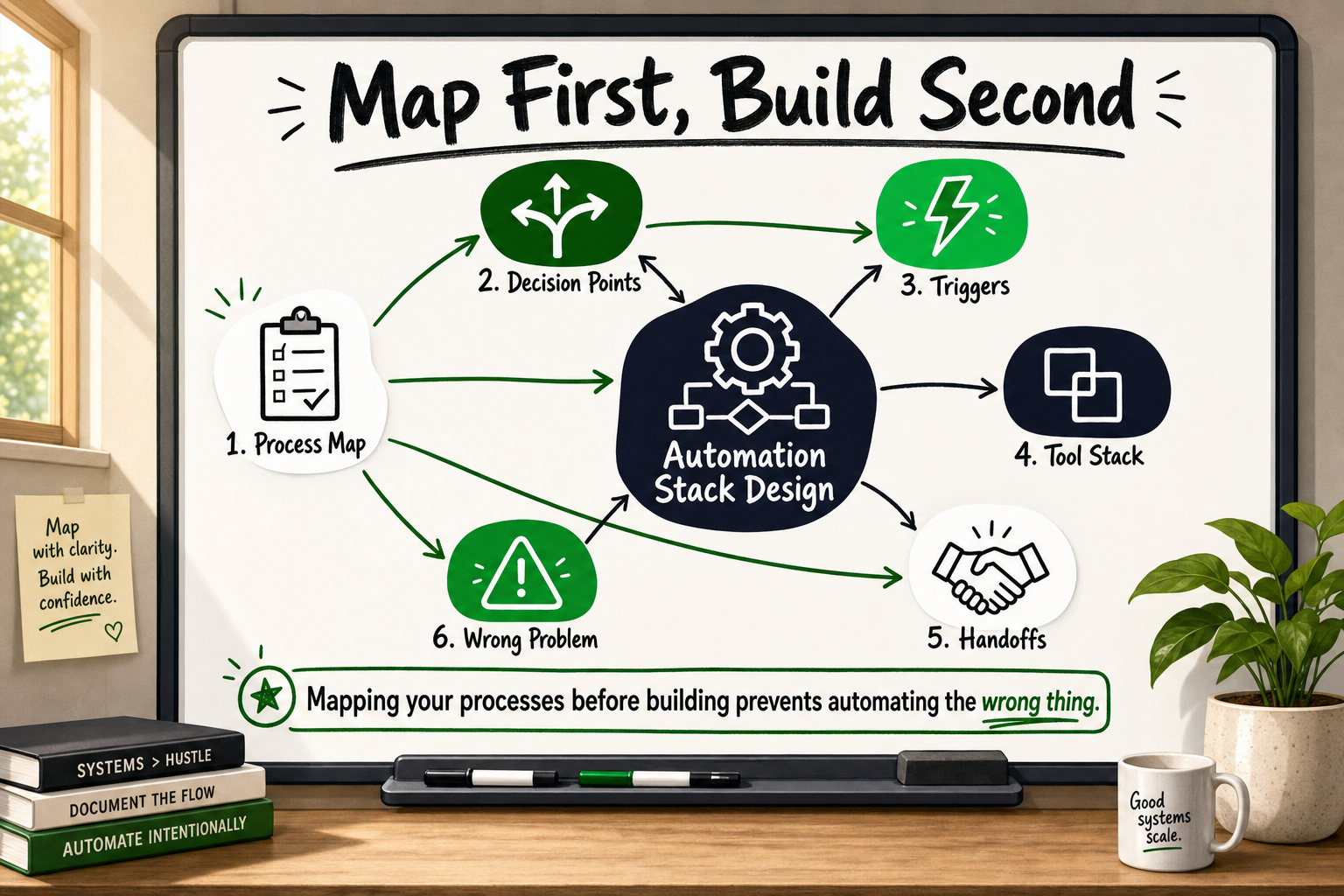
Building an automation stack without a process map is like writing code without a brief. The tools get configured, the workflows go live, and then — three weeks later — someone notices that the edge cases were never handled, the data is entering the system in the wrong format, and the team has quietly gone back to doing things manually. Automation stack design starts long before you open Zapier or GoHighLevel. It starts with understanding exactly what happens in your business right now.
This guide walks operations managers, marketing leads, and founders through a practical four-step framework for mapping business processes before a single workflow is built. By the end, you will have a method for auditing your current state, identifying what is actually automatable, and choosing the right tools for the job — in that order.
Why Most Automation Projects Fail Before a Single Workflow Is Built
The most common reason automation projects disappoint is not a bad tool choice. It is that the team automated a process that was already broken.
A broken process, automated at speed, produces wrong outputs faster. If your lead follow-up sequence is inconsistent because the CRM data is incomplete, connecting that CRM to an email tool does not fix the inconsistency — it broadcasts it at scale.
CRM Automation Explained: What to Automate and What Not To
The difference between automating a process and fixing one
Automation replaces human effort on a task that already works predictably. If the task does not work predictably — if outcomes depend on who is doing it that day, or if exceptions get handled differently each time — automation is not the right first move. Process redesign is.
Our team reviews automation requests regularly where the stated problem turns out to be a process design flaw rather than a missing tool. A client might say, "We need to automate our invoice approval." What the audit reveals is that invoice approval has four different routes depending on the supplier, two of which are handled by email and two by a spreadsheet, and no one has written down which route applies when. That is a process problem. Build the automation before resolving it and you will configure four separate workflows that still do not agree with each other.
What 'garbage in, garbage out' actually means for workflow design
Every automated workflow is only as reliable as the data that enters it. If your CRM contacts are missing phone numbers 30% of the time, your SMS follow-up automation will silently fail on 30% of leads. If your order management system uses inconsistent date formats across integrations, your reporting automation will produce totals that no one trusts.
The solution is not a more sophisticated automation tool. It is data validation built into the process map, upstream of the automation layer.
What a Process Map Actually Is (and What It Is Not)
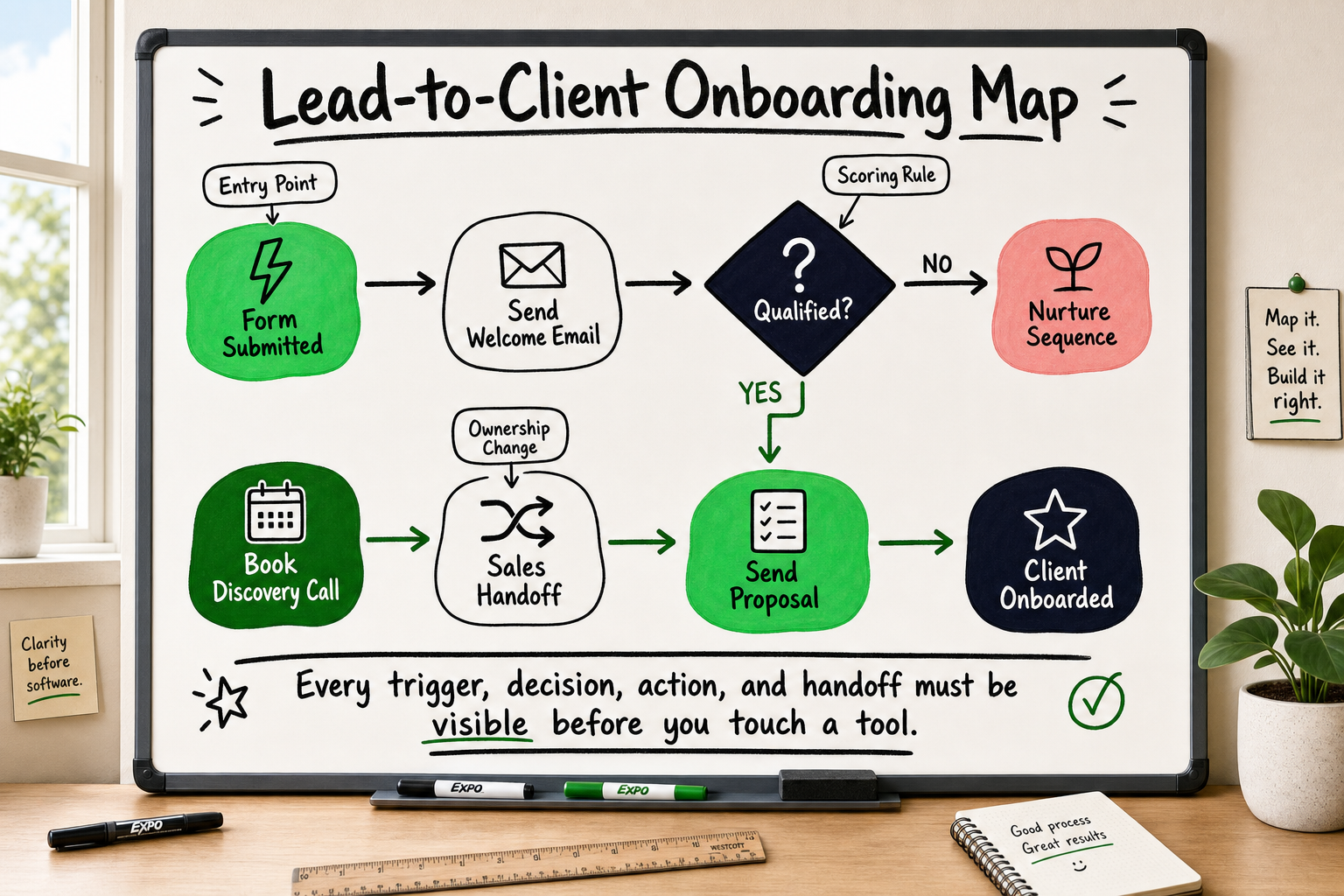
A process map is a structured description of how work flows through your business — who does what, in what order, under what conditions, and what happens when something goes wrong. It is not a marketing funnel diagram. It is not a software architecture drawing. It is a plain-language account of reality.
The five elements every process map must include
- Trigger — the event that starts the process (a form submission, a payment, a status change)
- Steps — the ordered sequence of actions that follow the trigger
- Decision points — where the path splits based on a condition (if the lead is in a specific region, route to a different rep)
- Handoff points — where responsibility moves from one person, team, or system to another
- Error states — what happens when a step fails, an input is missing, or a condition is not met
Most teams produce process maps that cover steps one and two. They skip decision points, handoffs, and error states entirely — which is exactly where automations break in production.
Common misconceptions about process maps among non-technical founders
A process map is not a flowchart of how things should work in theory. It documents how things actually work right now. Those two things are almost always different.
Process maps also do not need to be technical. They are written for business stakeholders, not engineers. The engineering translation happens afterwards, when the map is used as the specification for workflow configuration.
When our team mapped the retailer onboarding flow for a B2B wholesale marketplace serving 40,000+ retailers across Australia and New Zealand, the map ran to twelve distinct steps with seven decision points — none of which were visible from the surface-level brief. That map became the source of truth for every technical decision that followed. What Is a Product Backlog? Quality, Grooming & Velocity
Step 1 — Audit What Actually Happens, Not What Should Happen
The first step in automation stack design is a current-state audit. You are not designing yet. You are listening and documenting.
How to run a current-state process interview
Sit down with the person who actually does the work — not their manager, not the process owner, the person whose hands are on the task every day. Ask these questions:
- Walk me through what you do when [trigger event] happens.
- What do you check before you start?
- What happens if the information you need is missing or wrong?
- Are there shortcuts or workarounds you use that are not in the official process?
- How often does this process produce an outcome that needs to be corrected?
Record the answers verbatim. You are building a map of reality, and reality is messy.
Spotting manual workarounds that reveal hidden process gaps
Manual workarounds are the most valuable thing you will find in a current-state audit. They tell you exactly where the official process fails. If someone has built a personal spreadsheet that sits alongside the CRM, that spreadsheet is doing something the CRM does not support. That gap must be resolved — in the process design, not in the automation layer.
In one engagement, a current-state audit revealed that a client's invoice processing step had three unofficial workarounds that had accumulated over eighteen months. The official process document described a clean, linear flow. The reality involved two separate inboxes, a shared drive folder that only one person knew about, and a standing Tuesday meeting to resolve exceptions. Any automation built on the official document would have ignored 40% of real invoice traffic.
Step 2 — Identify Triggers, Actions, and Handoff Points
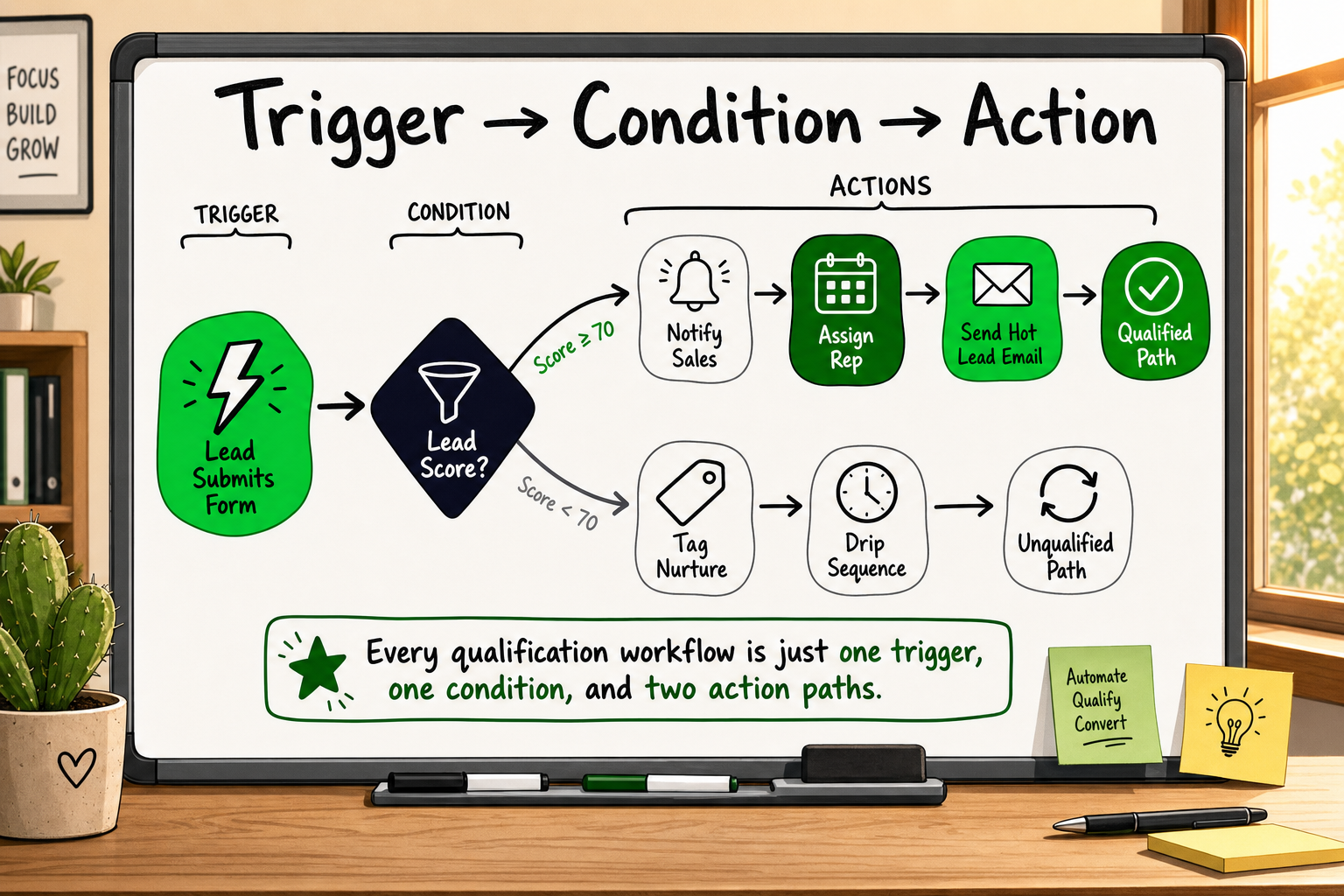
Once you have a documented current-state map, you translate it into the structure that automation tools actually understand: triggers, actions, conditions, and handoffs.
Defining your trigger: what event starts the process?
Every automated workflow begins with a trigger — a specific, unambiguous event that the system can detect. Common triggers include:
- A form is submitted
- A deal stage changes in the CRM
- A payment is received
- A date or time condition is met
- A webhook fires from a connected system What Is a Webhook? Plain-English Guide for Founders
Vague triggers produce vague automations. "When a new lead comes in" is not a trigger. "When a contact is created in GoHighLevel with a tag of 'inbound-website'" is a trigger.
Mapping actions and conditions in sequence
For each step after the trigger, document the action (what happens) and any condition that governs it (under what circumstances does this happen). Use plain language:
- Send confirmation email (always)
- If lead score is above 60, assign to senior sales rep; if below 60, enrol in nurture sequence
- Wait 24 hours, then check whether the contact has booked a call
- If booked: move to discovery pipeline; if not: send follow-up SMS
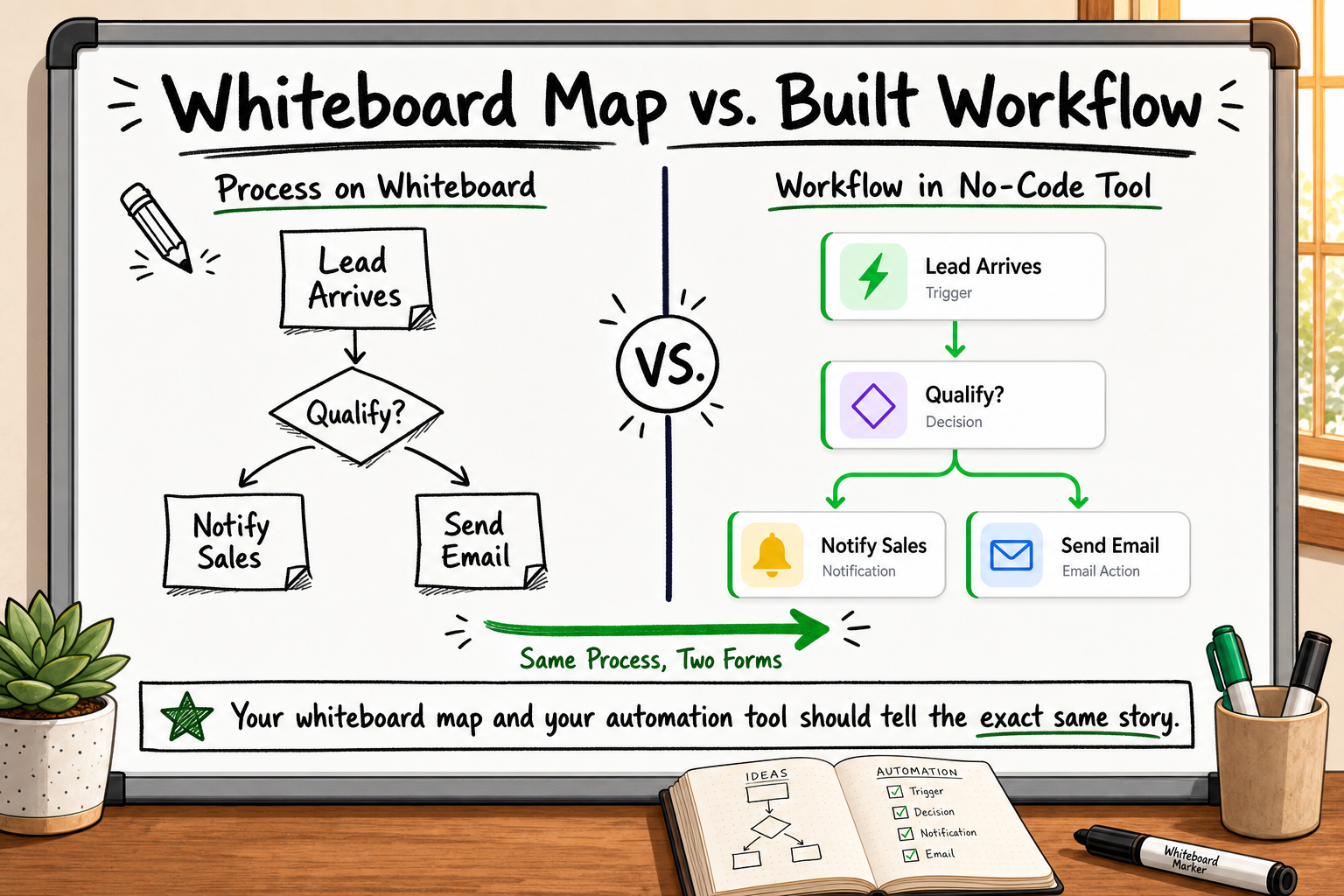
This is a trigger-action map. It is also, almost directly, the configuration logic for GoHighLevel, Zapier, or any equivalent platform. The workflow blueprints our team deploys for clients are built directly from maps in this format — which is why implementation is faster and edge cases are handled before the first test run.
Where human handoffs break automation — and how to design around them
Handoff points are where one person or system passes responsibility to another. They are the highest-risk nodes in any automated workflow because they depend on both sides behaving consistently. Design around them by:
- Making the handoff a system event, not an email (a task assignment, a pipeline stage change, a Slack notification with a direct action link)
- Building a timeout condition: if the receiving party does not act within X hours, escalate
- Logging every handoff so you have an audit trail when something goes wrong
Step 3 — Score Each Process for Automation Readiness
Not every process that can be automated should be automated next. A readiness score helps you prioritise.
The four criteria for automation readiness
Score each process on a scale of 1–5 against each criterion:
- Volume — How many times does this process run per week or month? High volume amplifies the ROI of automation and the cost of manual error.
- Rule-based predictability — Can every decision in this process be expressed as an if-then rule? If it regularly requires human judgment or context, automation will handle it poorly.
- Input consistency — Does the data entering this process arrive in a reliable, structured format? Inconsistent inputs require pre-processing before automation is viable.
- Error cost — What is the cost of getting this process wrong? High-cost errors (missed payments, incorrect client communications, compliance failures) justify more investment in careful automation design.
Processes that score 4–5 on all four criteria are your first candidates. Processes that score 1–2 on rule-based predictability need redesign before automation.
Building a simple prioritisation matrix
Plot your candidate processes on a two-axis matrix: automation readiness (horizontal) versus strategic value to the business (vertical). The top-right quadrant — high readiness, high strategic value — is where you start.
This mirrors the approach our team uses before scoping any automation engagement. Just as a 12-point GA4 configuration audit identifies where data is being lost before a single dashboard is built, a readiness score prevents building an automation stack on a process that will undermine it from day one.
Which processes to fix before you automate them
If a process scores low on input consistency or rule-based predictability, the investment belongs in process redesign, not tooling. Common examples:
- Lead qualification processes where the definition of a "qualified lead" varies between sales reps
- Invoice approval flows that depend on unwritten knowledge about supplier relationships
- Onboarding sequences where the steps differ based on who is doing the onboarding that week
Fix the definition first. Automate the defined process second.
Step 4 — Design the Future-State Map and Choose Your Stack
With a current-state map, a trigger-action breakdown, and a readiness score, you are ready to design what the process should look like — and then select the tools to build it.
Drawing the future-state process map
The future-state map applies the same five elements as the current-state map, but with the broken steps removed, the decision logic made explicit, and the handoffs systematised. It is your specification document. Every stakeholder — operations, marketing, engineering, and any external partner — works from this document. It prevents scope creep because disagreements about what the automation should do get resolved in the map, not mid-build.
Matching process complexity to the right tool tier
Once the future-state map exists, tool selection becomes a straightforward matching exercise:
| Process complexity | Recommended tool tier | |---|---| | Single trigger, 2–5 linear actions, no branching | Zapier free or starter plan | | Multiple branches, CRM integration, multi-channel | GoHighLevel, Make (Integromat), or HubSpot workflows | | Cross-system orchestration, custom logic, high volume | Custom Node.js/Express automation layer or hybrid | | Real-time event processing, multi-tenant systems | Custom backend with queue management |
The map tells you which tier applies. A lead notification that sends a Slack message when a form is submitted is a Zapier job. A multi-tenant restaurant management system that syncs POS data, manages inventory across locations, handles online orders, and generates back-office reports is a custom engineering job — which is exactly what the Multiverse system required. What Is Multi-Tenant Architecture? Plain-English Guide
When no-code is the right answer — and when it is not
No-code and low-code tools are genuinely excellent for:
- High-volume, rule-based marketing and CRM workflows
- Internal notification and task routing
- Simple data transfer between well-supported SaaS platforms
They reach their limits when:
- The process requires custom data transformations that no-code tools cannot express
- Volume or latency requirements exceed what SaaS platforms guarantee
- Security or data residency requirements prevent using third-party cloud infrastructure
- The automation is core to the product, not just supporting operations
The process map will surface these constraints before you invest in a platform licence.
The Most Common Automation Stack Design Mistakes — and How to Avoid Them
Even with a solid process map, automation projects fail at the implementation stage. These are the mistakes we see most often.
Building without error states
Every automation needs an error state — a defined behaviour for when a step fails. What happens if the API call times out? What happens if a required field is empty? What happens if a downstream system is unavailable? Without error states, failures are silent. The workflow appears to run. The outcome never arrives. Nobody notices for three days.
Build error states into the future-state map, not as an afterthought in configuration.
Ignoring data quality before connecting systems
Connecting two systems that each hold unreliable data does not produce reliable outputs — it produces confidently wrong outputs at higher speed. Before any integration is built, audit the data quality in both source and destination systems. Check for missing required fields, inconsistent formats, duplicate records, and orphaned entries.
Over-engineering a three-step process
Not every workflow needs a webhook, a queue, and a custom microservice. Simpler is more reliable. A common mistake among technically capable teams is reaching for infrastructure complexity on problems that a native Zapier integration handles perfectly. The future-state map keeps scope honest — if the map has three steps, the implementation should have three steps.
Our consistent ★ 5.0 delivery record across 12+ years of client engagements reflects a discipline of building to the specification, not beyond it — and of communicating clearly when a simpler solution serves the outcome better than a complex one. How to Evaluate a Software Development Partner: 9 Criteria
How Decyb Technology LLP Approaches Automation Stack Design
For operations and marketing teams planning their first serious automation investment, the framework above gives you the foundation to brief any partner, evaluate any proposal, and hold any delivery accountable. If you want a partner who applies this framework as a standard part of delivery — not an optional discovery phase — here is how Decyb Technology LLP works.
From process map to working system — what our engagement looks like
Every automation engagement at Decyb begins with a structured discovery session, not a tool recommendation. We run a current-state process audit, produce a trigger-action map that every stakeholder can read, and score candidate processes against the four readiness criteria before any configuration begins.
That process map becomes part of the client's documented deliverables — not internal paperwork. It is the kind of artefact you can hand to a future CTO, show to an investor, or use to brief the next partner if you ever need to. We have applied this approach across CRM automation builds, GoHighLevel workflow implementations, Zapier integrations, Twilio communication sequences, and fully custom Node.js orchestration layers.
For amoti, a GoHighLevel implementation was completed on schedule with clear communication throughout — earning a ★ 5.0 client review. For the FieldFolio B2B wholesale marketplace, the process mapping phase produced an architecture that now supports 40,000+ retailers across Australia and New Zealand without requiring a full re-engineering cycle as volume grew.
Tools we use and why we select them for your context
Decyb is not a GoHighLevel partner or a Zapier affiliate. We are a technology partner. That means the tool selection follows the process map, not the other way round. We deploy GoHighLevel, Zapier, Twilio, Make, and fully custom automation backends depending on what the future-state map calls for. We document every tool decision with the rationale behind it — so when your team scales and a future engineer inherits the system, the decisions are defensible. Ai automation
Why a documented process map is part of every Decyb delivery
Across 12+ years and consistent ★ 5.0 ratings from international clients, the most common reason cited for re-engaging Decyb — or for recommending us — is that the deliverables are comprehensible and maintainable. A working automation built on an undocumented process is a liability. A working automation built on a clear, shared process map is an asset.
If you are planning your first serious automation investment and want to start with a process map rather than a platform recommendation, book a free 24-hour technology strategy call with our senior team. We will review your current processes, identify the highest-readiness candidates, and give you a prioritised action plan — with no obligation to engage further.
Book your free strategy call — get a plan in 24 hours
Frequently Asked Questions
How long does it take to map a business process before automating it?
A single, well-scoped process typically takes two to four hours of structured interviews with the people who do the work, plus one to two hours of documentation and review. Multi-department processes with numerous handoffs can take two to five working days. That investment consistently saves more time than it costs — every ambiguity resolved in the map is a bug or a rework avoided in implementation.
Do I need a technical background to create a process map?
No. Process mapping is a business skill, not a technical one. The goal is to describe what actually happens in plain language. Engineers and developers translate that description into technical design. The most useful process maps we have worked from were written by operations managers with no engineering background at all.
What tools can I use to draw a process map?
The tool matters far less than the discipline. FigJam, Miro, Lucidchart, and Whimsical all work well for visual process maps. A well-labelled whiteboard photograph is equally valid. Start with whatever removes friction from the exercise. Standardise the format later, once the content is captured.
How do I know if a process is ready to automate?
Score it against four criteria: volume (does it run frequently enough for automation to pay back?), rule-based predictability (can every decision be expressed as an if-then rule?), input consistency (does the incoming data arrive in a reliable format?), and error cost (what is the consequence of getting it wrong?). If any criterion scores very low, fix the process first.
Can I automate a process that still involves human judgment?
Yes — hybrid automation is often the right answer. Design the automation to handle the rule-based steps and route judgment-required decisions to a human via a task assignment, a notification, or a pipeline stage that requires manual action. The key is making the handoff to a human an explicit, logged event rather than an implicit gap in the workflow.
All project timelines and delivery estimates are indicative and subject to scope confirmation. Third-party service costs (hosting, domains, SaaS tools) are billed separately at cost. Decyb Technology LLP is registered in India; engagements are subject to terms of service available at decyb.com/terms.