
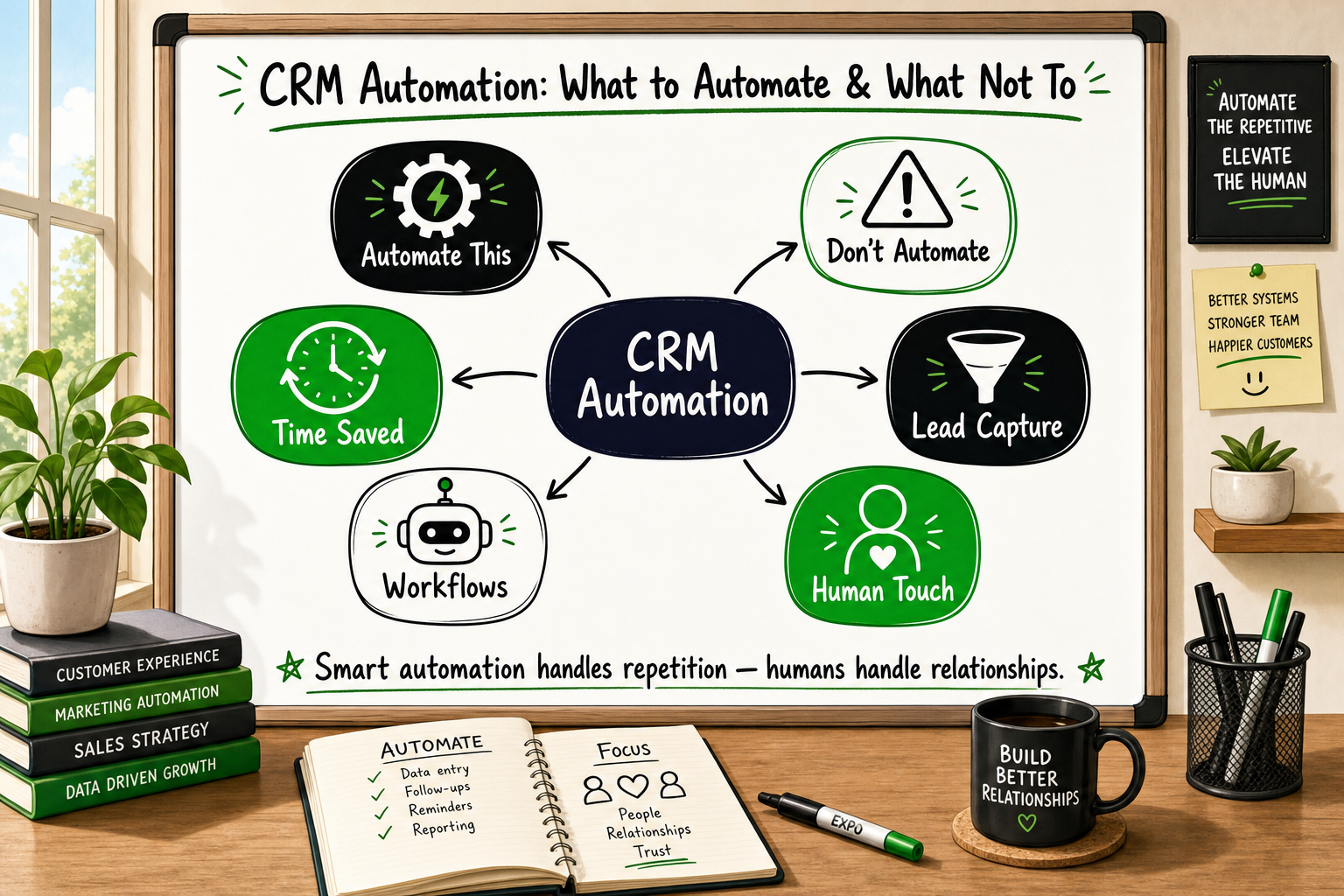
Every founder eventually hits the same wall. The product is working, inbound leads are coming in, and the team is spending four hours a day copy-pasting contact details, sending the same follow-up email for the fifth time, and updating pipeline stages by hand. Someone mentions CRM automation, and suddenly it sounds like the answer to everything.
Sometimes it is. Often, it is only the answer to some things. And occasionally, automating the wrong part of your workflow makes the underlying problem worse, not better.
This guide explains exactly what CRM automation is, which workflows are worth automating, which ones you should leave human, and how to calculate whether the investment actually makes sense before you commit time or budget to building anything.
What CRM Automation Actually Means (Beyond the Marketing Speak)
The difference between CRM automation and marketing automation
These two terms are used interchangeably in a lot of vendor material, but they describe different things.
CRM automation manages the contact record, the pipeline stage, internal task assignment, and the handoff between team members. It answers the question: what should happen inside our system when something changes?
Marketing automation manages outbound communication: email sequences, SMS messages, ad audience updates, and re-engagement campaigns. It answers the question: what should we send this person, and when?
Most modern platforms — GoHighLevel, HubSpot, Salesforce — blend both into a single interface. That is convenient, but it can obscure which problem you are actually solving. A founder who sets up a twelve-step email nurture sequence before they have sorted out their pipeline logic has built their marketing automation on an unstable CRM foundation.
What a trigger-action workflow looks like in plain English
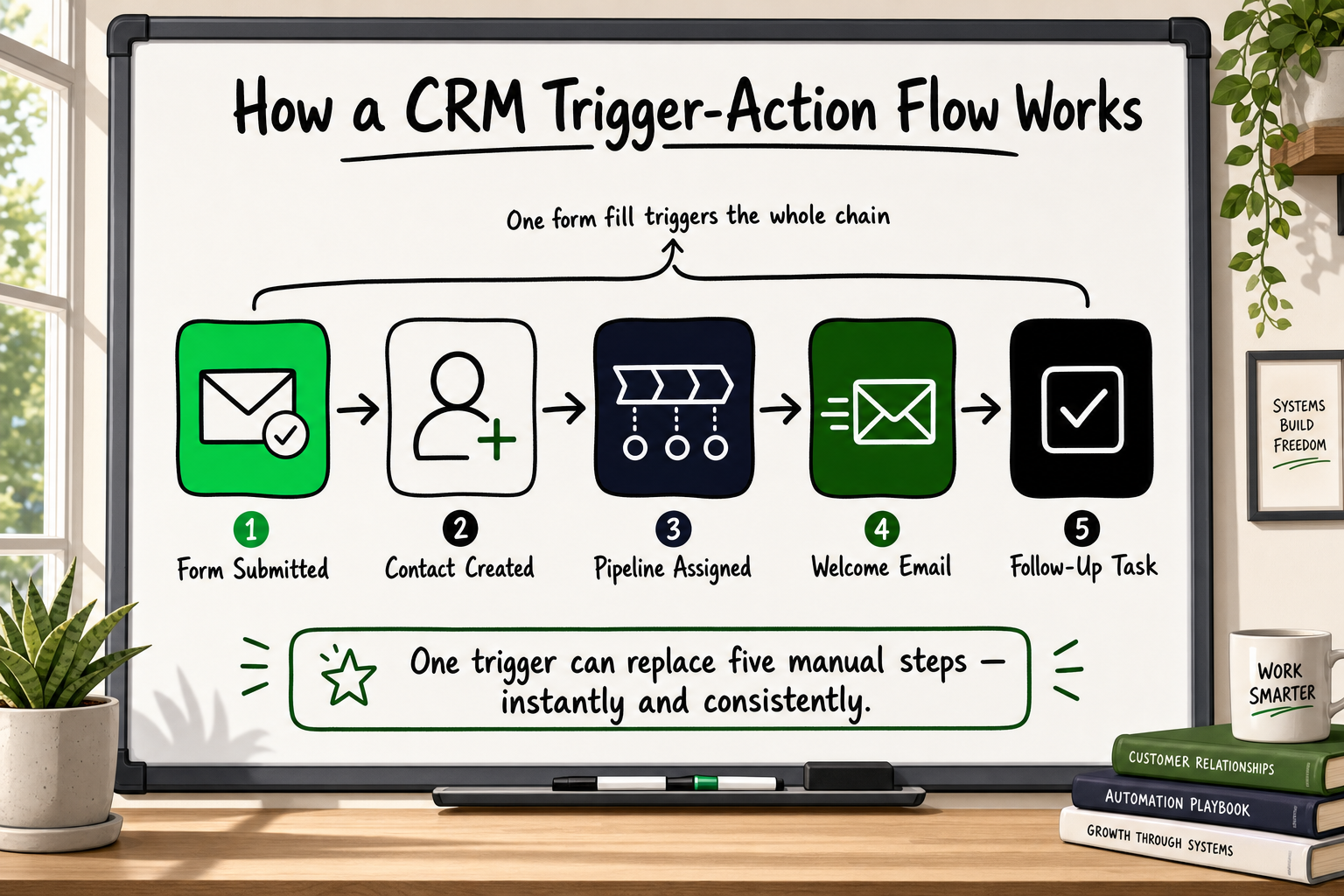
Every automation, regardless of how complex the platform makes it look, follows the same structure:
- Trigger — something happens (a form is submitted, a deal stage changes, a date arrives, a payment is received)
- Condition — optionally, a rule that must be true for the action to fire (the contact is tagged as 'enterprise', the deal value is above a threshold)
- Action — the system does something (creates a contact record, sends an email, assigns a task, updates a field, notifies a Slack channel)
Example: a lead fills in a contact form on your website. The CRM creates a contact record, assigns it to the correct pipeline stage, sends a personalised welcome email, and creates a follow-up task for a team member — all without anyone clicking anything. That single workflow can save a four-person team thirty to sixty minutes every day.
Where CRM automation sits in your operations stack
CRM automation is one layer in a broader operations stack that includes your product, your analytics, your marketing channels, and your customer support tools. It works best when it sits between your data sources (forms, product events, payment processors) and your human team, handling the rules-based work so people can focus on the judgement-based work.
The Workflows That Are Genuinely Worth Automating
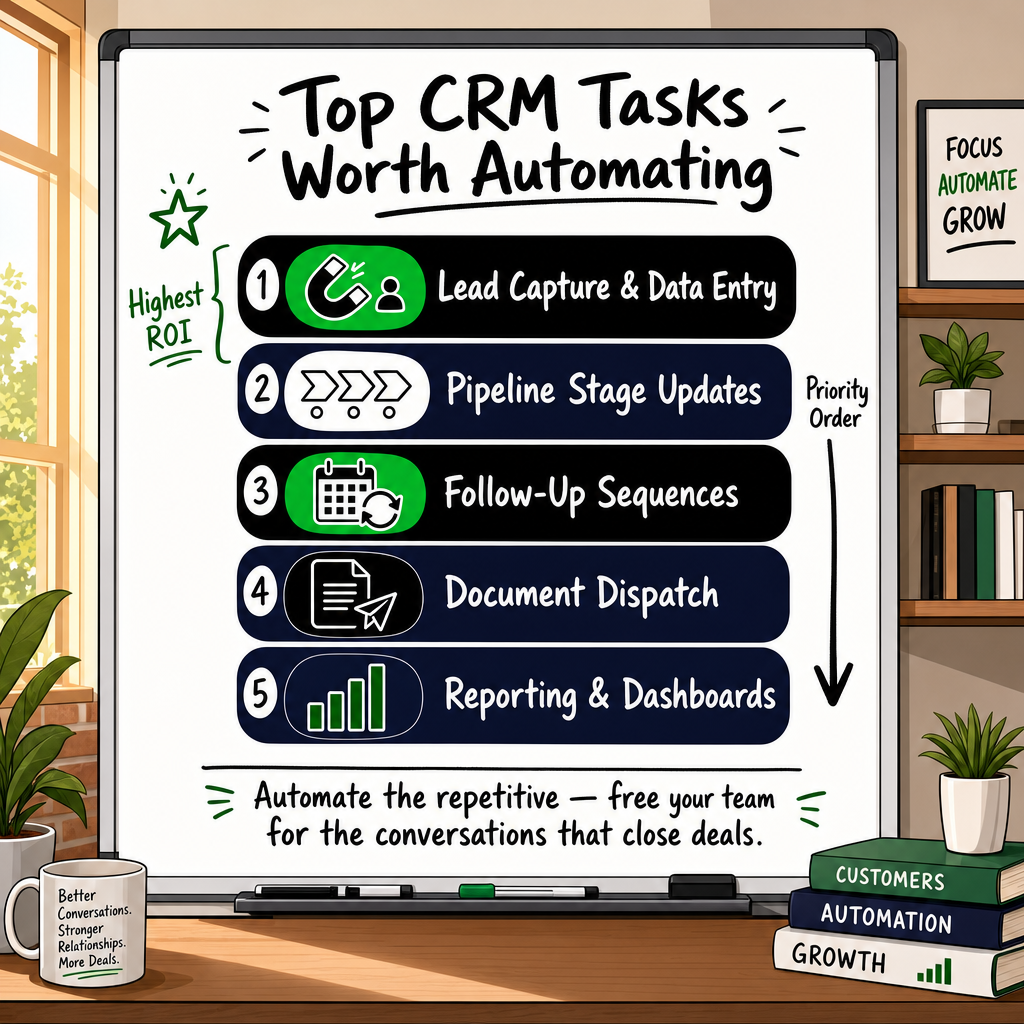
Not all tasks are equal candidates for automation. The best targets share three characteristics: they happen frequently, they follow a consistent set of rules, and getting them wrong is recoverable. Here is a prioritised list.
Lead capture and contact creation
Manually creating a CRM contact every time someone fills in a form is pure overhead. This is the single highest-return automation for most early-stage teams. The trigger is a form submission or an inbound API event; the action is a new contact record with fields pre-populated from the form data, tagged by source, and placed in the correct pipeline.
This also feeds your analytics cleanly. When contact creation is automated and consistent, your pipeline reports reflect reality rather than whatever the last person remembered to log.
Pipeline stage updates and task assignment
When a prospect books a call, the deal should move to 'Call Booked' automatically. When a proposal is sent, the deal should move to 'Proposal Sent' and a follow-up task should be created for five days later. These are rules-based transitions that require no judgement — they just require someone to define the rules once.
Across GoHighLevel and Zapier workflow deployments, this category consistently delivers some of the fastest visible wins for teams transitioning away from spreadsheet-based pipeline management.
Follow-up sequences and reminder triggers
The research on sales follow-up is consistent: most deals require multiple touchpoints, and most teams do not send enough of them because the manual effort is too high [VERIFY]. Automating a structured follow-up sequence — email on day one, SMS reminder on day three, internal task on day seven — removes the dependence on individual discipline and ensures consistent outreach.
The key word is structured. These sequences work when the contact is at the right pipeline stage and the message is appropriate for that stage. They fail when the sequence fires regardless of where the contact actually is.
Invoice and onboarding document dispatch
Sending a contract, an invoice, or an onboarding welcome pack after a deal is marked as won is mechanical work. Automating it removes a step that is easy to forget in a busy week and ensures the new client receives a consistent, professional experience from day one.
Reporting and dashboard refreshes
Weekly pipeline reports, conversion rate summaries, and activity logs that previously required someone to pull data from three tools and paste it into a spreadsheet can be automated into a single dashboard or scheduled email report. This is a low-glamour win that saves significant time across a quarter.
What Should Never Be Automated — and Why Founders Get This Wrong
The failure mode here is almost always the same. The team automates the high-volume, low-stakes tasks (correctly), gets excited about the results, and then starts automating everything — including the interactions that require human judgement and genuine personalisation.
High-value sales conversations at the decision stage
When a prospect is choosing between you and a competitor, a templated email is not neutral — it is actively harmful. It signals that you are not paying attention. Decision-stage communication should be written by a human who understands the specific context of that deal.
Automation can support this stage by surfacing the right information (deal history, previous email threads, engagement data) to the person writing the message. It should not replace the message itself.
Complaint handling and churn-risk situations
An automated response to a complaint is one of the fastest ways to escalate a recoverable situation into a lost customer. The moment a contact signals dissatisfaction — through a support ticket, a survey response, or a usage drop — the response needs to come from a person.
CRM automation can flag the risk (a trigger fires when a net promoter score drops below a threshold, or when a customer has not logged in for thirty days) and route it to the right team member. The follow-through must be human.
Personalised proposals and scoped quotes
A proposal is a demonstration of understanding. If it reads like a template — and prospects are quite good at spotting templates — it undermines the trust you have built in the preceding conversations. Automation can pull in data fields (company name, deal value, product selection), but the narrative and the pricing rationale must be written for the specific situation.
Re-engagement of cold or disengaged contacts
Consider what happens when a templated re-engagement sequence fires on an enterprise contact who went cold after a difficult conversation. The automated email reads as oblivious to the history. In many cases, a personalised message acknowledging the silence and asking a direct question would reopen the conversation. The template closes it permanently.
The distinction to internalise: automation is excellent at volume and consistency. Human communication is necessary when context, nuance, or trust is the primary variable.
What Is a Webhook? Plain-English Guide for Founders
How to Calculate CRM Automation ROI Before You Build Anything
Building automation without an ROI framework leads to two failure modes: automating things that are not worth the effort, or abandoning automation because the results are not visible without measurement.
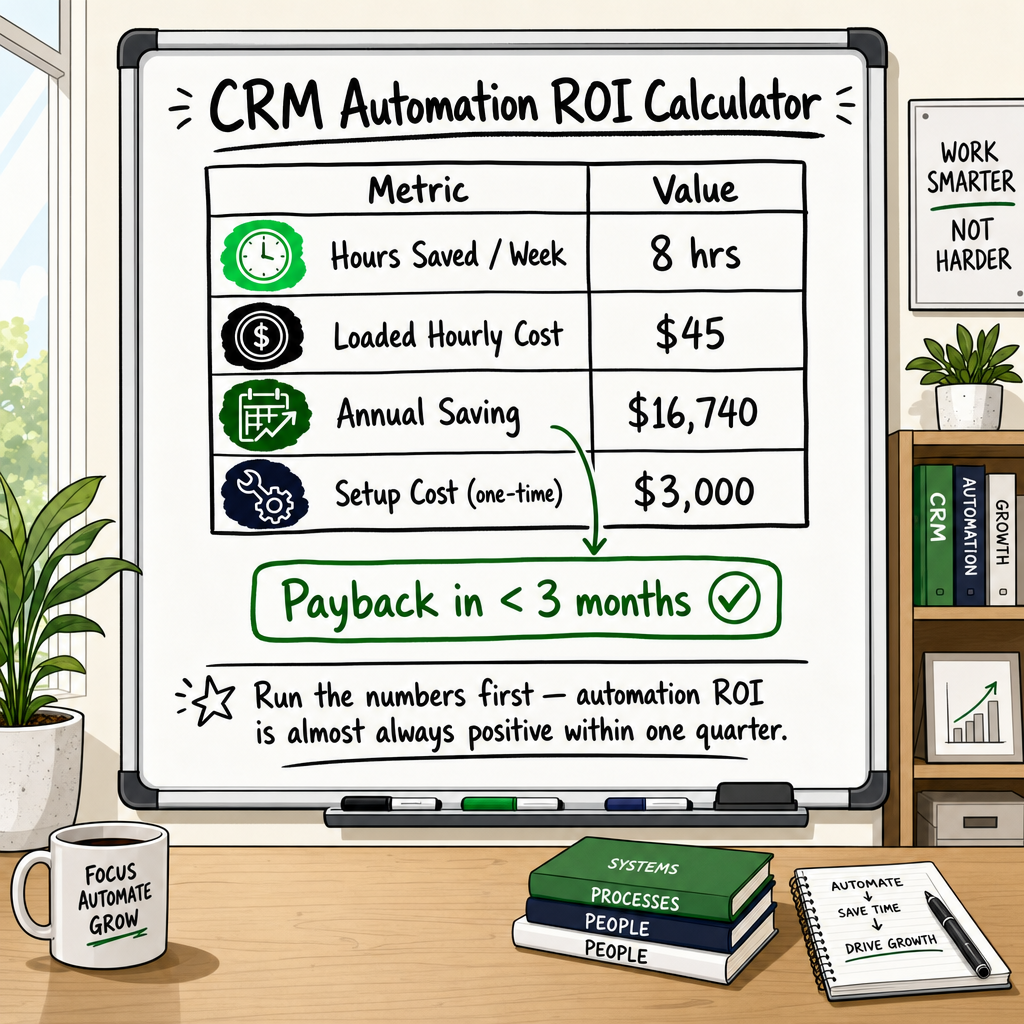
The time-saving formula: hours reclaimed × loaded hourly cost
Start by auditing how much time your team currently spends on the tasks you plan to automate. Be specific: not 'admin' but 'creating CRM contacts from form submissions', 'sending follow-up emails', 'updating pipeline stages'.
Multiply the weekly hours by the loaded cost of the person doing the work (salary plus employer costs, divided to an hourly rate). Multiply by 52 for an annual figure. That is the gross annual saving from reclaiming that time — before any quality or error-reduction benefit.
Example: a four-person startup where team members collectively spend six hours per week on manual lead logging and pipeline updates. At a conservative loaded rate of £35 per hour, that is £10,920 per year in staff time spent on rules-based work that a machine can handle.
Error-reduction value: what manual data entry mistakes actually cost
Manual processes produce inconsistent data. A contact entered with the wrong source tag distorts your conversion reporting. A missed follow-up task costs a deal. These errors are harder to quantify but worth estimating: what is the value of one deal in your pipeline? How often does a manual process failure contribute to losing one?
Opportunity cost: what your team does with recovered time
The real ROI from CRM automation is not just the hours saved — it is what those hours are redirected towards. A sales team that spends two fewer hours per day on data entry has two more hours for outbound calls, relationship development, or proposal writing. The multiplier effect of redirected attention is usually larger than the direct time saving.
When the maintenance burden cancels the benefit
Automation is not free to maintain. Tools update their APIs, contact data gets messy, conditional logic needs adjusting as the business model evolves. A complex automation that saves two hours per week but requires three hours per month of maintenance is a marginal investment at best.
The practical rule: simple, high-frequency automations almost always pay for themselves quickly. Complex, multi-tool, conditional-logic automations require a proper build-versus-maintain calculation before committing.
What Is a Product Backlog? Quality, Grooming & Velocity
The Most Common Mistakes Founders Make With CRM Automation
After working across dozens of automation engagements spanning SaaS, fintech, and eCommerce, the failure patterns cluster around four mistakes that appear repeatedly.
Automating before the process is defined
This is the most common one. A founder discovers that GoHighLevel can automate their lead follow-up and immediately starts building sequences — without first documenting what the manual process actually looks like, where it breaks down, and what outcome they are trying to produce.
The result is an automated version of a broken process. It runs faster and at greater scale than the broken manual version, which means it fails faster and at greater scale.
Fix the process on paper first. Run it manually for two weeks. Document the triggers, conditions, and actions clearly. Then automate it.
Connecting tools without a data quality plan
CRM automation requires clean, consistent data. If your contact records have inconsistent source tags, duplicate entries, or missing fields, the automations that depend on those fields will fire incorrectly — or not fire at all.
Before building any automation, audit your CRM data. Define the required fields for each contact record. Set up validation rules at the point of entry. This is unglamorous work, but skipping it is why most automation projects underperform.
Ignoring the handoff point between automation and human action
Every automation needs a defined point where the machine stops and the human starts. 'The automation will handle it' is not a complete process design. Who gets notified when the automation completes? What does that person do next? What happens if the automation fails?
The handoff point — where the CRM creates a task, sends a Slack notification, or flags a record for review — is often the part of the design that gets least attention and causes the most problems.
Treating automation as a substitute for a sales strategy
Automation executes a strategy. It cannot replace one. A twelve-step nurture sequence built on messaging that does not resonate will just fail faster than a manual version. An automated pipeline that moves contacts forward based on time rather than genuine qualification will produce a misleading picture of revenue health.
The strategic question — who is your buyer, what do they need to hear, in what order, and what action do you want them to take — must be answered by humans before automation is introduced.
How to Evaluate a Software Development Partner: 9 Criteria
Building an Automation Stack That Scales Without Breaking
Start with one trigger, one action, one measurable outcome
The founders who build durable automation stacks almost always start small. One trigger. One action. One metric that tells them whether the automation is working. They validate that simple workflow for four weeks before adding complexity.
This approach surfaces data quality problems early, when they are cheap to fix. It also builds the team's confidence in automation as a tool — which matters when you are asking people to change how they work.
When to move from Zapier to a native CRM workflow
Zapier is excellent for connecting tools that do not natively integrate. It is not the right choice for high-frequency, business-critical workflows that need reliability guarantees and detailed logging.
The signal to move to a native CRM workflow (or to a more robust automation platform like GoHighLevel or Make) is usually one of two things: the Zapier workflow is running thousands of times per month and the task usage cost is significant, or the workflow is complex enough that debugging a Zapier failure takes meaningful time.
For most early-stage teams, Zapier is the right starting point. The architecture review of when to move is worth doing at the six-month mark, not at the point when things are breaking.
Connecting CRM automation to your analytics and tracking layer
CRM automation generates events: a contact was created, a deal stage changed, an email was sent, a task was completed. These events are valuable analytics data. Most teams do not capture them.
Connecting your CRM automation to your analytics layer — whether that is GA4, a data warehouse, or a reporting dashboard — means you can measure conversion rates at each pipeline stage, identify where contacts are dropping off, and use data rather than intuition to decide which parts of the automation to improve.
For teams running paid media alongside their CRM, this connection is especially important. Accurate pipeline data closes the loop between ad spend and revenue, which is where the real optimisation opportunity sits [VERIFY].
How Decyb Technology LLP Approaches CRM Automation for Founders
The framework above reflects what we have learned building and fixing automation stacks across more than a decade of engagements — in SaaS, fintech, healthcare, and eCommerce. Most of the failure modes described in this article are ones we have encountered when taking over a broken automation setup from a previous vendor or freelancer.
Mapping your process before touching a single tool
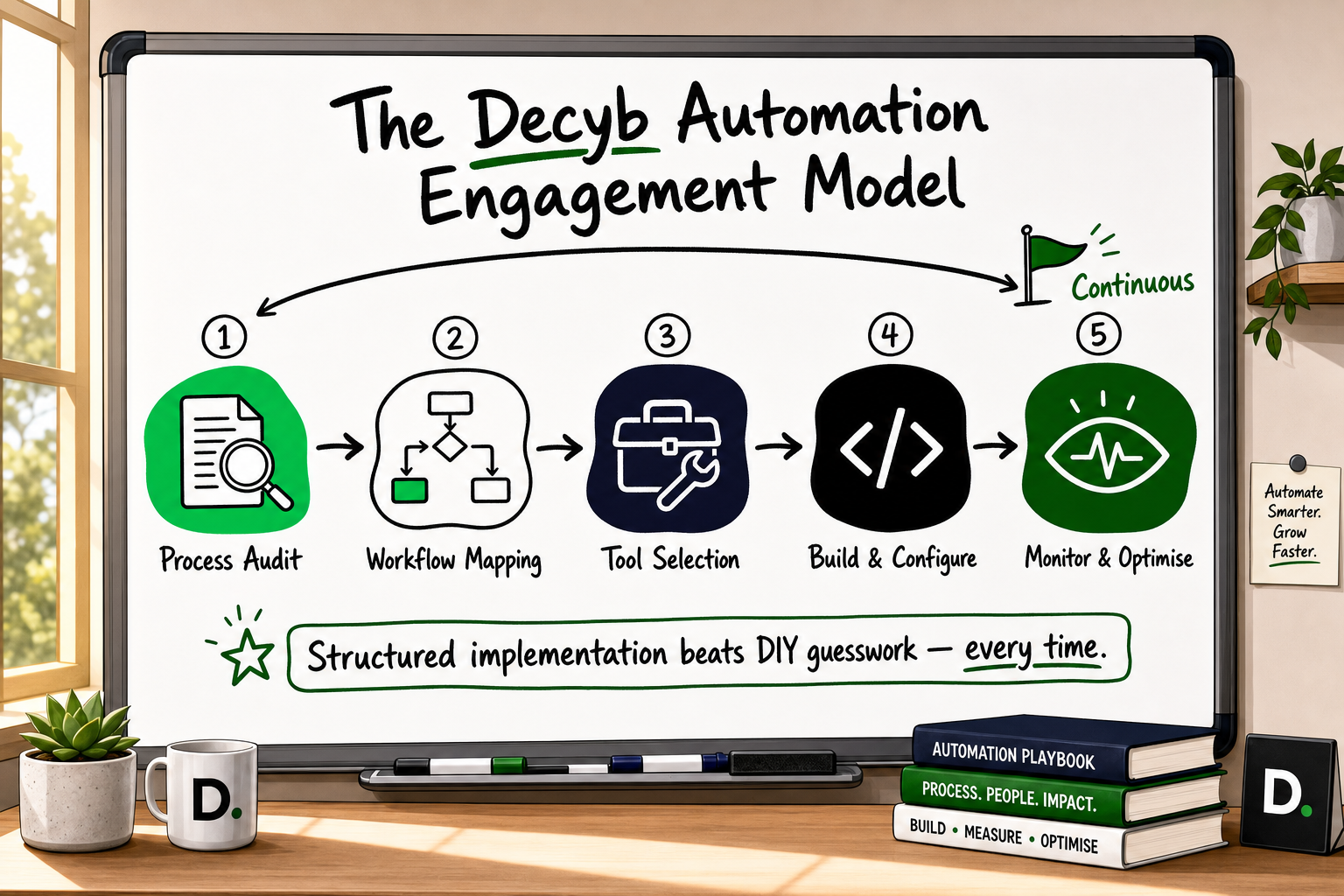
Every CRM automation engagement at Decyb starts with a process audit, not a tool selection conversation. We document the manual workflow, identify the trigger-action pairs, confirm the data quality baseline, and define what success looks like — before a single workflow is built.
This step is what most agencies and freelancers skip. It is also the step that determines whether the automation actually works three months after launch.
What a CRM automation engagement looks like in practice
For most founder-stage clients, we work within platforms they already have access to — GoHighLevel, HubSpot, Zapier, Twilio — or recommend the right combination based on their actual use case rather than tool preference. We build trigger-action workflow blueprints, test against real contact data, and document the handoff points so the team knows exactly what the automation handles and what they need to do.
Where the CRM connects to paid media or product analytics, we set up the tracking layer to match — including server-side event capture where client-side tracking would otherwise lose data to ad blockers or iOS privacy changes. Accurate CRM data and accurate analytics data are two sides of the same problem.
Proof that the approach works
We have delivered GoHighLevel integrations on schedule with ★ 5.0 client reviews — with feedback specifically noting clear communication and consistent delivery. The FieldFolio B2B wholesale marketplace, serving over 40,000 retailers across Australia and New Zealand, was built on the same principle: document the architecture, define the process, build it once correctly.
Across 12 years of client engagements on international platforms, our delivery record is consistent ★ 5.0. That is not a claim about being exceptional — it is a reflection of a process that does not skip the steps that matter.
If you are researching CRM automation and want an honest assessment of what your current setup is missing, the best starting point is a conversation rather than a proposal. We offer a free 24-hour technology strategy call with a senior partner — no obligation, no sales pitch. You will walk away with a clear picture of what to automate first, what to leave alone, and what the build would actually involve.
Book your free strategy call — get a plan in 24 hours
Frequently Asked Questions
Which CRM workflows should I automate first?
Start with high-frequency, low-stakes tasks: lead capture and contact creation, pipeline stage updates, follow-up reminder sequences, and onboarding document dispatch. These deliver immediate time savings with minimal risk to the customer relationship. Validate each workflow at small volume before expanding.
Can CRM automation replace my sales team?
No. CRM automation handles repetitive, rules-based tasks. It cannot replicate human judgement in high-value conversations, objection handling, or complex negotiation. The strongest setups use automation to eliminate administrative overhead so the sales team has more time and better data for the human interactions that actually close deals.
How long does CRM automation take to set up?
Simple workflows — form-to-CRM contact creation, basic follow-up sequences — can be live within a few days. Multi-tool stacks with conditional branching, CRM and analytics integration, and proper testing typically take two to four weeks. Rushing the build phase is one of the primary causes of automations that fail silently over time.
What is the difference between CRM automation and marketing automation?
CRM automation manages the contact record, pipeline stage, and internal task assignment — it is concerned with what happens inside your system. Marketing automation manages outbound communication: email sequences, SMS, ad audience updates. Most modern platforms combine both, but understanding the distinction helps you build in the right order and avoid gaps.
How do I avoid the most common CRM automation mistakes?
Document the manual process before building any automation. Automate only workflows that are already working consistently. Define a clear handoff point where the automation ends and a human takes over. Monitor data quality from day one. Do not treat automation as a strategy — it executes the strategy you define.
How does GoHighLevel automation work for small teams?
GoHighLevel provides a combined CRM, pipeline, email, SMS, and workflow automation platform. For small teams, the main advantage is that it consolidates tools that would otherwise require separate subscriptions and Zapier connections. The automation builder uses a visual trigger-action interface that is accessible to non-technical users, though complex conditional logic still benefits from a structured design process before build.
All project timelines and delivery estimates are indicative and subject to scope confirmation. Third-party service costs (hosting, domains, SaaS tools) are billed separately at cost. Decyb Technology LLP is registered in India; engagements are subject to terms of service available at decyb.com/terms.