
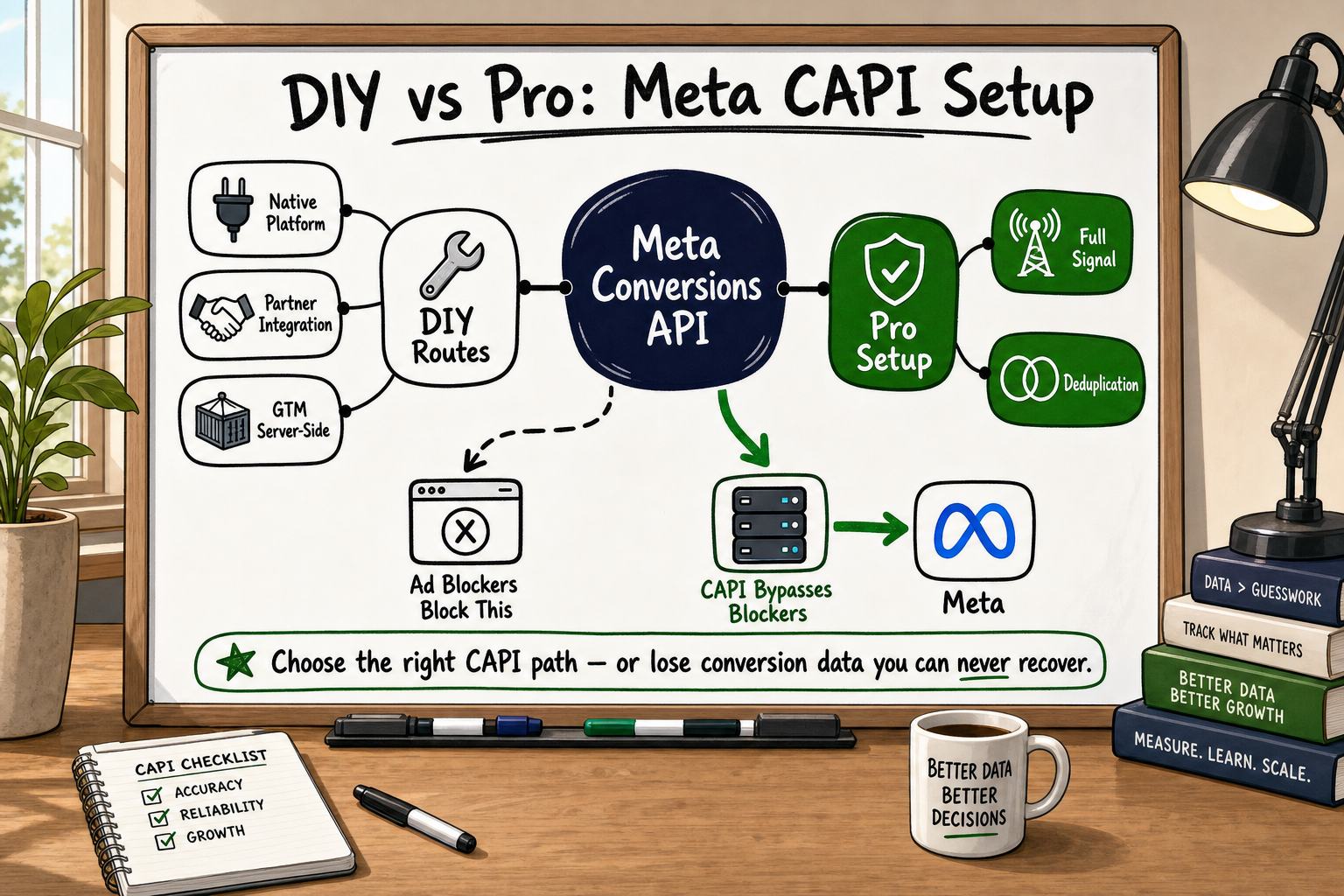
If you have looked at your Meta Events Manager recently and noticed gaps, duplicates, or a low Event Match Quality score, you are not alone. Meta Conversions API implementation has become one of the most searched topics in performance marketing — and one of the most misunderstood. The good news is that some of it genuinely can be done without writing a single line of code. The honest news is that some of it absolutely cannot, and trying anyway will quietly cost you money in wasted ad spend.
This guide gives you a clear, unspun picture of the DIY routes available, what each one can realistically achieve, and the specific points at which a professional setup stops being optional.
What Meta Conversions API Actually Does (And Why It Matters Now)
The browser-tracking problem in plain English
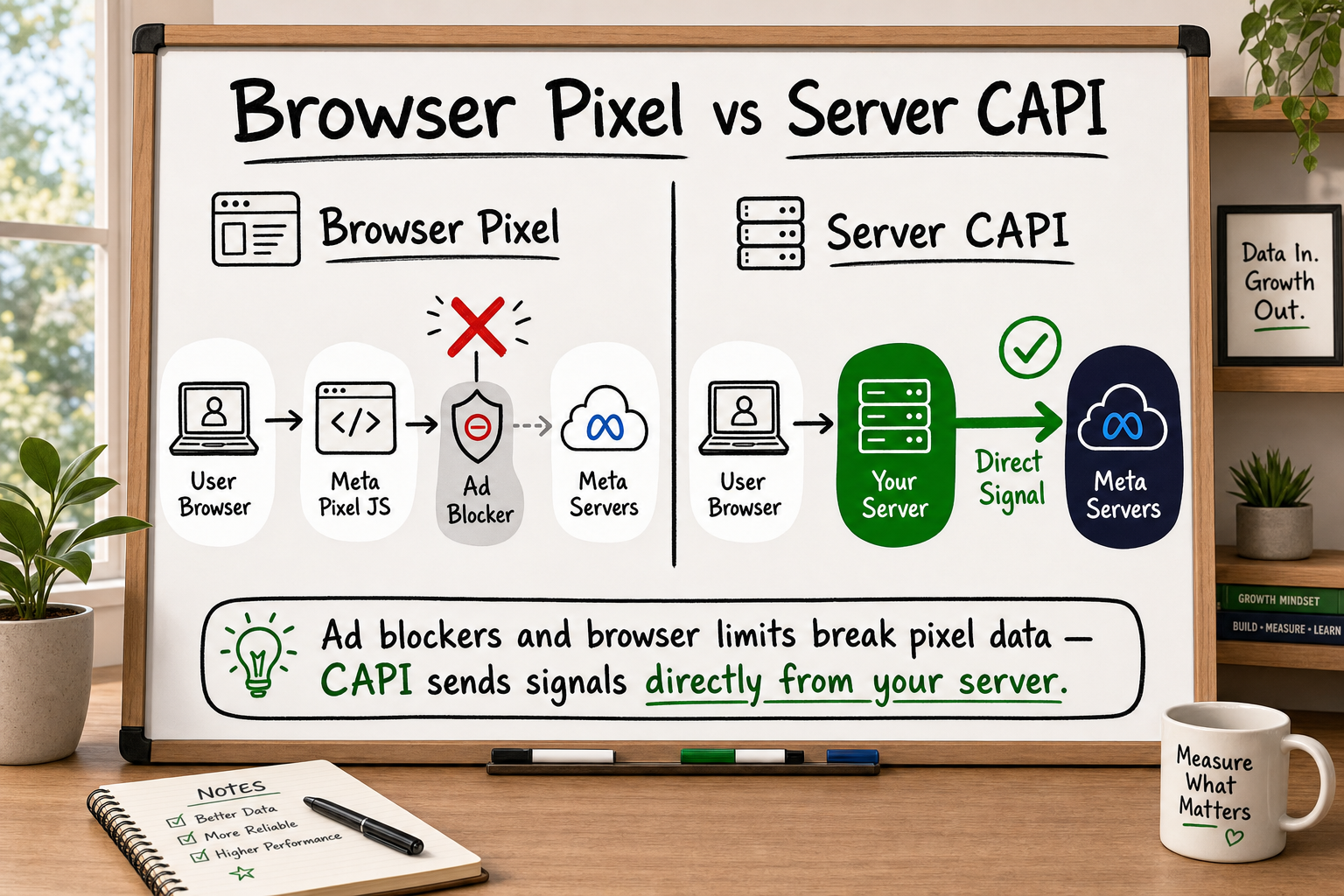
The Meta Pixel is a snippet of JavaScript that runs inside a visitor's browser. When someone lands on your thank-you page after a purchase, the Pixel fires a Purchase event and sends that data to Meta so the platform knows your ad worked.
The problem is the browser. Ad blockers prevent Pixel scripts from loading entirely. Safari's Intelligent Tracking Prevention (ITP) restricts the cookies the Pixel relies on. iOS 14.5 introduced App Tracking Transparency, which defaulted millions of users to opt-out. The net result: a large share of your real conversions are never reported.
Across client discovery audits, it is common to find 40–60% of browser-side conversion events going unmeasured [VERIFY] — meaning the data Meta's algorithm uses to optimise your campaigns is less than half the true signal.
How CAPI fills the gap left by ad blockers and iOS privacy changes
The Conversions API (CAPI) sends event data directly from your server — or a middleware server — to Meta, bypassing the browser entirely. Because the data never touches the visitor's browser, ad blockers and iOS restrictions have no effect on it.
The critical point most guides gloss over: CAPI does not replace the Pixel. Both should run together. The Pixel captures real-time, rich browser context (page URL, scroll depth, click data). CAPI captures confirmed server-verified events with higher-quality customer signals. Combined, they give Meta a complete, deduplicated picture of your conversion funnel.
How Ad Blockers Wreck Your Conversion Data (And the Fix)
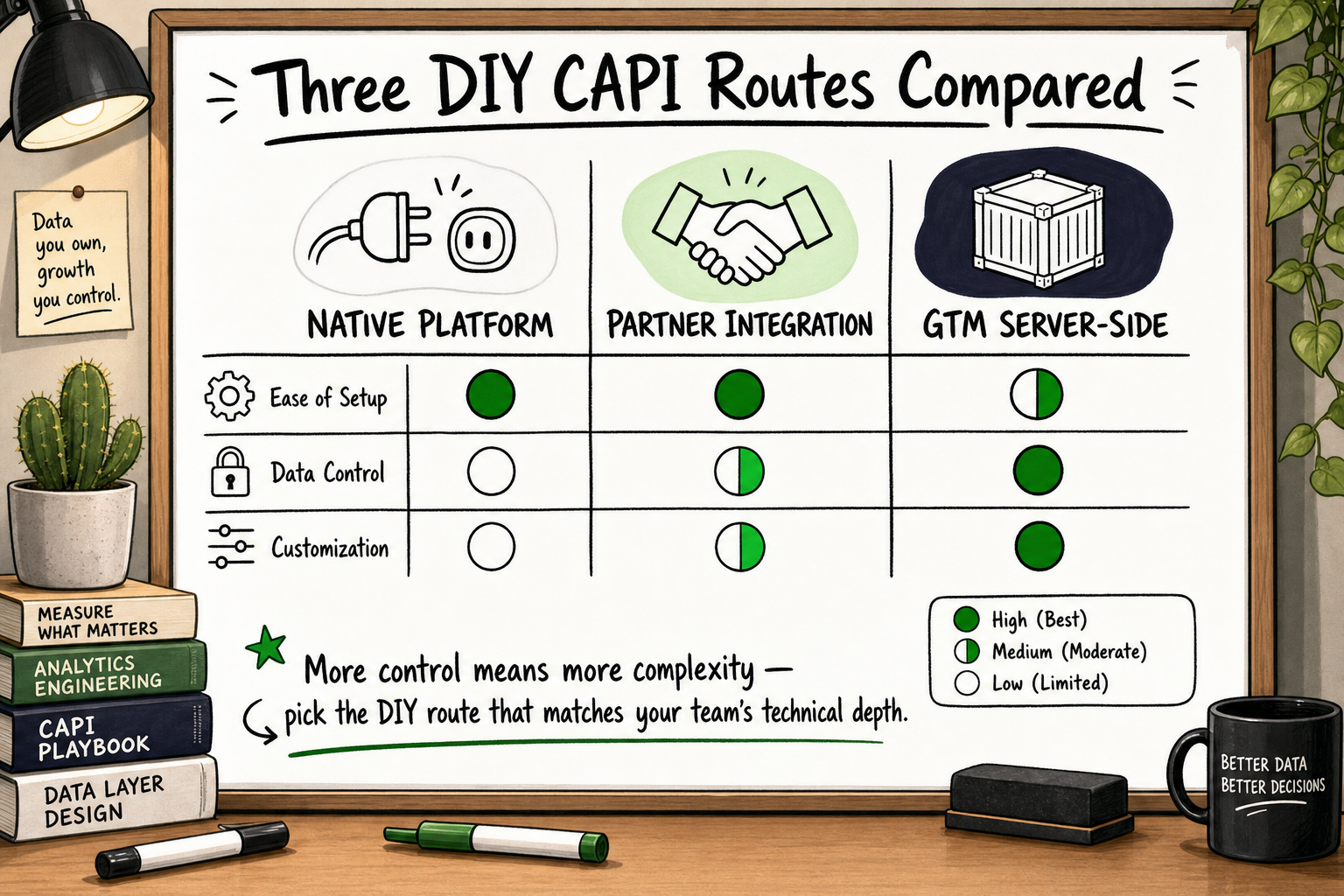
The Three DIY Routes: What Each One Can Realistically Achieve
Route 1: Native platform integrations (Shopify, WooCommerce, Squarespace)
Several eCommerce platforms have built CAPI support directly into their Meta integrations.
Shopify is the most capable here. Its native Meta channel integration does send server-side Purchase and other standard events automatically once you connect your Facebook Business account and enable the data sharing toggle in Shopify admin. No code required. For a standard Shopify store running standard checkout, this gets you a working CAPI setup relatively quickly.
WooCommerce has official Meta plugins that include CAPI support, though configuration depth varies and plugin conflicts are a known issue.
Squarespace and Wix offer lighter integrations — typically covering Purchase events but with limited control over customer data parameters or custom event schemas.
Capability ceiling: Native integrations cover standard events on standard flows. They struggle with custom events (e.g. a bespoke lead scoring trigger), non-standard checkout flows, subscription billing events, or any conversion that happens outside the native checkout path.
Route 2: Meta Business Partner integrations via Events Manager
Meta maintains a directory of certified partner platforms — CRMs, marketing automation tools, customer data platforms — that have built CAPI connectors. You can activate these directly from Events Manager without writing code.
Examples include Klaviyo, HubSpot, and certain customer data platforms. If your conversion events live inside one of these tools, a partner integration can connect CAPI in hours.
Capability ceiling: You are limited to what the partner has built. If your event schema does not match the partner's template, or you need to pass custom parameters, you will hit a wall quickly.
Route 3: Google Tag Manager with a server-side container
GTM's server-side container lets you route events through a server you control before forwarding them to Meta. This is more flexible than native integrations and gives you control over payloads, custom parameters, and deduplication logic.
It requires: a cloud-hosted server-side GTM container (typically on Google Cloud Run or similar), correct configuration of the Meta Conversion API tag in GTM, and a reliable mechanism for generating consistent event_id values across browser and server.
Capability ceiling: Setting this up correctly — especially deduplication — requires comfort with server infrastructure, GTM's data layer, and Meta's event schema requirements. It sits at the edge of what a non-developer can reliably do without error.
What Is Meta Conversions API? A Guide for Marketers
What DIY CAPI Gets Right — and Where It Breaks Down
What DIY handles adequately
- Standard Purchase, Lead, and ViewContent events on supported platforms
- Basic customer data hashing (Meta's partner integrations handle SHA-256 hashing automatically)
- Coverage of the most common iOS and ad-blocker gap for straightforward eCommerce stores
- Faster time-to-value than a full custom build if your stack is entirely on supported platforms
Five failure points that require developer-level work
1. Event deduplication across browser and server When both the Pixel and CAPI fire for the same event, Meta needs to know they represent the same conversion — not two separate ones. Without a correctly implemented event_id that matches between the browser and server payloads, you will double-count conversions. This is the single most common error found during implementation audits. It silently inflates your reported ROAS and corrupts your bidding signals. More on this in the next section.
2. Custom or non-standard conversion events If your most valuable conversion is not a purchase on a standard checkout — say, a qualified form submission that triggers a CRM status change, or a subscription upgrade event — native and partner integrations will not fire it. You need custom server-side logic.
3. Payload enrichment with customer data Meta's Event Match Quality score improves significantly when you send hashed email, phone, first name, last name, city, and external ID together. Doing this reliably, for every event, across your entire funnel requires accessing customer data at the server level and passing it consistently. Most DIY setups send partial customer data or send it inconsistently.
4. Handling server-side authentication securely CAPI calls use an access token tied to your Meta Business account. That token must be stored and rotated securely. Embedding it in front-end JavaScript or in a plugin config field that is visible to other admins is a security risk.
5. Testing and ongoing maintenance Meta's API schema changes. Platform updates break plugin-based integrations without warning. A DIY setup that works today may silently fail next quarter when Shopify updates its checkout or Meta deprecates a field.
Event Tracking Analytics: A Founder's Guide
Event Deduplication: The Silent Killer of DIY Implementations
Why duplicate events hurt your ad account more than missing events
Missing events under-report performance. Duplicate events actively corrupt it.
When Meta receives both a Pixel Purchase event and a CAPI Purchase event for the same transaction without a matching event_id, it records two purchases from one ad click. Your reported conversions double. Your cost-per-acquisition looks artificially low. Meta's algorithm interprets this as a highly efficient campaign and scales spend accordingly — optimising toward phantom conversions that never existed.
The result is wasted budget, misleading reporting, and campaigns that under-perform in reality while looking healthy in the dashboard.
How the event_id deduplication mechanism works
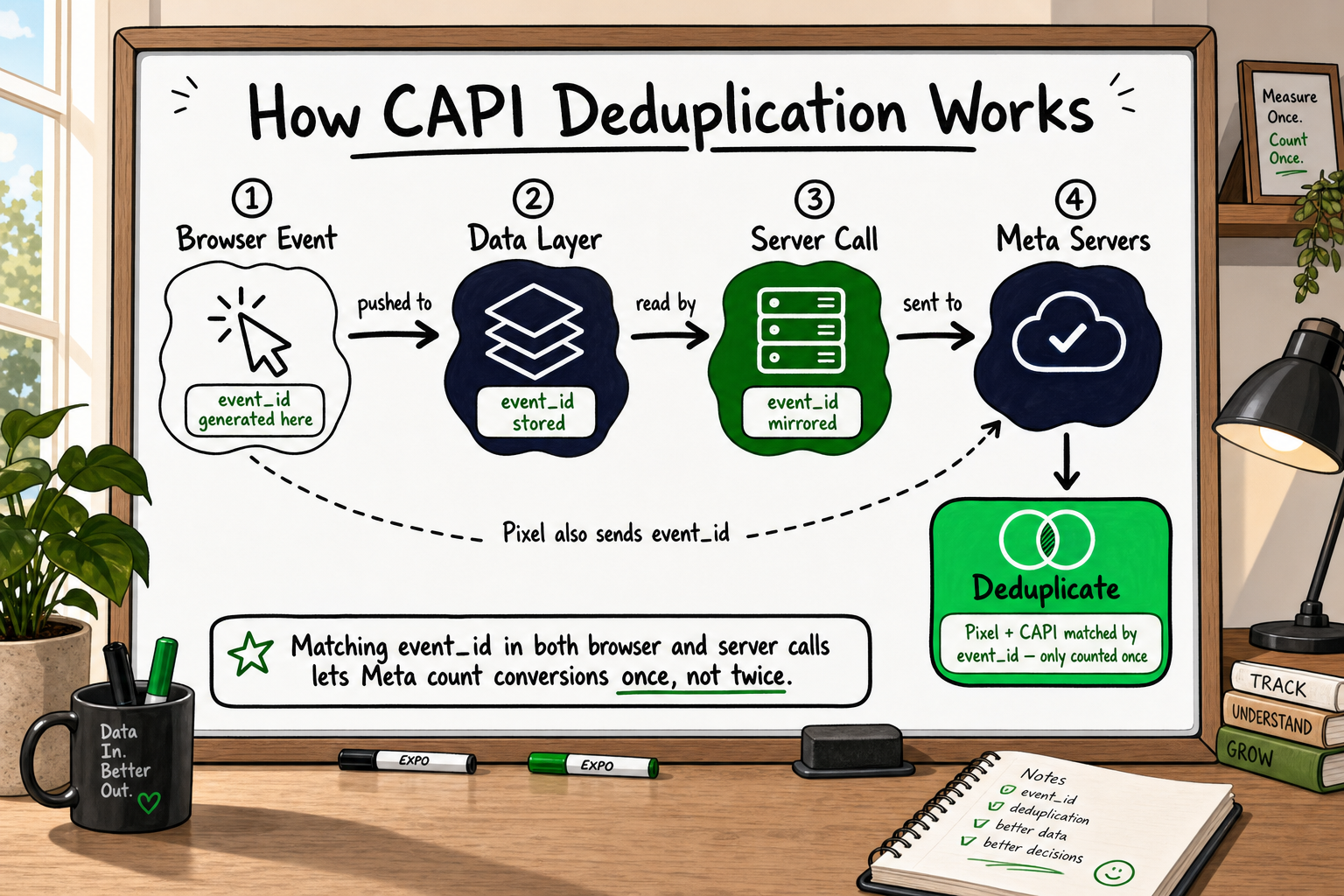
Meta's deduplication system is straightforward in principle: if two events share the same event_name and event_id within a 48-hour window, Meta counts them as one event [Source: Meta for Developers — Conversions API documentation].
The requirement is that the event_id must be:
- Generated once per conversion event (not per page load)
- Identical in both the Pixel's
fbq('track', 'Purchase', {}, { eventID: 'your-unique-id' })call and the CAPI server payload - Unique across different conversion events
In practice, this means your server needs to generate or receive the event_id before the Pixel fires it on the front end — which requires coordination between your front-end JavaScript and your server-side logic. That coordination is where DIY setups most commonly fail.
Common deduplication mistakes in self-configured setups
- Using a timestamp as the
event_id— timestamps are not sufficiently unique under concurrent traffic - Generating different
event_idvalues on the browser and server because they use different generation logic - Omitting
event_identirely from the Pixel call and relying on Meta's fallback deduplication (which is unreliable) - Using the same
event_idfor multiple event types within the same session
A correct deduplication setup requires generating a UUID (or equivalent unique identifier) server-side at the moment the conversion is confirmed, passing it to the front-end data layer, and including it in both the Pixel call and the CAPI payload.
How to Test Whether Your CAPI Implementation Is Actually Working
Using the Test Events tool in Events Manager
Meta's Test Events tool, found inside Events Manager under your dataset, lets you send a test event and watch it arrive in real time. You input a test event code, add it to your server-side payload or your plugin configuration, trigger a test conversion, and confirm the event appears with the correct parameters.
This confirms that events are reaching Meta. It does not confirm that they are correctly deduplicated or that the customer data quality is adequate.
Reading the Diagnostics tab
The Diagnostics tab in Events Manager surfaces configuration warnings automatically. Common warnings include:
- Missing customer information parameters (indicating low Event Match Quality)
- Events received without a matching browser Pixel event (potential deduplication gap)
- High event frequency anomalies (potential duplicate events)
Check this tab at least once per week during the first month after any implementation or platform change.
What a good Event Match Quality score looks like
Meta scores each event's match quality from 0 to 10 based on how many customer data parameters were sent and how well they match Meta's user records. A score below 6 is considered poor. A score of 7 or above is a reasonable target for most implementations [Source: Meta for Developers — Conversions API documentation].
Improving your score typically means sending more hashed customer data parameters — particularly email address, phone number, and external ID — consistently with every event.
GA4 Audit Checklist: 12 Fixes for Common Setup Errors
When DIY Is Enough vs When You Need Professional Implementation
Signs your current setup is probably fine
- You run a standard Shopify or WooCommerce store with no custom checkout modifications
- Your primary conversion events are Purchase, Lead, and ViewContent — all supported natively
- Your Event Match Quality score is 7 or above
- The Diagnostics tab shows no active warnings
- Your reported ROAS in Meta is consistent with actual revenue in your back-end systems
- You spend under £3,000–£5,000 per month on Meta ads (lower stakes if data is slightly imperfect) [VERIFY]
Signs you need a developer or specialist agency
- Your Event Match Quality score is persistently below 6 despite enabling all available data fields
- You see duplicate events in the Diagnostics tab or your conversion numbers are higher than actual orders
- Your most important conversions happen outside the native checkout (CRM events, subscription upgrades, offline conversions)
- You are running significant paid media spend (£5,000+ per month) where data accuracy directly affects ROAS and bidding efficiency
- You need CAPI to work alongside a custom-built web application, not a standard eCommerce platform
- You are preparing conversion data for investor or board reporting and need it to be defensible
- You have already attempted a DIY setup and Meta's Diagnostics tab is still showing warnings after troubleshooting
The threshold is not technical complexity for its own sake. It is the cost of getting it wrong — wasted ad spend, corrupted bidding signals, and misleading performance reports — weighed against the cost of professional setup.
How to Evaluate a Software Development Partner: 9 Criteria
How Decyb Technology LLP Approaches Meta CAPI Implementation
What a professional implementation covers that DIY misses
At Decyb Technology LLP, the Meta CAPI implementations we deliver go beyond connecting an integration and pressing save. The work starts with an audit of the existing tracking setup — using the same 12-point checklist we apply during client onboarding — to identify every configuration error before writing a single line of new code. In our experience across eCommerce, SaaS, and lead-generation clients, the most common issues are incomplete deduplication logic, partial customer data payloads, and missing custom event schemas for non-standard conversion types.
A complete implementation from our team covers:
- Server-side event architecture: events fired from a server we configure and maintain, not a browser plugin that breaks on platform updates
- Consistent
event_idgeneration: UUID-based deduplication logic that matches across browser Pixel and server payload for every event type - Full customer data hashing: all available parameters passed with every event to maximise Event Match Quality scores
- Custom event schemas: for conversion events that live outside standard checkout — CRM triggers, subscription events, offline conversions
- Secure access token management: credentials stored correctly, not exposed in front-end config
- Before-and-after data completeness benchmarking: so you can see the measurable improvement, not just take our word for it
We delivered a full Meta Conversions API implementation for a client ahead of schedule, with complete event deduplication and server-side optimisation in place — a project that earned a ★ 5.0 review specifically noting the accuracy of the data and the clarity of communication throughout.
Our delivery record on CAPI projects
Our team has operated across international client engagements since 2014, maintaining a consistent ★ 5.0 delivery record across 12+ years. We do not layer account managers between you and the senior engineers doing the work. When we scope a CAPI implementation, the person scoping it is the person building it.
If you have already attempted a self-service setup and hit the limitations described in this article, the honest starting point is an audit rather than an immediate rebuild. We offer a free 24-hour technology strategy call where a senior partner reviews your current Events Manager setup, identifies the gaps, and gives you a clear picture of what a complete implementation would involve — with no obligation to proceed.
Ready to find out exactly where your CAPI setup is losing data? Book your free strategy call and get a written assessment within 24 hours.
Frequently Asked Questions
Can I implement Meta Conversions API without any coding knowledge? Yes, for basic setups using native platform integrations (Shopify, WooCommerce) or Meta Business Partner connectors. These cover standard events like Purchase and Lead without code. However, event deduplication, custom conversion events, and payload enrichment for high Event Match Quality scores all require either developer skills or a specialist to configure correctly.
Does Shopify's native Meta integration include server-side tracking? Shopify's native Meta channel integration does include a form of CAPI for standard events. It covers the basics for a standard store. Limitations appear with custom checkout extensions, non-standard conversion events, subscription billing, and deduplication reliability under high traffic. These gaps are worth auditing if you run significant ad spend on Shopify.
What is event deduplication and why does it matter for CAPI? Event deduplication prevents the same conversion from being counted twice — once by the browser Pixel and once by CAPI. Without it, Meta records phantom conversions, your cost-per-acquisition appears artificially low, and the algorithm scales spend toward those phantom results. The mechanism relies on a matching event_id sent in both the Pixel call and the CAPI server payload.
How do I know if my Meta Conversions API is working? Use the Test Events tool in Events Manager to confirm events are arriving in real time. Then check the Diagnostics tab for configuration warnings. Finally, review your Event Match Quality score — a score of 7 or above indicates adequate customer data quality. If you see warnings or a score below 6, the setup needs attention.
How much conversion data am I losing without CAPI? Practitioner experience and published research consistently suggest that 40–60% of browser-side conversion events go unrecorded due to ad blockers and iOS privacy restrictions [VERIFY]. CAPI running alongside the browser Pixel recovers a substantial portion of that gap, giving Meta's algorithm a more complete signal to optimise against.
What is a good Event Match Quality score in Meta? Meta scores event match quality from 0 to 10. A score of 7 or above is a reasonable target. Scores below 6 indicate that too few customer data parameters are being sent, or that they are being sent inconsistently — which reduces Meta's ability to match events to real users and optimise campaigns accurately.