
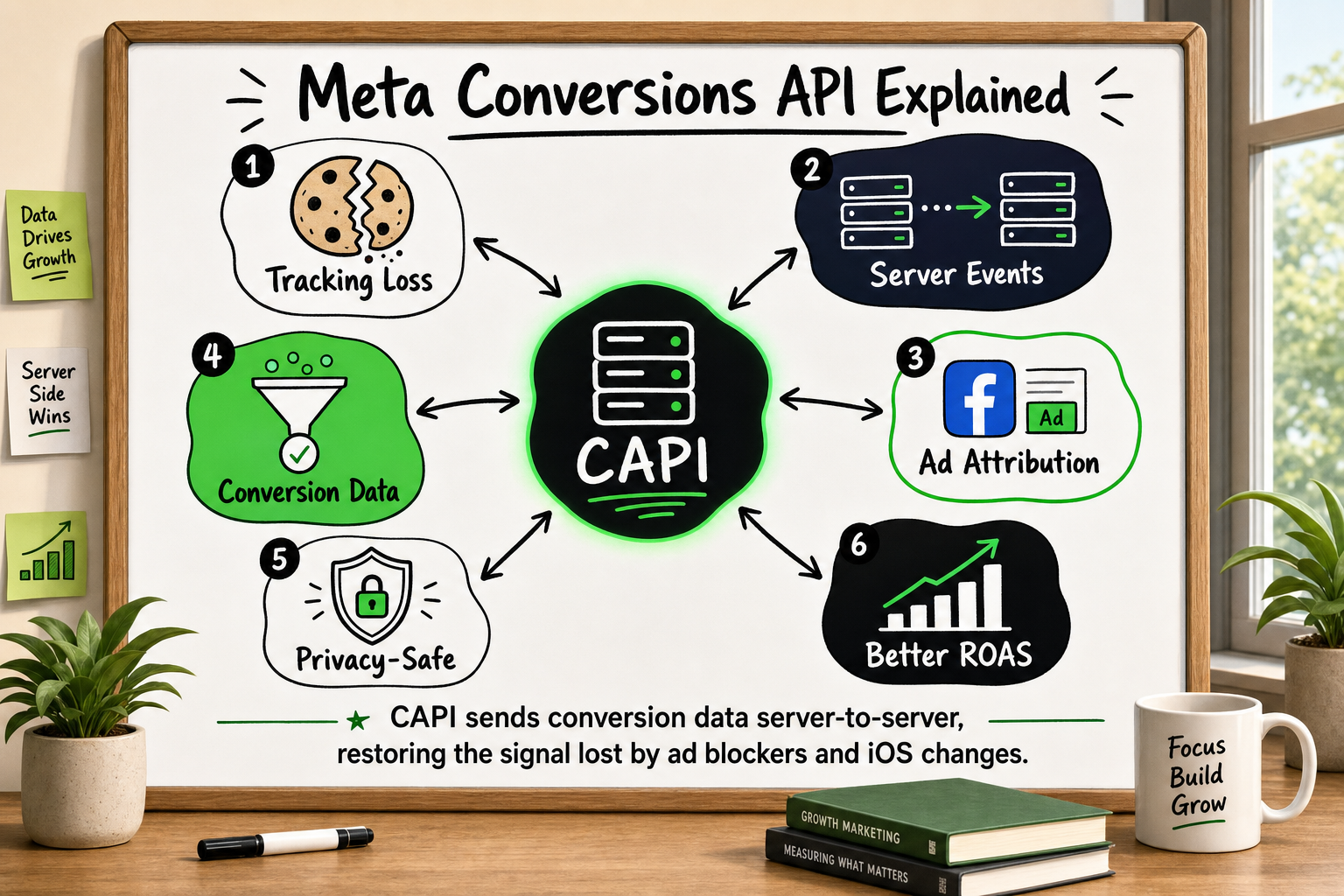
If your Facebook ad reports feel increasingly disconnected from your actual sales numbers, you are not imagining it. The tracking method most advertisers still rely on — the Facebook Pixel — has developed serious blind spots. Meta Conversions API (CAPI) is the fix Meta built in response. This article explains what it is, why it exists, how it works, and what it means for your campaigns — in plain English, with no code required.
What Is Meta Conversions API? A Plain-English Definition
The Two-Sentence Version
Meta Conversions API is a tool that lets your website's server send conversion data directly to Meta's advertising platform — instead of relying on a small piece of code running in a visitor's browser. It exists because the browser-based method (the Facebook Pixel) has become unreliable, and Meta needs accurate data to optimise your ad campaigns.
Where CAPI Sits in the Tracking Picture
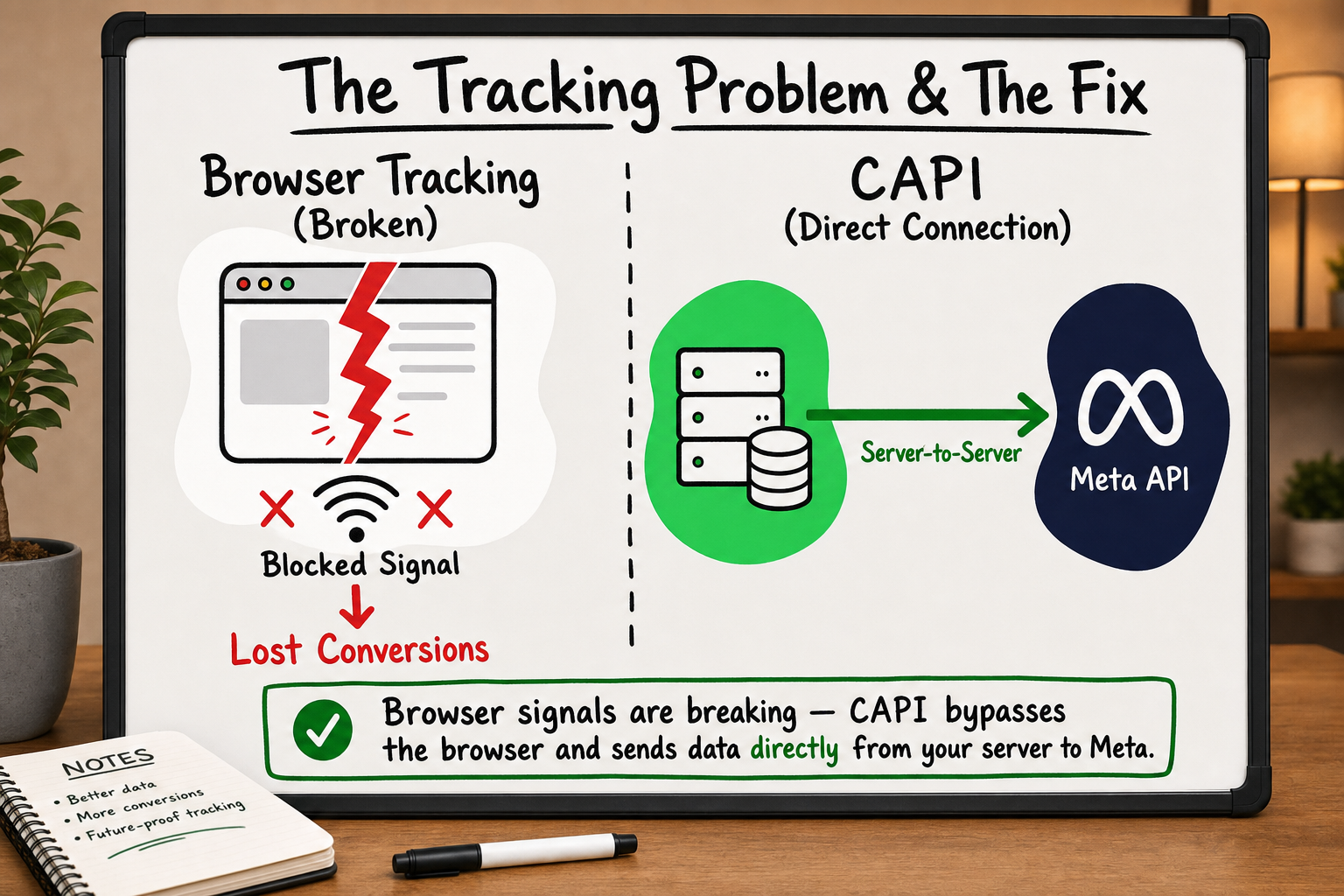
Think of the Facebook Pixel as a window between your website and Meta's systems. For years, that window worked fine. Every time someone visited your site, clicked a button, or completed a purchase, the Pixel quietly sent that information through to Meta.
Then two things happened: people started installing ad blockers, and Apple changed how iPhones handle data sharing. Suddenly, that window started getting bricked up — partially at first, then significantly. Meta Conversions API is a private door that bypasses all of that. Instead of sending data through the visitor's browser, it sends data directly from your web server to Meta's API. The visitor's ad blocker cannot touch it. iOS privacy restrictions cannot intercept it.
Event Tracking Analytics: A Founder's Guide
Why the Facebook Pixel Alone Is No Longer Enough
Ad Blockers and Browser Restrictions
Ad blockers have been around for years, but their adoption has grown sharply. When a visitor to your site has an ad blocker running, it routinely blocks the Facebook Pixel from firing. That means any action that visitor takes — adding a product to a cart, filling in a lead form, completing a purchase — goes completely unrecorded in your Meta ad account.
Beyond dedicated ad blocker extensions, major browsers like Firefox and Safari have added built-in tracking prevention tools. These restrict how long a Pixel's cookies remain valid and limit what data can be passed back to Meta. The result is a growing layer of invisible data loss.
iOS 14 and App Tracking Transparency
In 2021, Apple introduced App Tracking Transparency (ATT) with iOS 14.5. From that point, any iPhone or iPad user was shown a prompt asking whether they consented to being tracked across apps and websites. The majority of users declined [VERIFY: Apple ATT opt-in rate post-iOS 14.5].
For Facebook advertisers, this had an immediate and lasting impact. Meta could no longer reliably track what iOS users did after clicking an ad. Campaigns that had previously shown strong return on ad spend (ROAS) suddenly looked far less efficient — not because they were performing worse, but because the attribution mechanism had broken.
The Real Cost: Data Gaps of 40–60%
When our team audits client ad accounts and analytics setups during onboarding, we consistently find that businesses running only the Facebook Pixel are missing between 40% and 60% of their conversion events. That is not a minor rounding error. If your campaigns are optimising toward a signal that is half-missing, Meta's algorithm is working with incomplete information. It cannot find your best customers efficiently because it cannot see enough of them.
How Meta Conversions API Actually Works (No Code Required to Understand)
Client-Side vs Server-Side: What That Actually Means
"Client-side" means code that runs in your visitor's browser — on their device. The Facebook Pixel is client-side. It lives in your webpage's code and fires events directly from the browser.
"Server-side" means code that runs on your website's server — a computer you control, not your visitor's device. Meta Conversions API is server-side. When a conversion happens, your server sends the event data to Meta via a secure API connection. The visitor's browser is not involved in that transmission at all.
The Journey of a Conversion Event
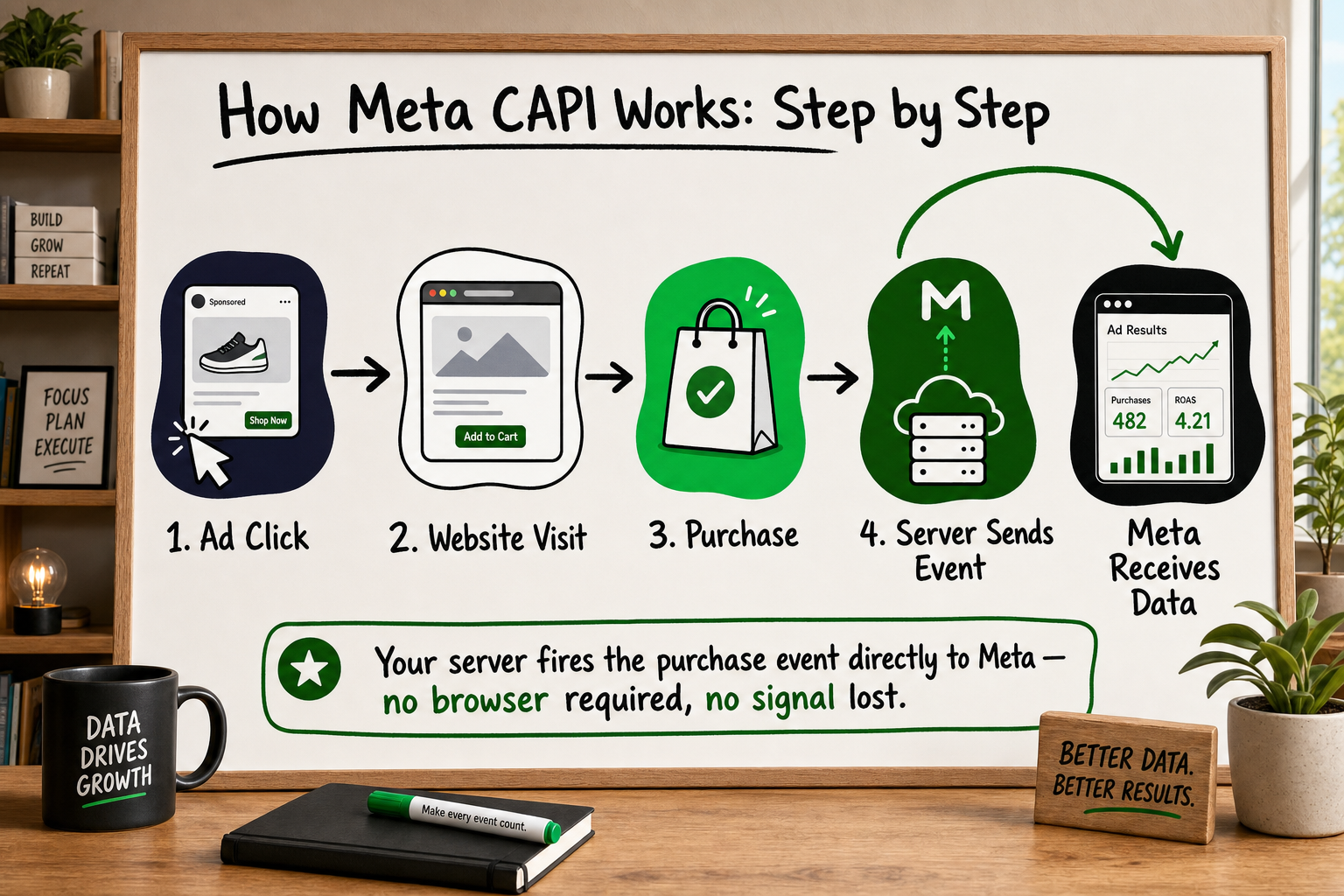
Here is how a purchase event travels when you have CAPI set up alongside your Pixel:
- A user clicks your Facebook ad and lands on your product page.
- They add an item to the cart and complete the checkout.
- At the moment of purchase, two things happen simultaneously: the Pixel in their browser tries to fire a Purchase event (which may or may not succeed, depending on their device and settings), and your server sends a Purchase event directly to Meta's API with the same information.
- Meta receives both signals, matches them using a shared identifier called an Event ID, and counts the purchase once.
The result is a more complete picture of your actual conversions — including the ones the Pixel would have missed entirely.
Event Deduplication: Why It Matters
You might have noticed Step 4 mentions counting the purchase once, not twice. That is event deduplication. Because you are now sending the same events from two sources (browser and server), there is a risk Meta counts them as two separate conversions. That would inflate your numbers and send the algorithm in the wrong direction.
Deduplication works through a unique identifier — an Event ID — that you assign to each conversion event. When both the Pixel and CAPI send the same Event ID to Meta, Meta knows to merge them rather than count them separately. Set up correctly, this is invisible and automatic. Set up incorrectly — or skipped entirely — it becomes a source of data pollution.
Facebook Pixel vs Meta Conversions API: What Changes for You
What Stays the Same
Your Pixel does not get removed. The visual setup inside Meta's Events Manager looks largely the same. The campaigns you are already running continue as normal. From a marketer's day-to-day perspective, the interface is familiar.
What Improves
The volume of conversion events Meta receives goes up. That improved signal quality directly affects how Meta's algorithm optimises your campaigns. With more complete data, the system can identify patterns in your converting audience more accurately — which typically means better targeting, lower cost per acquisition over time, and more reliable attribution reporting.
Based on our Meta CAPI implementation playbook — built from real client deployments — the difference in attributed events between a pixel-only setup and a properly implemented CAPI setup can be substantial, particularly for audiences with high iOS device usage or technically savvy users who run ad blockers [VERIFY: specific percentage lift figures from Decyb's client implementations].
What You Need to Set Up Once
CAPI is not something you click on in your ad account. It requires a technical implementation — either through a platform integration (Shopify, WooCommerce, and a handful of other tools offer native CAPI connections) or through a custom server-side setup built by a developer. Once it is configured and verified, it runs in the background without ongoing maintenance from the marketing team.
Event Tracking Analytics: A Founder's Guide
Which Conversion Events Should You Send Through CAPI?
Must-Have Events for Most Businesses
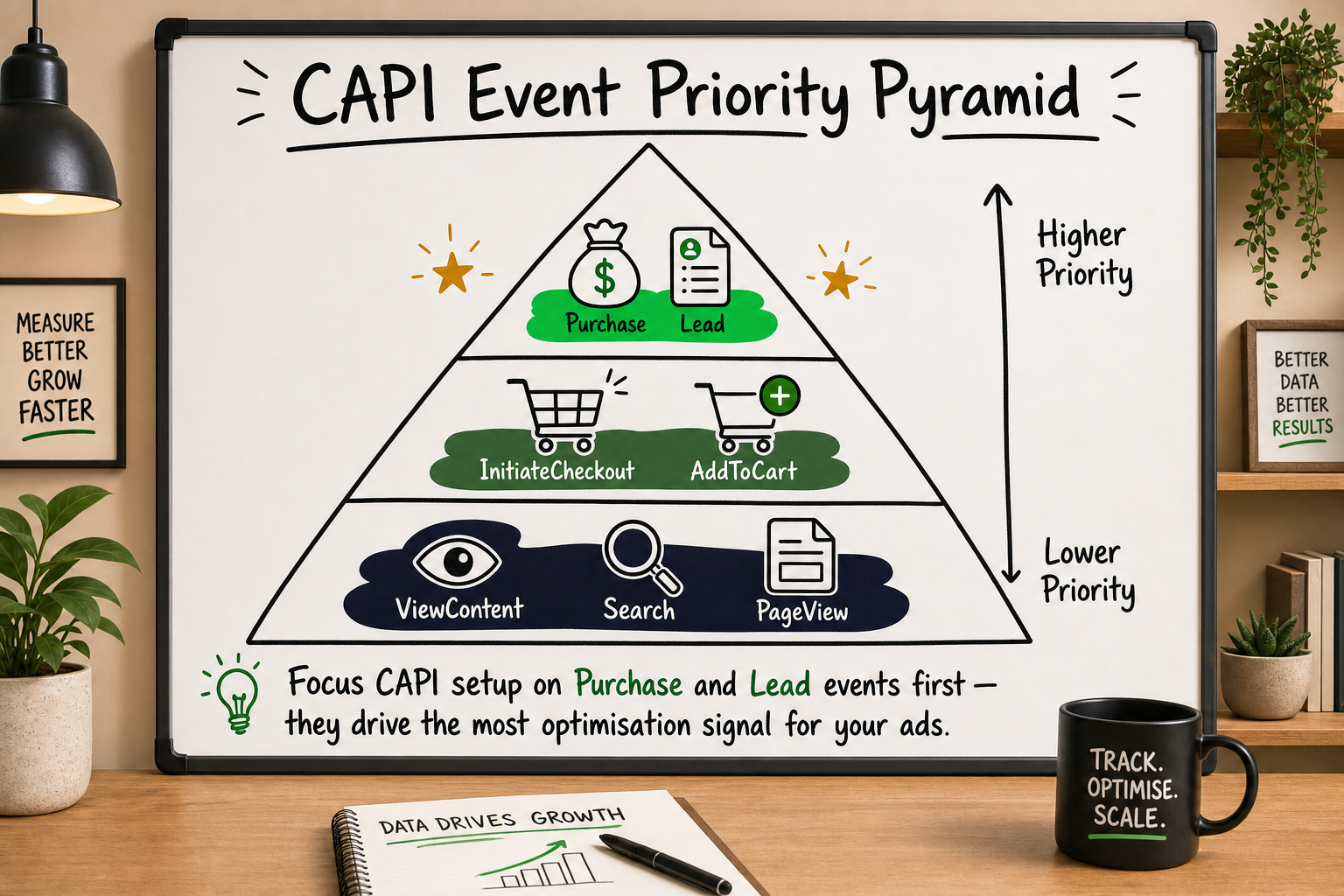
Not every action on your website needs to go through CAPI. The goal is to send the events that matter most to your campaign optimisation. For the majority of businesses, the non-negotiable events are:
- Purchase — your most important signal. Missing purchase events is the most expensive form of data loss.
- Lead — if you run lead generation campaigns, this tells Meta which users actually converted into enquiries or sign-ups.
- InitiateCheckout — a strong intent signal for eCommerce, useful for retargeting and lookalike audiences.
Events That Have the Biggest Impact on Ad Optimisation
From our team's experience implementing CAPI across client accounts, these three events — Purchase, Lead, and InitiateCheckout — consistently produce the most measurable improvement in campaign performance when their data completeness is restored. They are the conversions Meta's algorithm weighs most heavily when deciding who to show your ads to next.
If your business has a longer sales cycle, adding events like ViewContent (product page views) and AddToCart can help Meta build a fuller picture of the funnel even before a purchase happens.
What to Avoid Sending
Avoid sending events that contain raw, unhashed personal data. All personally identifiable information — email addresses, phone numbers, names — must be hashed before transmission. Sending unhashed data is both a compliance risk and against Meta's terms of service. Also avoid creating custom events for every minor interaction; that dilutes the signal quality rather than improving it.
Is Meta CAPI GDPR and Privacy Compliant?
What Data Meta CAPI Sends
Meta Conversions API typically sends two categories of data: event information (what happened, when, and on which page) and customer information (identifiers used to match the event to a Meta user, such as email, phone number, or browser cookies). The customer information is hashed before it leaves your server — meaning it is converted into an unreadable string that Meta can use for matching without ever seeing the raw value. [Source: Facebook Conversions API developer docs]
How to Handle Consent Correctly
CAPI does not make consent irrelevant — it changes where the data flows, not whether consent is required. Under GDPR and similar frameworks, you still need a valid legal basis for processing and sharing user data. In practice, this means your cookie consent banner needs to be set up so that CAPI events are only sent for users who have given consent, or you need another valid legal basis (such as legitimate interests, assessed carefully).
A compliant setup ties CAPI event transmission to your consent management platform. If a user declines tracking, no personal identifiers should be sent — only anonymous event data, if applicable.
The Difference Between Compliant and Non-Compliant Setups
The key distinction is not whether you use CAPI — it is whether your implementation respects user consent and properly hashes personal data. A CAPI setup that fires regardless of consent status, or that sends raw email addresses rather than hashed ones, creates real legal exposure. A properly configured setup, tied to your consent management layer and using hashed data, is both technically sound and privacy-respectful. [Source: Facebook Conversions API developer docs]
Frequently Asked Questions About Meta Conversions API
Does Meta CAPI replace the Facebook Pixel completely?
No. Meta Conversions API and the Facebook Pixel are designed to work together. The Pixel still captures browser-side signals that CAPI does not have access to, and the two sources complement each other. Event deduplication — using a shared Event ID — prevents the same conversion from being counted twice. Running both gives you the most complete data picture available.
Do I need a developer to implement Meta Conversions API?
For basic setups, platforms like Shopify and WooCommerce offer native CAPI integrations that can be activated without writing code. However, a clean, fully deduplicated implementation — where your server sends correctly matched, hashed, consent-gated events — requires technical input. The native integrations often miss edge cases or fail to hash data correctly. If your ad spend is significant, a proper implementation is worth the technical investment.
How much data am I losing if I only use the Facebook Pixel?
Based on analytics audits carried out during client onboarding, our team regularly identifies data gaps of 40–60% in accounts where only the Facebook Pixel is running. The exact figure depends on your audience's device mix (iPhone users are disproportionately affected), the proportion of visitors using ad blockers, and your browser's default tracking prevention settings.
Will setting up Meta CAPI immediately improve my ROAS?
Not immediately, and not automatically. What CAPI does is restore the quality and completeness of the conversion signal that Meta's algorithm uses to optimise your campaigns. With a stronger signal, the algorithm can make better targeting decisions over time — which typically translates to improved efficiency. Think of it as fixing a broken instrument rather than pushing a performance lever. Results compound gradually as Meta accumulates better data.
What is event deduplication in Meta CAPI?
When both the Facebook Pixel and CAPI send the same conversion event to Meta (for example, a Purchase), there is a risk that Meta counts it as two separate conversions. Deduplication prevents this. You assign a unique Event ID to each conversion event, and both the Pixel and CAPI send that same ID to Meta. Meta then merges the two signals and records the conversion once. Without deduplication, your reported conversion numbers can be inflated and your campaign optimisation skewed.
How Decyb Technology LLP Approaches Server-Side Tracking
Most of the marketing teams we speak with already know something is wrong with their attribution data. The GA4 dashboard shows one number, the Meta ad account shows another, and the actual revenue in their CRM is a third. The instinct is usually to blame the platforms. In practice, the issue is almost always in the implementation layer — specifically, what data is being collected, from where, and whether it is being deduplicated correctly.
What We See in Most Audits
During our standard onboarding process, we work through a 12-point analytics audit across every new client account. The same problems appear repeatedly: the Pixel firing on pages it should not, no server-side fallback when the Pixel is blocked, Event IDs either missing entirely or inconsistently generated, and consent signals not being wired through to the CAPI payload. In these setups, 40–60% of conversion data is invisible to Meta — which means the campaigns are optimising toward an audience that looks nothing like the actual buyers.
Our approach to Meta Conversions API implementation starts with a complete audit of what is currently firing and where the gaps are, before writing a single line of server-side code.
Our Implementation Approach
We build Meta CAPI setups to a specific standard: every server-side event includes a correctly generated Event ID matched to the browser-side Pixel event, all personally identifiable information is SHA-256 hashed before transmission, consent management platform signals gate which events fire and which do not, and the implementation is verified against Meta's Test Events tool and payload debugger before going live.
This is the same approach we used when delivering a complete end-to-end Meta Conversions API implementation for a client ahead of schedule — a project that earned a ★ 5.0 review specifically noting accurate event deduplication and server-side optimisation. It is also consistent with how we instrument tracking across complex multi-system environments, including the FieldFolio B2B marketplace serving 40,000+ retailers across Australia and New Zealand.
The goal in every case is the same: give Meta's algorithm a complete, clean, consent-compliant signal so that every pound or dollar of ad spend is working from accurate data.
Who This Is For
If you are running paid media on Meta and your attribution reporting feels unreliable, if you have noticed a significant drop in reported conversions since iOS 14, or if you simply want to understand whether your tracking setup is accurate before scaling spend — a server-side tracking review is a logical first step.
We offer a free 24-hour technology strategy call with a senior partner to walk through exactly what is happening in your current setup and what a clean implementation would look like. No commitment, no sales pitch — just an honest assessment of where your data is and where it should be.
Read the case study to see how we've built tracking infrastructure for high-volume eCommerce and marketplace environments — or book your free strategy call to get a clear picture of your own data gaps.
All project timelines and delivery estimates are indicative and subject to scope confirmation. Third-party service costs (hosting, domains, SaaS tools) are billed separately at cost. Decyb Technology LLP is registered in India; engagements are subject to terms of service available at decyb.com/terms.