
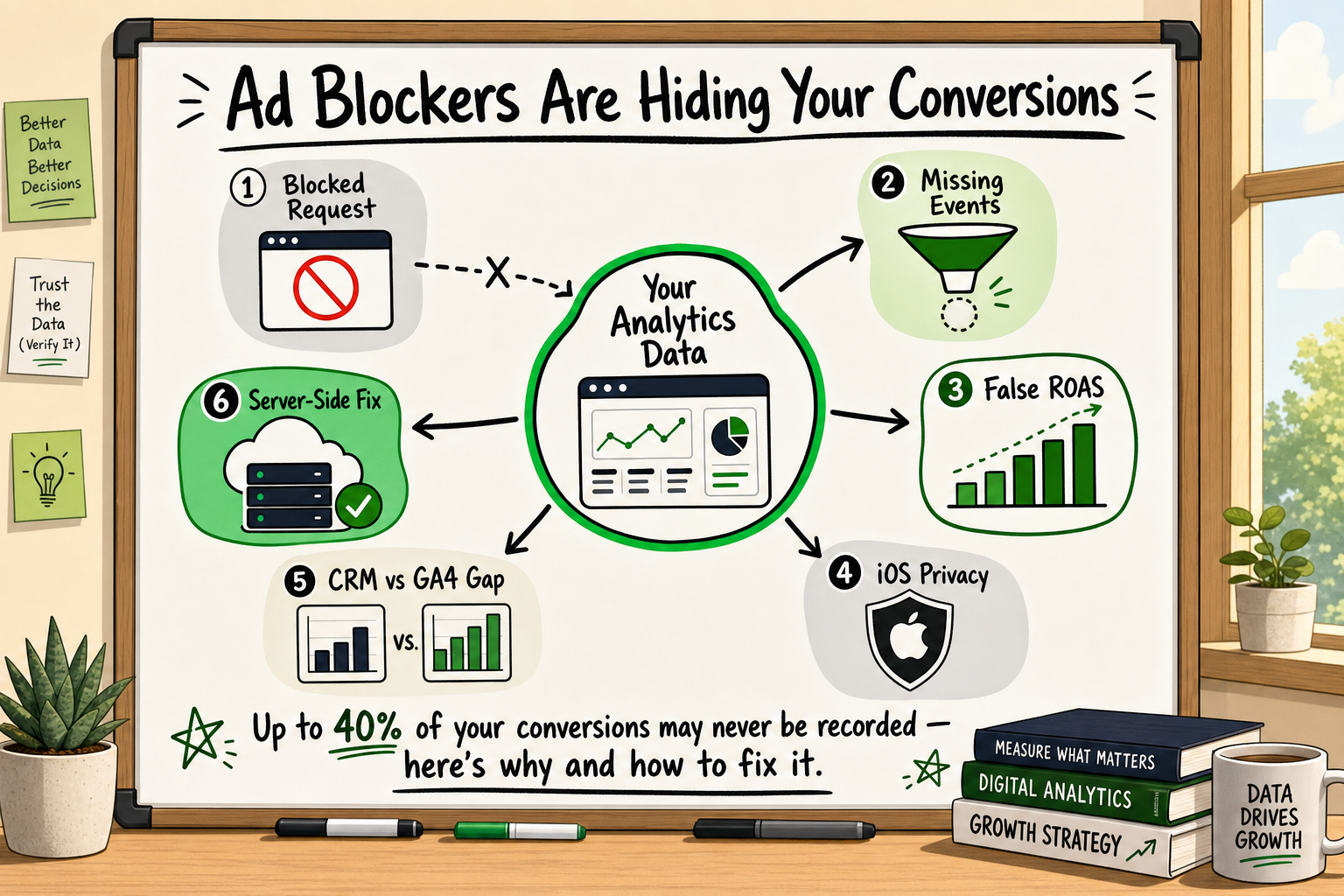
If your paid media ROAS looks shakier than your revenue figures suggest, or your A/B tests keep returning inconclusive results despite decent traffic, ad blockers conversion data loss is probably a large part of the explanation. This is not a fringe problem affecting a handful of privacy enthusiasts. For many funded startups and growth teams, between 40 and 60 per cent of analytics events never reach Google Analytics or Meta at all — and the damage compounds silently, week after week [VERIFY].
This article explains exactly how the breakage happens, how to estimate how much data you are losing, and what the structural fix looks like. No sales pitch — just the mechanics, the business consequences, and a self-audit you can run today.
Event Tracking Analytics: A Founder's Guide
Why Your Conversion Numbers Might Be Lying to You
The gap between reported conversions and actual revenue
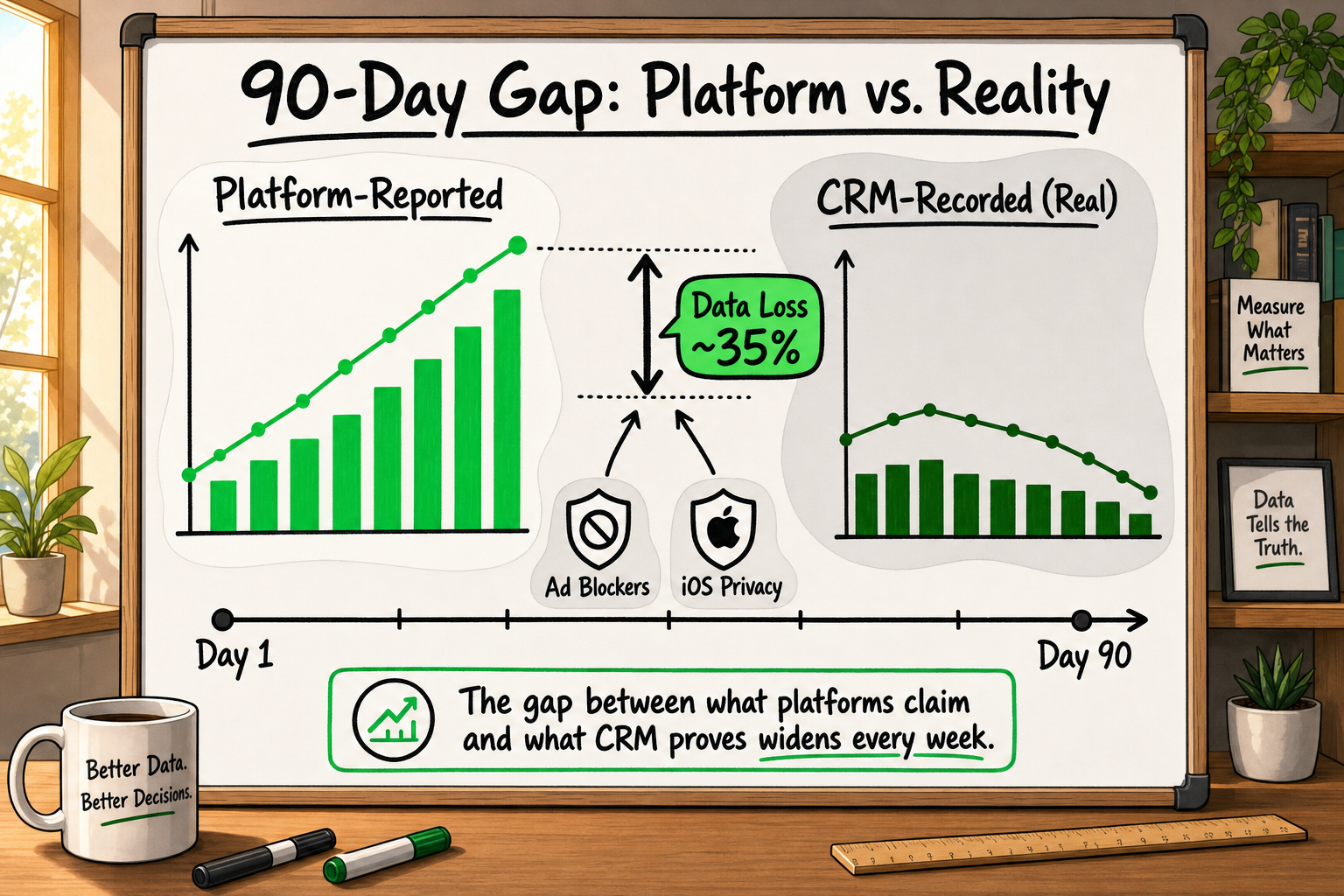
The most common early warning sign is a mismatch between the story your analytics tells and the story your finance team or CRM tells. Your GA4 dashboard reports 38 purchases last week. Your payment processor logged 61. The difference is not a rounding error or a reporting lag — it is a measurement gap, and ad blockers are one of the primary causes.
The reason this matters beyond vanity metrics: every growth decision you make downstream — which ad channel to scale, which landing page variant to roll out, which audience segment to target — is built on that incomplete number. Scale a campaign based on a reported cost-per-acquisition that is actually 40 per cent underreported and you will systematically underspend on your best channels while spreading budget across ones that merely look equivalent.
Our team encounters this pattern consistently across client audits. The analytics data looks plausible on its own. It is only when it is cross-referenced against server logs, CRM records, and payment data that the gap becomes visible — and it is rarely small.
Why most teams don't notice until it's too late
The uncomfortable truth is that incomplete data looks like complete data. GA4 does not show you a banner reading "Warning: 45% of your events were blocked today." It simply reports what it received. If your baseline was already established during a period of high ad-blocker interference, every subsequent comparison is measured against an already-broken benchmark. The gap is invisible because there is no clean reference point.
This is especially damaging during fundraising, when you are presenting growth metrics to investors, or during a paid media scale-up, when budget decisions are being made fast.
How Ad Blockers Actually Block Your Analytics Scripts
What happens when a browser loads your tracking pixel
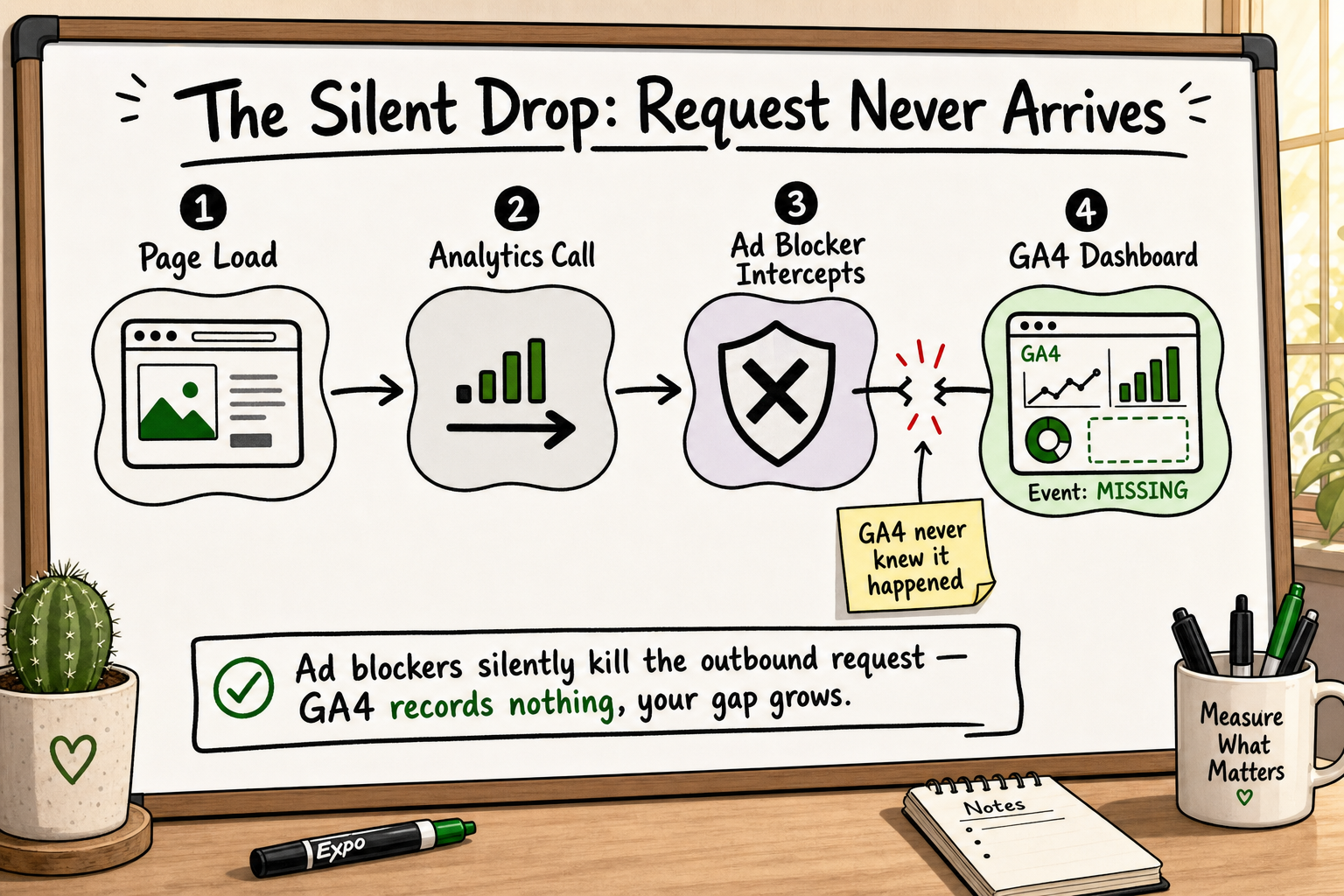
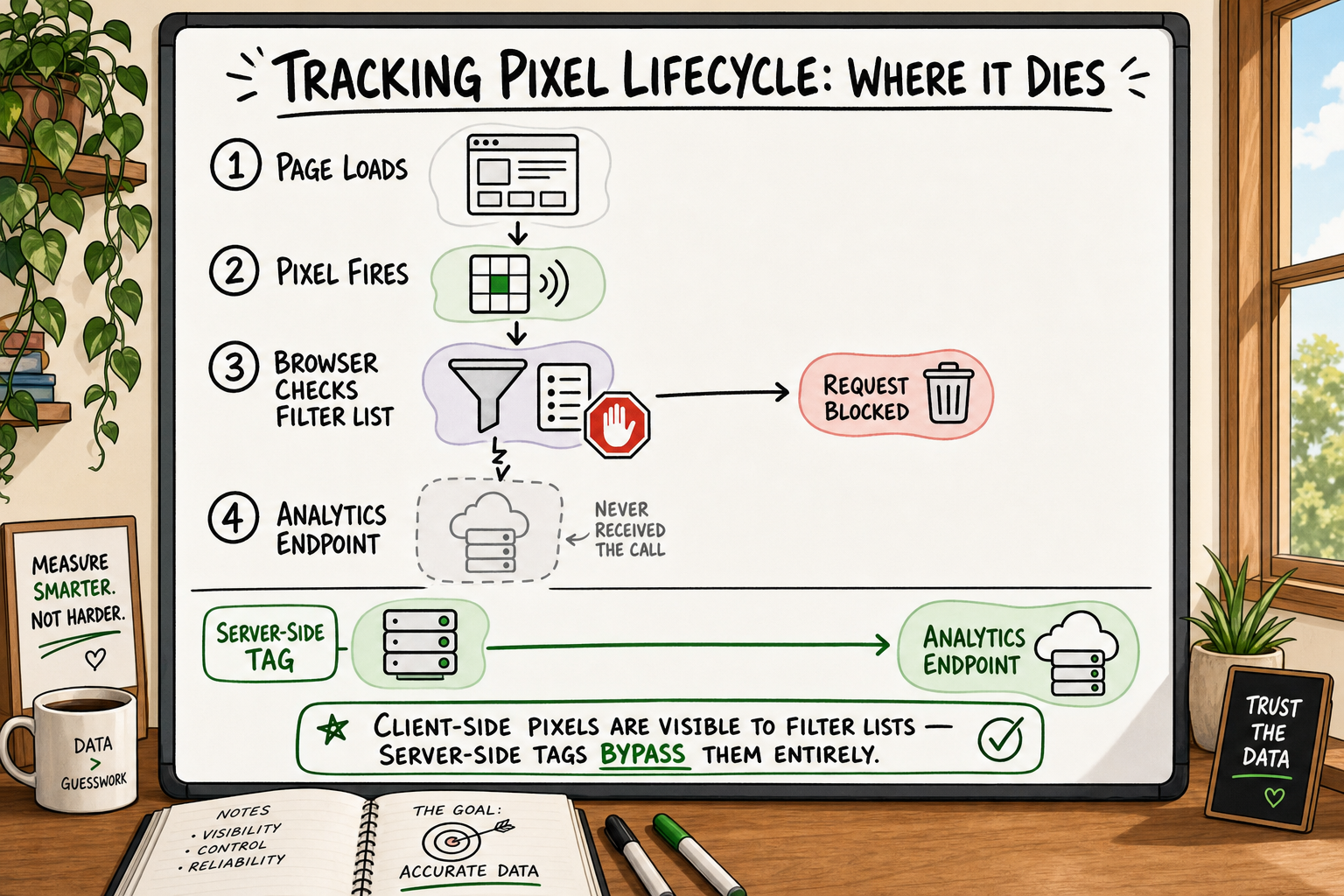
Every time a visitor lands on your website, their browser parses the page and begins executing JavaScript. If you have Google Analytics 4 installed via a standard tag — whether added directly to the <head> or through Google Tag Manager — that tag fires a network request to google-analytics.com or analytics.google.com to register the session and any events the visitor triggers.
Ad blockers intercept that request before it leaves the browser. The visitor sees your page normally. Your server delivered the HTML. But the analytics event was silently discarded. From your perspective, that visitor never existed.
Filter lists and how they identify analytics scripts
Ad blockers such as uBlock Origin, AdBlock Plus, and Ghostery rely on continuously updated filter lists — EasyList, EasyPrivacy, and similar catalogues — that contain domain patterns and URL fragments associated with known tracking and advertising services. Google Analytics, Meta Pixel, the Google Tag Manager container script, and most other client-side tracking tools are listed.
When the browser's extension checks an outbound request against these lists and finds a match, the request is cancelled. No event fires. No data is sent. The sophistication of modern filter lists means that even if you rename your GTM container or host a copy of the analytics script on your own domain, the fingerprinting logic in tools like uBlock Origin can often still identify and block it. [Source: Mozilla Developer Network documentation on content blocking]
The role of DNS-level blockers and browser privacy modes
Beyond browser extensions, a growing share of users block at the DNS level using tools such as Pi-hole or NextDNS — meaning tracking requests are dropped before they even reach the browser extension layer. On top of that, browsers with built-in privacy controls — Brave, Firefox with Enhanced Tracking Protection, and Safari with Intelligent Tracking Prevention — block or restrict analytics cookies and third-party requests by default, without the user needing to install anything.
The practical result: a user running Brave with no extensions installed will still block most client-side analytics scripts natively, simply by opening your site.
What Is Meta Conversions API? A Guide for Marketers
How Many of Your Visitors Are Actually Using Ad Blockers?
Ad blocker adoption rates by audience segment
Global ad blocker adoption is estimated at around 27 per cent of internet users as of recent years, but that average conceals significant variation by audience type [VERIFY]. [Source: Statista — worldwide ad blocker usage statistics]
For developer, engineering, and tech-savvy audiences, estimates consistently run higher — some surveys suggest 40 to 60 per cent of developers use an ad blocker or privacy browser as their primary tool [VERIFY]. If your product targets founders, engineers, product managers, or other digitally sophisticated users, your effective data loss rate is almost certainly above the global average.
For consumer-facing eCommerce with a broad demographic, the rate is lower but still meaningful — typically 15 to 25 per cent, depending on device and geography [VERIFY].
iOS privacy changes compound the problem
Apple's App Tracking Transparency (ATT) framework, introduced with iOS 14.5, requires apps to ask permission before tracking users across apps and websites. The majority of users decline. Safari's Intelligent Tracking Prevention (ITP) also caps the lifespan of cookies set by JavaScript — often to as little as 24 hours — meaning even users who are not running ad blockers lose attribution data if they take more than a day to convert after their first click.
These iOS-level restrictions operate entirely independently of browser ad blockers. A user can have no extensions installed, no privacy browser, and still cause attribution gaps due to ITP or ATT. The two problems stack.
The combined effect on paid media attribution
When you combine browser extension blocking, DNS-level blocking, privacy-first browsers, iOS ATT, and Safari ITP, the realistic data completeness picture for a tech-focused startup running paid media campaigns is often 50 to 70 per cent of actual conversion events appearing in reported data [VERIFY]. The rest are invisible — not because the conversions did not happen, but because the measurement infrastructure was not built to survive the modern privacy environment.
What Data You're Actually Losing — and Why It Matters for Growth Decisions
Conversion events that disappear silently
The events most commonly lost to ad blockers are not pageviews — they are the high-value events your entire growth strategy depends on: purchase completions, lead form submissions, free trial sign-ups, add-to-cart actions, and checkout initiations. These are typically triggered by JavaScript firing after a user interaction, making them entirely client-side and therefore fully exposed to blocking.
Pageviews are partially recoverable because some blockers allow static HTML requests through. But the events you care most about — the ones that define your CAC, your ROAS, your conversion rate — are the most vulnerable.
How broken attribution distorts paid media ROAS
Consider a concrete scenario. A startup is running Google Ads and Meta campaigns simultaneously with a monthly budget of £20,000. GA4 reports 80 conversions from Meta at a cost per acquisition of £125, and 60 conversions from Google at £167. The team reallocates budget toward Meta.
What actually happened: Meta's pixel is blocked at a higher rate than Google's conversion tag in this particular audience (common, because Meta's pixel domain is on nearly every major filter list). The real conversion split was closer to 50/50. By optimising on broken data, the team moved budget in the wrong direction.
This is not a hypothetical edge case. It is a structural problem that affects any team running multi-channel paid media on client-side tracking alone.
The knock-on effect on A/B testing and product experiments
A/B test reliability depends on consistent, complete measurement of outcomes. If ad blockers are removing a significant and non-random subset of events — specifically, the events from your most privacy-conscious users, who may also correlate with higher intent or higher LTV — your test results are systematically biased. A variant may appear to underperform simply because its audience happened to have a higher ad-blocker rate.
The result is that teams ship the wrong variant, pause experiments that were actually working, or continue running tests for longer than necessary because the data never reaches statistical significance.
Client-Side Tracking vs Server-Side Tracking: The Core Difference
What client-side tracking depends on
Client-side tracking means the event collection happens in the user's browser, using JavaScript that runs after the page loads. The GA4 tag, the Meta Pixel, and standard Google Tag Manager implementations are all client-side. Their fundamental dependency is that the browser must be willing to execute the script and send the resulting network request — and ad blockers are specifically designed to prevent both.
How server-side tracking routes events differently
Server-side tracking moves the event collection logic out of the browser entirely. When a user completes a conversion — a purchase, a sign-up, a key interaction — your web server (or a dedicated tagging server) sends the event data directly to the analytics or ad platform endpoint. The communication happens server-to-server. It never passes through the user's browser after the initial page load.
Because ad blockers operate at the browser network layer, they have no visibility into server-to-server requests. There is nothing to block. The event arrives at Google Analytics or Meta's Conversions API (CAPI) endpoint without interception. [Source: Meta for Developers — Conversions API documentation]
Server-side GTM, Meta's Conversions API, and GA4's Measurement Protocol are the three primary tools used to implement this approach.
First-party data and why it survives ad blockers
Server-side tracking also allows you to send events using first-party cookies — cookies set by your own domain server rather than a third-party script. First-party cookies are not subject to the same browser restrictions as third-party cookies, survive ITP's 24-hour cap, and are not visible to most ad-blocker filter lists.
This combination — server-to-server event delivery plus first-party cookie identification — is why a properly implemented server-side tracking setup can recover a large portion of the data that client-side tracking loses. It does not make you invisible to all data limitations, and it does not override user consent obligations, but it closes the largest gaps in the measurement stack.
A Quick Self-Audit: Signs Your Analytics Are Broken Right Now
Before deciding on a fix, it is worth establishing how large your gap actually is. Here is a practical starting checklist:
Cross-checking GA4 sessions against server logs
Your web server processes every single request — regardless of ad blockers — because the HTML itself is served before any JavaScript runs. Pull a week of server log data and count unique sessions or page requests. Compare that number to GA4's reported sessions for the same period. A significant discrepancy (typically 20 per cent or more) indicates meaningful tracking loss.
Spotting the tell-tale conversion drop on mobile vs desktop — and Brave vs Chrome
Segment your GA4 conversion data by browser. If Brave, Firefox, and Safari show substantially lower conversion rates than Chrome, despite comparable traffic volumes, that is a strong signal that the conversion events are being blocked rather than that those users genuinely convert less. Similarly, a large drop in mobile conversion rate for iOS users relative to Android users, despite similar session quality, points to ITP interference.
Comparing platform-reported conversions to CRM records
Pull the conversion events your CRM or payment processor recorded over a 30-day period. Compare those to what GA4 and Meta Ads Manager reported for the same window. If your CRM shows 200 sign-ups and GA4 shows 140, you have lost 30 per cent of your conversion data at minimum. This gap is your baseline for measuring the impact of any server-side fix.
Our team uses a 12-point GA4 audit checklist during client onboarding that surfaces the most common configuration errors causing this kind of data loss. The audit typically takes less than two hours to run and almost always reveals gaps that were not visible from inside the GA4 interface.
Event Tracking Analytics: A Founder's Guide
Frequently Asked Questions
How much data can ad blockers remove from Google Analytics? Estimates vary by audience type and industry. For general consumer audiences, data loss is commonly in the 15 to 30 per cent range. For tech-focused or developer audiences, the gap regularly reaches 40 to 60 per cent when ad blockers, privacy browsers, and iOS restrictions are combined [VERIFY]. The only way to know your specific gap is to cross-reference GA4 data against server logs and CRM records.
Does server-side tracking completely eliminate ad blocker interference? It removes the primary mechanism by which ad blockers block events — the browser-layer network interception. Events sent server-to-server cannot be blocked by browser extensions or DNS blockers. However, server-side tracking does not override user consent requirements. If a user has not consented to tracking under GDPR or similar frameworks, you are still legally obligated to honour that choice, and your implementation must be designed accordingly.
Will switching to server-side tracking break my existing GA4 setup? Not if the migration is handled correctly. Server-side tagging is typically implemented alongside the existing client-side setup during a transition period. Events are deduplicated using a shared event ID so that the same conversion is not counted twice. A careful implementation plan avoids any reporting disruption and allows you to validate data completeness before fully cutting over.
How do iOS privacy changes make the ad blocker problem worse? Apple's App Tracking Transparency and Safari's Intelligent Tracking Prevention operate at the operating system and browser level, independently of any ad-blocker extension. ITP caps JavaScript-set cookies to 24 hours in many cases, breaking attribution for users who convert more than a day after their first visit. ATT requires explicit opt-in for cross-app tracking, and most users decline. These mechanisms stack with ad-blocker blocking, compounding the total data loss.
Can I fix this with Google Tag Manager alone? Standard GTM runs in the browser and is therefore still fully exposed to ad-blocker interception. The relevant fix is server-side GTM — a separate GTM container deployed on a cloud server you control (typically Google Cloud Run or a similar environment). This requires additional infrastructure configuration and is distinct from the standard GTM setup most teams have in place.
How Decyb Technology LLP Approaches Broken Conversion Tracking
If you have reached this point and recognise the gap in your own data, the next question is what an actual fix looks like in practice — not in theory, but as a deliverable that results in accurate conversion data you can act on.
This is the core problem our team at Decyb Technology LLP exists to solve for growth-focused startups and marketing teams. The work involves three components working together: a server-side tagging infrastructure, a correctly configured Meta Conversions API implementation with full event deduplication, and a GA4 setup validated against server logs and CRM data so you have a reliable baseline from day one.
The server-side tracking and Meta CAPI implementation process
Our implementation starts with a measurement audit — the same 12-point checklist described above — to quantify your actual data gap before a single line of code is written. That audit defines the scope of the fix and sets the benchmark against which we measure success after go-live.
The server-side tagging layer is then built on infrastructure your brand owns, using server-side GTM alongside direct API integrations to GA4's Measurement Protocol and Meta's Conversions API. Events are matched using browser-to-server payload matching and deduplicated using a consistent event ID structure so there is no double-counting in your reporting. [Source: Meta for Developers — Conversions API documentation; Google Analytics — GA4 Measurement Protocol]
First-party cookies are set server-side, removing the ITP 24-hour cap that destroys attribution for returning visitors. The result is a measurement stack that survives ad blockers, iOS privacy restrictions, and most other client-side blocking mechanisms.
What accurate data looks like after the fix
Our Meta CAPI implementation work has been independently reviewed and rated ★ 5.0 by clients, delivered ahead of schedule with full event deduplication and server-side optimisation in place. After implementation, clients typically see a significant increase in reported conversions — not because more conversions are happening, but because the ones that were already happening are now being measured correctly.
That shift changes budget allocation decisions, makes A/B tests reliable again, and gives paid media teams a ROAS figure they can actually trust when scaling spend. It also gives founders and investors a growth data set they can present with confidence rather than a caveat.
All project timelines and delivery estimates are indicative and subject to scope confirmation. Third-party service costs (hosting, domains, SaaS tools) are billed separately at cost. Decyb Technology LLP is registered in India; engagements are subject to terms of service available at decyb.com/terms.
Getting started with a free strategy call
If you suspect your analytics are incomplete but are not sure of the scale of the problem, the right first step is a measurement conversation — not a sales call. Our team offers a free 24-hour custom technology strategy session with a senior partner. We look at your current setup, estimate your data gap, and outline what a server-side tracking implementation would involve for your specific stack.
There is no cost and no obligation. If the gap is small and your current setup is close to accurate, we will tell you that.
Book your free strategy call — get a plan in 24 hours → Contact