
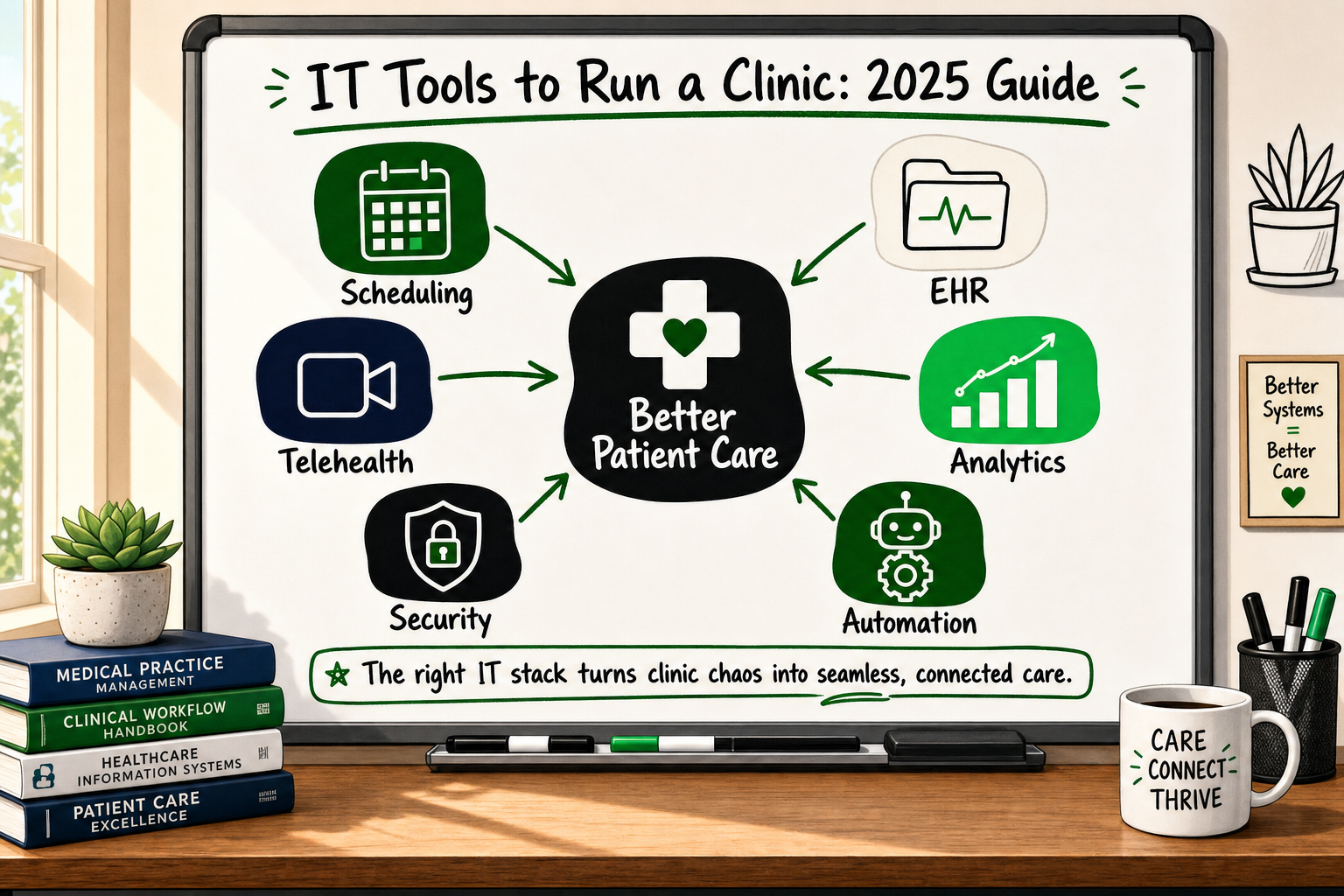
Running a clinic today means managing a small business and a clinical operation at the same time. The IT tools you choose to run a clinic will either free your team to focus on patients or quietly drain hours every week through manual workarounds, missed appointments, and data you cannot trust. This guide maps every technology category a modern practice needs — from scheduling through to analytics and security — so you can make informed decisions about what to buy, what to connect, and when (if ever) to build something custom.
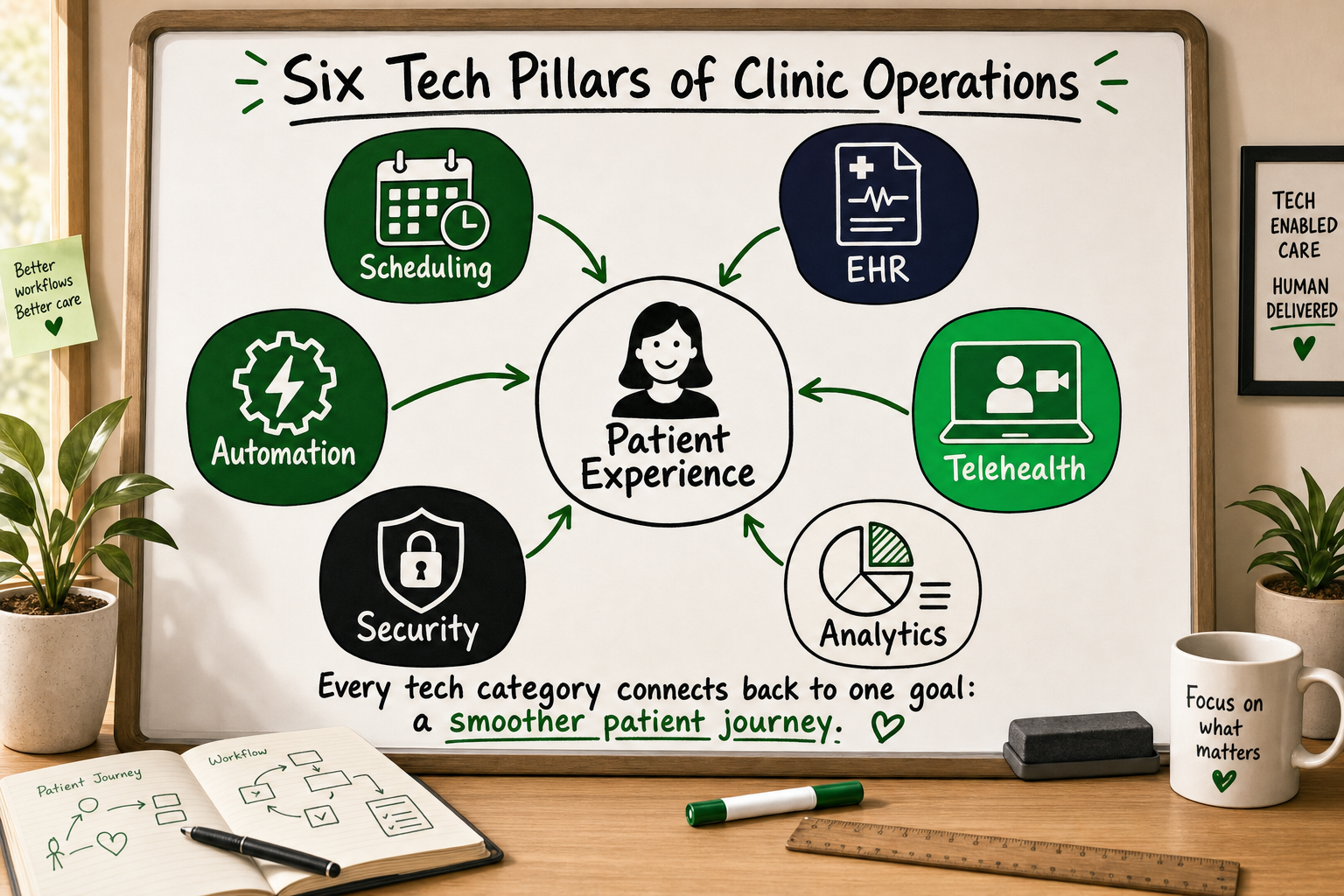
Why technology is now the backbone of a well-run clinic
The hidden cost of manual processes in clinical settings
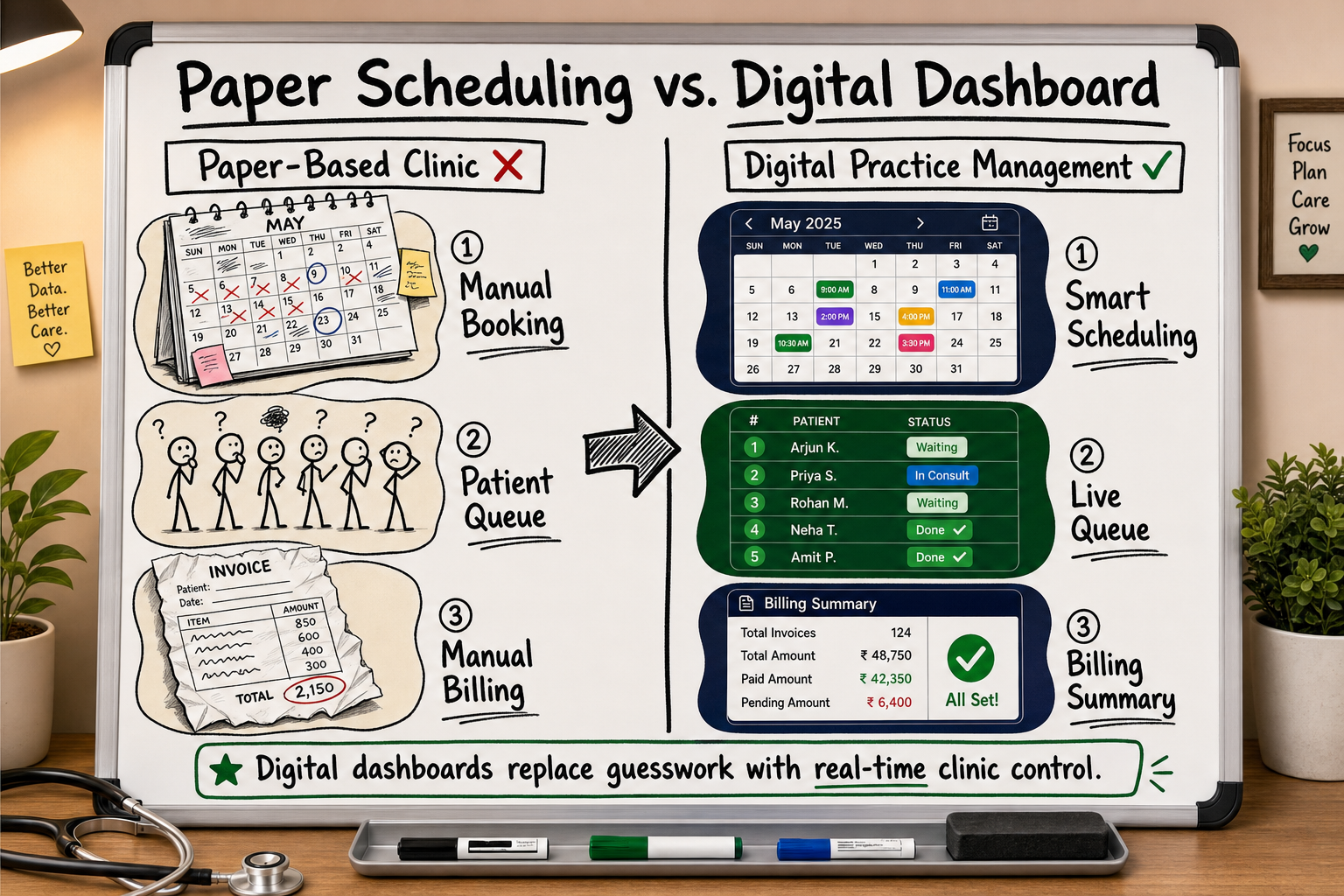
Paper appointment books, spreadsheet billing trackers, and WhatsApp chains for staff communication all have something in common: they scale terribly. Every time your clinic adds a new practitioner, a second location, or a new service line, the manual overhead multiplies. A receptionist who can manage 40 appointments a day on paper cannot suddenly manage 80 without making errors.
The cost shows up in predictable ways: double-booked slots, claims rejected because a billing code was entered incorrectly, patient records that live in three places at once, and staff spending the last hour of every day reconciling things that should have been automated.
From paper to digital: what the shift actually involves
Digitising a clinic is not a single project. It is a staged migration across several tool categories, each of which has its own vendor landscape, compliance requirements, and integration complexity. The good news is that you do not need to do it all at once. Most practices can start with scheduling and records, then layer in analytics, automation, and deeper integrations as volume and complexity grow.
The analogy holds in other industries too. Multi-location operations — whether they manage stock, staff rosters, and back-office reporting across sites — face the same architectural challenge: real-time data flowing between systems that were never designed to talk to each other. The structural patterns for solving that problem in healthcare are well understood; the key is knowing which layer to build first.
Core category 1 — Practice management and scheduling
A practice management system (PMS) is the operational hub of your clinic. It handles the logistics of running the business side of healthcare: who is booked in, when, for what, and whether they paid.
Appointment booking and automated reminders
Online booking — where patients self-schedule through a web page or patient portal — reduces the volume of inbound calls and removes the single point of failure of a busy receptionist. More importantly, automated SMS and email reminders before appointments have been shown to meaningfully reduce no-show rates [VERIFY]. In a clinic where a missed appointment slot cannot be backfilled at short notice, that is direct revenue recovered.
Look for a system that lets you configure reminder sequences: for example, an email seven days out, an SMS 48 hours before, and a confirmation link the morning of the appointment.
Patient registration and intake forms
Digital intake forms — completed by the patient on their phone before they arrive — remove the clipboard-and-pen routine from reception and push structured data directly into the patient record. This reduces transcription errors and speeds up the clinical consultation because the practitioner already has the patient's history, current medications, and reason for visit before they walk in.
Billing, insurance claims, and payment processing
Billing is where manual clinics lose the most money invisibly. Rejected insurance claims, undercoded consultations, and outstanding invoices that nobody chases add up quickly. A good PMS connects the clinical record to the billing workflow so that the correct codes are suggested based on what was documented, claims are submitted automatically, and payment status is tracked in one place.
Examples of established PMS platforms in this category include Jane App, Cliniko, and Kareo [SOURCE], though the right choice depends on your geography, specialty, and integration requirements.
Core category 2 — Electronic health records (EHR/EMR)
EHR vs EMR: what the difference means in practice
An Electronic Medical Record (EMR) is a digital version of a paper chart. It stores clinical notes, diagnoses, medications, and test results for a single practice. An Electronic Health Record (EHR) does all of that and is designed to share information across providers — so a GP, a specialist, and a hospital can all see the same patient record if the patient consents.
For most clinics, an EHR is the better long-term choice because it supports patient portals, referral workflows, and data exchange with labs and pharmacies. An EMR is adequate only if you operate in complete isolation from other providers, which is increasingly rare.
Structured vs unstructured clinical notes
Some EHR systems allow free-text clinical notes only. Others support structured templates — fields for vital signs, coded diagnoses, and standardised assessment scores — that make data searchable and reportable. Structured notes take more discipline to complete but produce data you can actually use: identifying patients overdue for review, tracking outcomes across a cohort, or generating the reports a commissioner or insurer requires.
Interoperability and data portability
Before committing to any EHR, ask two questions: can I export my patient data in a standard format if I want to switch systems? And does it support HL7 FHIR, the international standard for healthcare data exchange [SOURCE]? Vendor lock-in is a real risk in healthcare IT, and the cost of migrating structured clinical data to a new system years later can be significant.
On the security baseline, any EHR you choose should address the OWASP Top Ten vulnerabilities as a minimum [Source: owasp.org] — covering injection attacks, broken authentication, and insecure data storage among others.
Core category 3 — Telehealth and patient communication
Video consultation platforms
Post-pandemic, patients expect the option of a video consultation for follow-ups, medication reviews, and non-urgent concerns. The clinical platform you choose for this must be end-to-end encrypted and compliant with local data protection law — in the UK that means UK GDPR; in the US it means HIPAA. General-purpose video tools like standard Zoom or Google Meet do not meet this bar without specific business associate agreements and configuration.
Telehealth adoption has stabilised since its pandemic peak but remains structurally embedded in patient expectations, particularly for specialist and mental health services [VERIFY]. Building the infrastructure now is lower cost than retrofitting it later.
Patient portals and secure messaging
A patient portal gives patients access to their own records, test results, appointment history, and a secure messaging channel to the practice. This reduces phone call volume, improves patient engagement, and creates a documented communication trail that protects both patient and clinician.
Consent management and digital signatures
Digital consent — for procedures, data sharing, and marketing communications — is not only more convenient than paper; it is more defensible. A good system timestamps consent, links it to the patient record, and makes it auditable. This matters especially if your clinic runs any form of patient communications for preventive care reminders or health campaigns.
Core category 4 — Analytics, reporting, and data accuracy
Operational reporting: capacity, revenue, and staff utilisation
Your PMS should produce operational reports without manual exports: how many appointments were completed versus cancelled, revenue by practitioner and service line, average time per consultation, and slot utilisation by day of week. These numbers let you make staffing and scheduling decisions based on evidence rather than instinct.
Marketing analytics: understanding how patients find you
If your clinic runs any paid advertising — Google Ads, Meta, or otherwise — you need to know which campaigns are generating new patient registrations and at what cost. Most clinics install Google Analytics and assume they have this visibility. They do not.
Why client-side tracking alone fails healthcare marketers
Here is the part most analytics guides skip. Standard GA4 installed via a browser tag relies on JavaScript running in the patient's browser. Ad blockers, iOS privacy restrictions, and browser-level tracking prevention routinely block or strip that signal. The result is that 40–60% of conversion events — a patient booking their first appointment after clicking an ad — are never recorded [VERIFY].
This is not a hypothetical. It is the measurement gap that makes paid acquisition feel unreliable even when the campaigns are working. The fix is server-side tracking: the booking confirmation event is sent from your server to GA4 and Meta simultaneously, before any browser privacy tool can intercept it [Source: developers.facebook.com]. For clinics investing in paid growth, this is not optional infrastructure — it is the foundation on which every channel decision should rest.
How to Evaluate a Software Development Partner: 9 Criteria
Core category 5 — Cybersecurity and compliance
Data encryption and access control
Patient records are among the most sensitive personal data a business holds. The minimum security baseline for any clinic IT system includes:
- Encryption at rest and in transit — data stored on servers and moving between systems must be encrypted using current standards (AES-256 for storage, TLS 1.2 or higher for transit).
- Role-based access control — a receptionist should not be able to access clinical notes; a locum GP should not be able to export the full patient database. Permissions should match job function, not convenience.
- Multi-factor authentication — every system that holds patient data should require MFA for staff login.
Audit logs and breach notification requirements
An audit log records who accessed which record, when, and what they changed. This is not just good practice — it is a regulatory requirement in most jurisdictions. Under UK GDPR and equivalent frameworks, you also have a legal obligation to notify the relevant authority within 72 hours of discovering a data breach. Without an audit log, you cannot accurately determine the scope of a breach or demonstrate that access controls were functioning correctly.
Referencing the OWASP Top Ten [Source: owasp.org] provides a practical security checklist that any IT vendor or in-house IT lead should be able to map their systems against.
Staff training as a security tool
Insider threats and phishing emails account for the majority of healthcare data breaches [VERIFY]. No amount of technical security controls fully compensates for a staff member clicking a convincing phishing link or sharing login credentials. Quarterly security awareness training — covering phishing recognition, password hygiene, and the procedure for reporting a suspected breach — is as important as any software control.
Core category 6 — Automation and workflow integration
Connecting scheduling, EHR, and billing with APIs
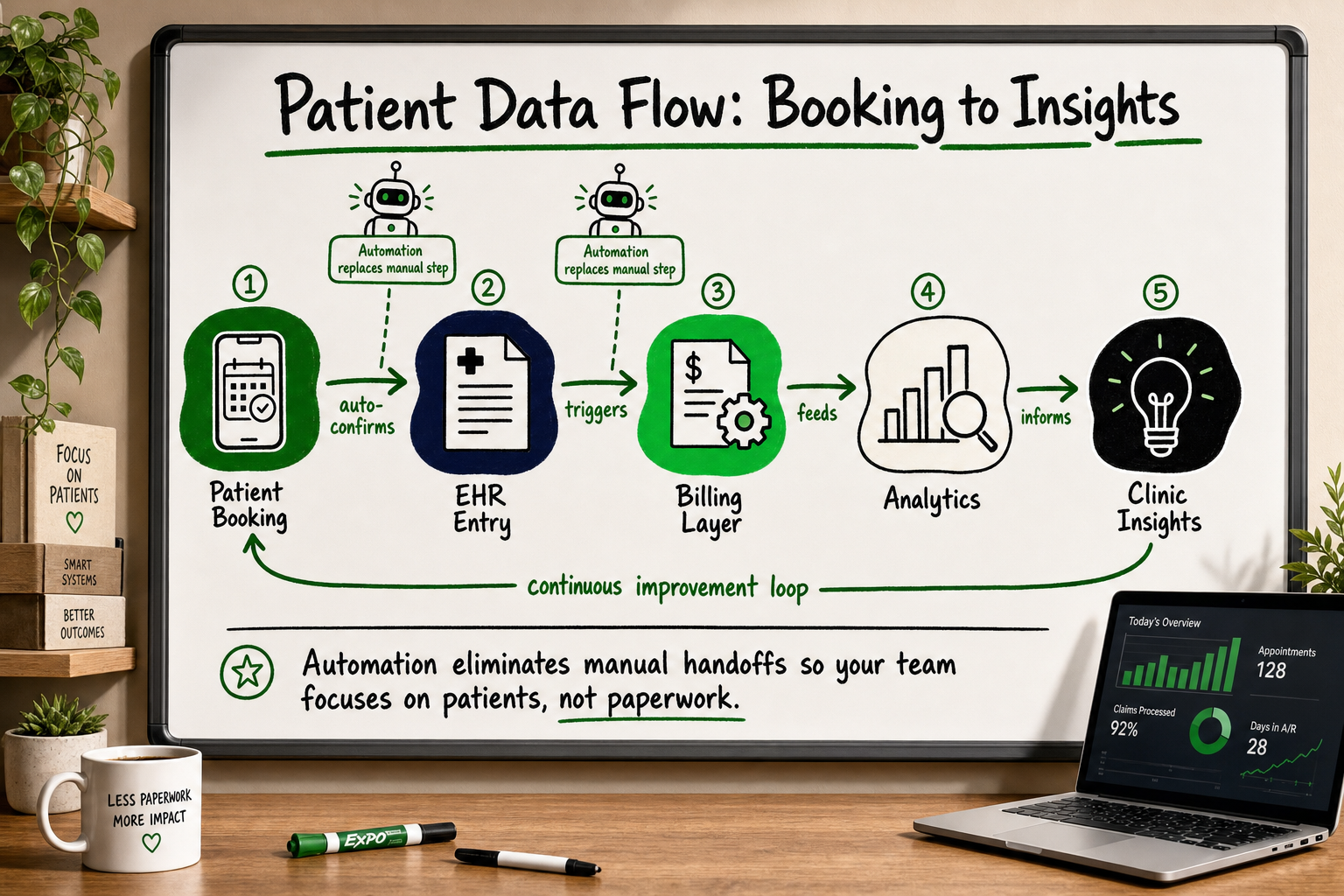
The individual tools above create value in isolation. They create compounding value when they are connected. An appointment confirmed in your PMS should automatically create a record in the EHR. A completed consultation note should automatically trigger the billing workflow. A payment received should update the patient account without anyone touching a keyboard.
This kind of integration is done through APIs — standardised connection points that let software systems talk to each other. Most modern SaaS tools in healthcare offer API access, though the depth and reliability of those APIs varies considerably.
Automating referral letters and follow-up communications
Referral letters, discharge summaries, and post-appointment follow-up messages are high-volume, templated communications that consume disproportionate staff time when done manually. Automation tools — whether built into your EHR or added as a workflow layer — can generate these from structured clinical data, route them to the correct recipient, and log the send in the patient record.
CRM and marketing automation for patient acquisition
For clinics that actively market their services — private practices, specialist clinics, wellness centres — a CRM layer above the clinical system handles the patient acquisition journey: tracking enquiries, nurturing leads who have not yet booked, reactivating lapsed patients, and running recall campaigns for preventive services. Tools like GoHighLevel, combined with automation platforms such as Zapier, can connect the marketing and clinical layers without requiring custom development for most use cases.
Build vs buy: when does a clinic need custom software?
Signs your clinic has outgrown off-the-shelf software
SaaS tools are the right starting point for almost every clinic. They are faster to deploy, cheaper to maintain, and backed by vendor support. The point at which custom development becomes worthwhile is specific:
- You operate across multiple sites with workflows that differ by location and no off-the-shelf system can accommodate both.
- Your clinical protocols are proprietary — an unusual care pathway, a novel diagnostic flow — and templated notes in any EHR produce a worse clinical record than your paper system.
- You need deep integration with a lab, pharmacy dispensing system, or hospital ERP that no commercial vendor has built.
The architecture pattern that emerges at this scale — multi-tenant systems managing real-time data across locations — is well understood in other industries. A B2B wholesale marketplace serving 40,000 retailers across multiple geographies faces structurally identical challenges to a multi-site clinic network: separate data environments per entity, shared infrastructure, real-time synchronisation, and a back-office that consolidates everything. The engineering principles that solve one solve the other.
The case for staying with SaaS as long as possible
For a single-site clinic with standard workflows, there is no compelling reason to build custom software. The ongoing maintenance cost, the dependency on a development partner, and the time required to specify requirements are all overhead that detracts from clinical operations. SaaS tools absorb that overhead in exchange for a subscription fee, and for most clinics that is the correct trade.
What a custom clinical system actually costs in time and money
Expect a meaningful custom clinical system — one covering scheduling, records, and billing with proper security architecture — to take four to eight months to build and an ongoing investment in maintenance and feature development thereafter. That commitment is justified when the system unlocks revenue or operational capability that no off-the-shelf tool can match. It is not justified to save a software subscription fee.
Frequently Asked Questions
What is the minimum IT setup a new clinic needs on day one?
The non-negotiables are a secure appointment scheduling system, a compliant electronic health record, and a billing tool. Telehealth, advanced analytics, and marketing automation can follow once core operations are stable. Starting with these three categories avoids the common mistake of buying too many tools before you understand your actual workflow.
How do I make sure my clinic's patient data is secure?
Four pillars: encryption at rest and in transit, role-based access control so staff can only access the data their role requires, audit logs that record every access event, and regular staff training on phishing and password hygiene. On the software side, any system you use should be able to demonstrate compliance with OWASP Top Ten [Source: owasp.org] as a minimum baseline.
Do small clinics really need server-side tracking for their marketing analytics?
If you are running paid advertising on Meta or Google, yes. Ad blockers and iOS privacy restrictions routinely strip 40–60% of conversion events from standard GA4 implementations [VERIFY]. Server-side tracking — where the booking event is sent from your server rather than the patient's browser — restores that signal and gives you accurate data to make channel decisions. Without it, you are optimising campaigns on incomplete information.
Can I run a clinic entirely on SaaS tools without any custom development?
For most single-site clinics, yes. SaaS tools cover the full stack: scheduling, EHR, billing, telehealth, and basic analytics. Custom development becomes worthwhile only when you have multi-site complexity, proprietary clinical workflows, or deep integration requirements that no commercial vendor supports.
What is the difference between EHR and EMR, and which does my clinic need?
An EMR is a digital patient chart used within a single practice. An EHR shares data across providers and supports patient portals and referral workflows. Most clinics benefit from an EHR because it supports the interoperability modern healthcare requires — with labs, specialists, and, increasingly, patient-facing apps.
How Decyb Technology LLP approaches clinical and healthcare IT
If you have read this far, you understand that the IT stack for a clinic is not one product — it is a set of decisions about which tools to connect, which workflows to automate, and when the complexity of your operation justifies building something custom.
At Decyb, we work with healthcare founders, clinical startup CTOs, and practice operators who are at exactly that decision point. Our role is not to sell a product but to act as the senior technical partner who has seen these architectural patterns before and can tell you honestly what you need — and what you do not.
Senior-led delivery with no account manager layer
Jatinder Kumar leads every engagement directly. There is no account manager between you and the engineer making architectural decisions. That matters in healthcare, where the consequences of a poorly designed data model or a misconfigured access control are not just technical — they are clinical and regulatory.
Across 12+ years of client engagements and consistent ★ 5.0 ratings on international platforms, the work has included a B2B wholesale marketplace serving 40,000+ retailers across Australia and New Zealand (a multi-tenant architecture directly analogous to multi-site clinic networks), a Meta Conversions API implementation completed ahead of schedule with full event deduplication [★ 5.0 client review], and a client relationship maintained across 10+ years in multiple technical capacities — which is the kind of continuity a healthcare operation needs from a technical partner.
Architecture decisions documented for investors and future CTOs
Every architecture decision we make is documented. If you raise a Series A, bring in a CTO, or are acquired, the technical foundation of your system is explainable and defensible — not a black box that only we understand. That is a non-negotiable standard for any healthcare product, and it is how we work on every engagement.
Accurate data from day one
For clinics running paid acquisition, we implement server-side tracking using Meta Conversions API [Source: developers.facebook.com] and GA4 server-side containers so that your marketing data is complete and privacy-compliant from the start — not patched six months later when you realise your attribution is broken.
If you are mapping the IT stack for a clinic — whether you are launching a new practice, digitising an existing one, or building a healthcare product from scratch — we offer a free 24-hour custom technology strategy call with a senior partner. No cost, no obligation. You will leave with a clear view of what you need, in what order, and what it will realistically take to build or integrate it.
Book your free strategy call — get a plan in 24 hours.
All project timelines and delivery estimates are indicative and subject to scope confirmation. Third-party service costs (hosting, domains, SaaS tools) are billed separately at cost. Decyb Technology LLP is registered in India; engagements are subject to terms of service available at decyb.com/terms.