
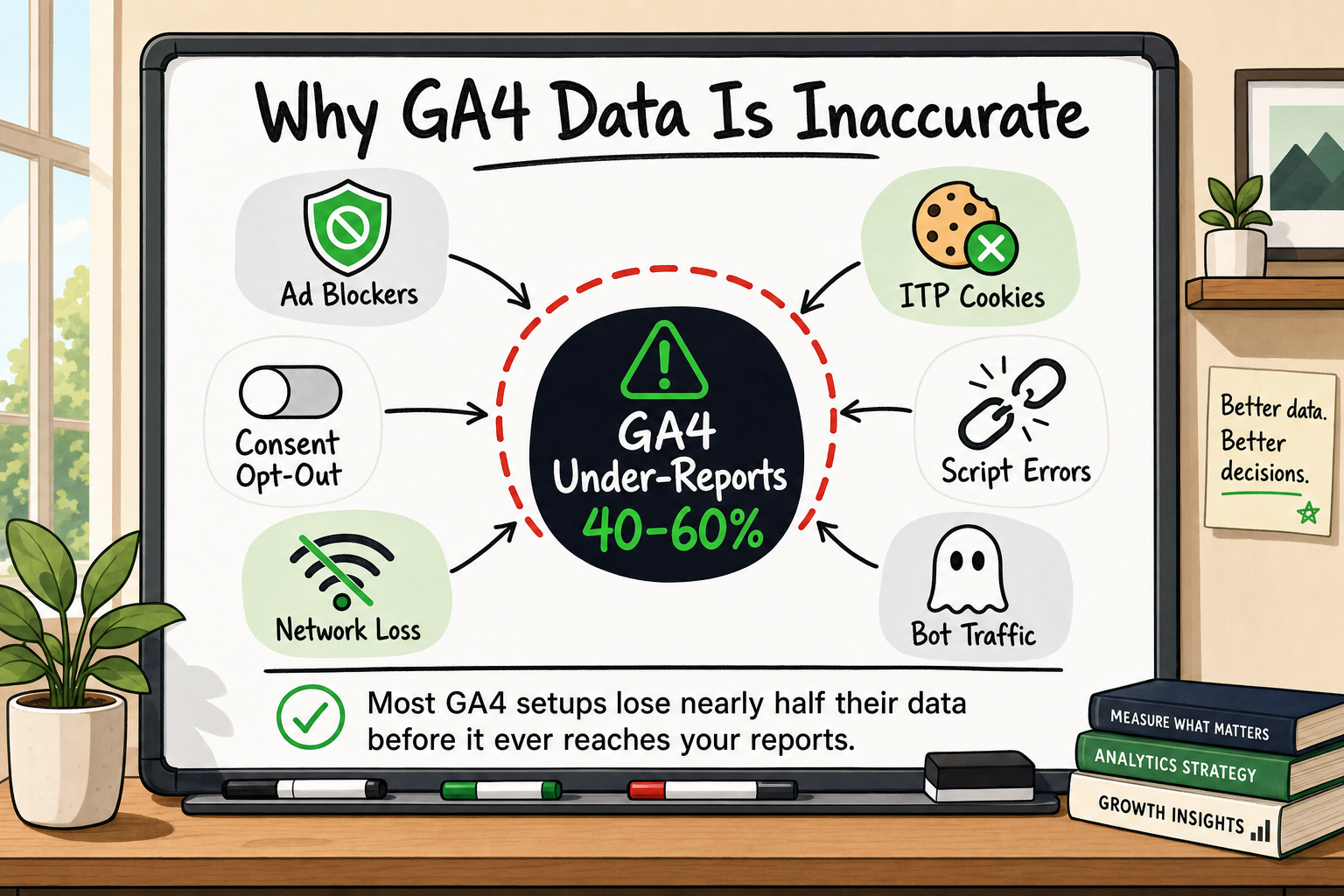
If you have Google Analytics 4 installed and you are making paid media or product decisions based on what it shows you, there is a good chance you are working with incomplete information. GA4 client-side tracking — the standard setup that most startups ship — routinely under-reports actual user activity by 40–60% [VERIFY: corroborate with Orbit Media or Conductor industry benchmark]. That is not a rounding error. It is a structural problem with how browser-based analytics works in 2024, and it has several distinct causes that compound on top of each other.
This article explains every root cause clearly, shows you how to measure your own data gap, and tells you what you can realistically do about each one.
How big is the GA4 data gap, really?
The 40–60% figure: where it comes from
The 40–60% range is not a single statistic from one study. It is a consistent pattern observed across multiple measurement contexts. Browser analytics providers, independent researchers, and analytics practitioners who compare GA4 session counts against server request logs or payment processor records routinely find gaps in this range [VERIFY: cite Orbit Media 2023 analytics accuracy study or equivalent]. In our own onboarding audits at Decyb, the first thing we do is stack GA4 goal completions against confirmed server-side transactions. A gap above 15% indicates a systemic tracking problem rather than statistical noise — and gaps of 40% or more are more common than most founders expect.
Why the gap is wider for B2C than B2B audiences
The size of your data gap depends heavily on who your users are. Consumer audiences — particularly younger, more technically literate users — are far more likely to use ad-blocking software or privacy-focused browsers. A B2C fintech or consumer SaaS product targeting developers or early adopters may see data loss at the higher end of the range. B2B audiences using corporate devices behind managed networks may see a smaller but still meaningful gap.
Root cause #1 — Ad blockers silently eating your events
Which browsers and extensions block GA4 by default
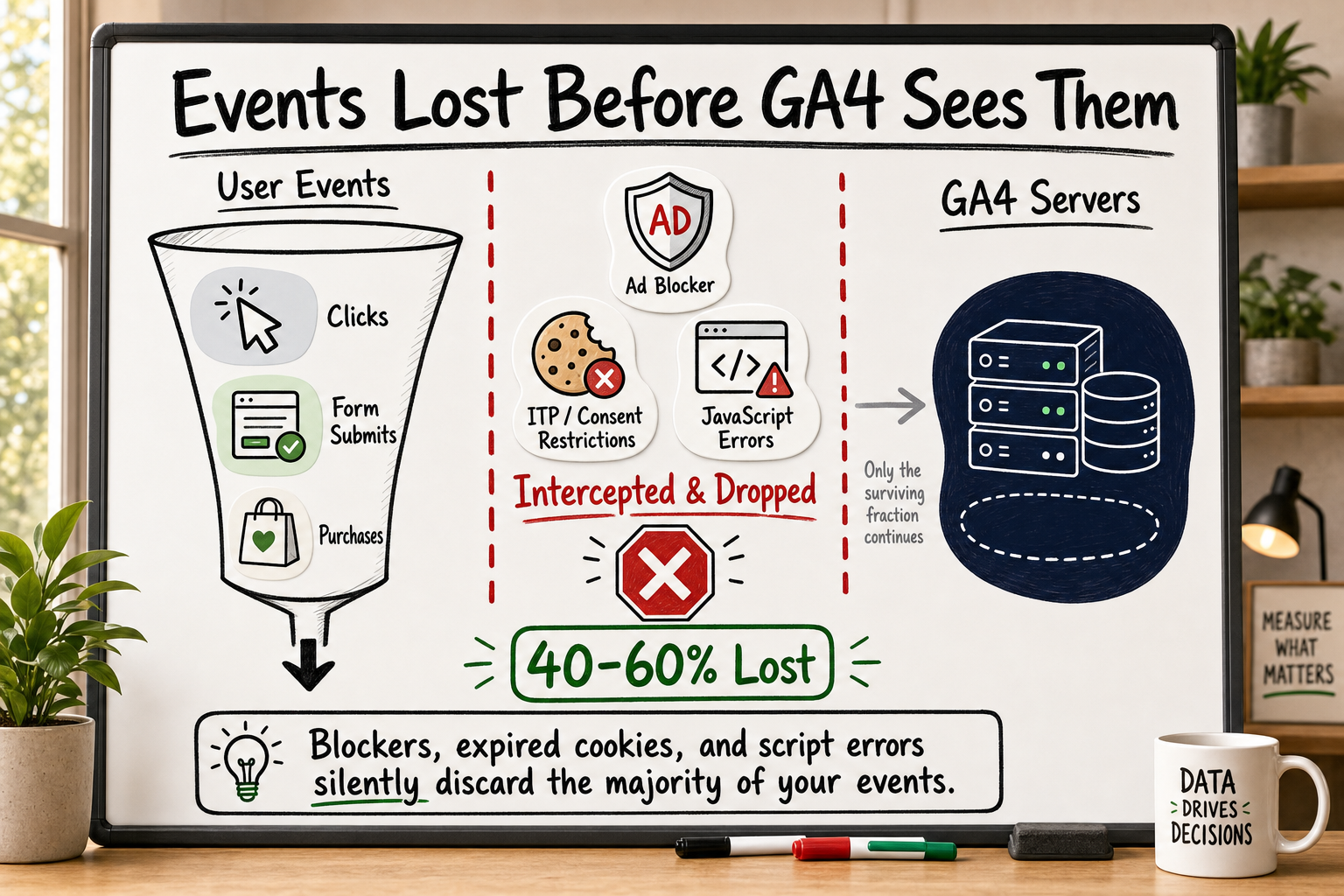
The most immediate and widespread cause of GA4 data loss is ad-blocking software. Major browser extensions — uBlock Origin, Privacy Badger, Ghostery — and privacy-first browsers including Brave and Firefox with enhanced tracking protection all block requests to googletagmanager.com and google-analytics.com by default. These are the endpoints that GA4's standard client-side tag uses to send event data to Google's servers.
When a user with any of these tools visits your site, your GA4 tag loads (or is prevented from loading entirely), attempts to fire an event, and the request is silently discarded. No error appears in your GA4 interface. No warning fires in GTM. The user's session simply does not exist in your data.
Brave browser alone reports more than 50 million monthly active users [VERIFY: confirm Brave MAU figure from Brave press releases or Statista]. When you account for all ad-blocking tools and privacy browsers across desktop and mobile, ad-blocker penetration among general web audiences sits somewhere between 25–40% globally, with tech-forward audiences skewing considerably higher [VERIFY: GlobalWebIndex or Statista ad blocker usage data].
Why GA4 gives you no warning when events are dropped
This is the detail that makes ad-blocker data loss particularly dangerous: GA4 has no built-in mechanism to tell you that events are being blocked. Your real-time view looks normal. Your session counts look plausible. There is no red flag in the interface. The only way to detect the gap is to compare GA4 data against a source of truth that lives outside the browser — your server logs, your CRM, or your payment processor.
Root cause #2 — Apple's privacy changes and Intelligent Tracking Prevention
What ITP actually does to GA4 cookies
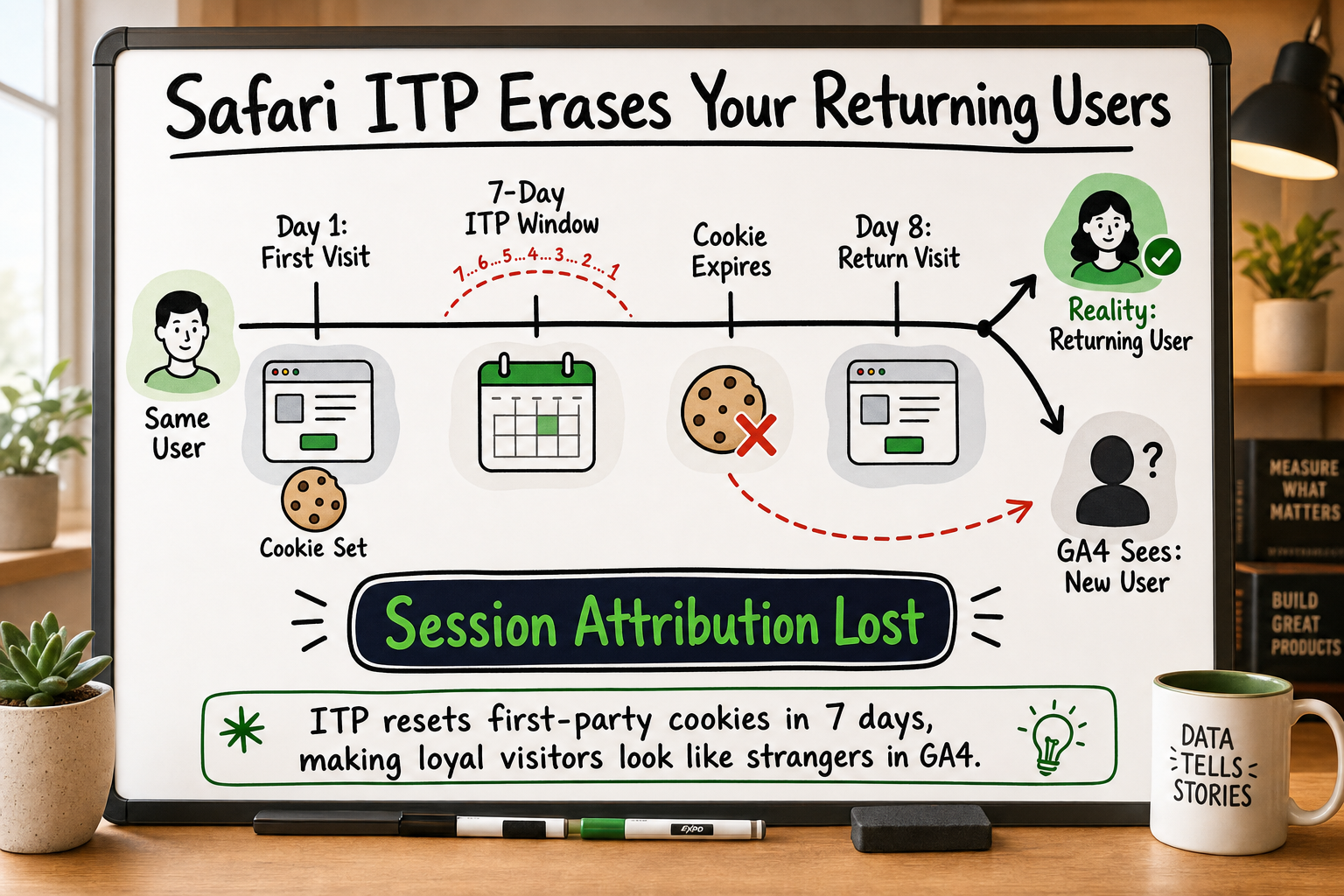
Apple introduced Intelligent Tracking Prevention (ITP) in Safari in 2017 and has tightened it with every major release since. For GA4, the most significant consequence is cookie lifetime restriction. Safari's ITP caps first-party cookies set via JavaScript — which includes the _ga cookie that GA4 uses to identify returning users — to a maximum of 7 days in most scenarios and as little as 1 day in certain configurations [Source: WebKit Tracking Prevention Policy — webkit.org].
In practice, this means a user who visits your site on a Monday and returns the following Wednesday may be counted as a brand-new user in GA4. Their sessions are split. Their attribution is broken. Any analysis of user retention, return visit rates, or multi-session conversion paths is affected.
Safari holds approximately 19% of global browser market share and significantly higher shares on mobile, particularly in English-speaking markets [VERIFY: StatCounter browser market share]. On iOS specifically, Safari is the default browser and — until recently — the only browser engine permitted under Apple's App Store rules, meaning the ITP limitation applies to every browser on every iPhone regardless of which app the user opens.
The App Tracking Transparency prompt and its effect on web-to-app journeys
Apple's App Tracking Transparency (ATT) framework, introduced with iOS 14.5, requires apps to request explicit permission before accessing the device's advertising identifier (IDFA). The majority of users decline this prompt [VERIFY: Flurry or AppsFlyer opt-in rate data post-ATT]. This severs the link between ad exposure and app-side conversion events, which is why Meta, Snap, and other ad platforms all reported significant measurement degradation after the iOS 14 rollout. The downstream effect on GA4 is that web-to-app journeys — a common pattern for mobile-first SaaS and consumer apps — become almost impossible to attribute accurately on a per-user basis.
Root cause #3 — Consent banners and refused cookies
How many users actually decline analytics consent
In markets covered by GDPR and equivalent legislation — the EU, UK, and increasingly others — websites must obtain informed consent before setting non-essential cookies, which includes the cookies GA4 uses for persistent user identification. When a user declines, GA4 is legally prohibited from setting those cookies and should not fire standard event tracking.
Opt-out rates vary significantly depending on banner design, copy, and the jurisdiction, but studies across EU markets consistently find that 30–60% of users decline non-essential analytics cookies when presented with a clearly labelled choice [VERIFY: IAB Europe or Cookiebot consent rate research]. This is a legally irreducible data gap. You cannot track these users without their consent, and any attempt to do so creates regulatory risk.
What Google Consent Mode V2 does — and doesn't — do
Google's Consent Mode V2 attempts to partially address this by sending cookieless, non-identifying pings when consent is refused, and using machine-learning models to fill in gaps in conversion data. This is better than nothing — it reduces the visible gap in GA4's conversion reports — but modelled data is not the same as measured data. The modelled figures are estimates based on the behaviour of users who did consent, applied probabilistically to those who did not. For paid media optimisation, this is a meaningful limitation. For product analytics decisions, it should be treated with caution.
Root cause #4 — Configuration errors and missing data layer events
The 12 most common GA4 setup mistakes
Even when no blocker or privacy restriction is involved, GA4 can under-report due to straightforward technical misconfiguration. In internal onboarding audits conducted across new client accounts, the following issues appear most frequently:
- Duplicate tracking tags — both
gtag.jsloaded directly in the page<head>and a GA4 tag in GTM running simultaneously, causing double-counting that then appears as suspicious data and prompts developers to remove one tag — sometimes the wrong one. - Cross-domain tracking not configured — users moving from a marketing site to a checkout subdomain appear as new sessions, splitting conversion paths and inflating session counts.
- Missing
itemsarray in purchase events — the ecommerce purchase event fires but without product-level data, making revenue attribution incomplete. - Form submission events firing on page load — a GTM trigger misconfiguration causes events to fire when the page loads rather than when the form is actually submitted.
- Single-page app routing not handled — covered in more detail in the next section.
- Referral exclusions not set — payment gateways or third-party tools appear as referral sources, overwriting the original acquisition channel.
- Session timeout not adjusted — the default 30-minute session timeout misrepresents engaged users on long-form content as multiple sessions.
- Internal traffic not filtered — team member and agency visits inflate session counts and contaminate conversion rate data.
- Enhanced measurement events double-firing — automatic events from enhanced measurement and manual custom events tracking the same interaction.
- User ID not passed — logged-in users are treated as anonymous, preventing cross-device and cross-session stitching.
- Data streams misconfigured — multiple data streams sending to the same property without stream-level filtering.
- GA4 debug mode left on in production — DebugView events pollute the live event stream [Source: Google Analytics Developer Documentation — developers.google.com/analytics/devguides/collection/ga4].
How to tell if your data layer is firing correctly
The fastest diagnostic tool is GTM's built-in Preview mode combined with GA4's DebugView. Open GTM Preview, load a critical page or complete a test conversion, and watch which tags fire and in what order. Then open GA4 DebugView (Admin → DebugView) and confirm the events arrive with the expected parameters. Any event that fires in GTM Preview but does not appear in DebugView has been blocked at the network level.
Root cause #5 — Browser-side JavaScript errors and tag firing failures
Single-page app routing and virtual pageviews
Modern web applications built with React, Next.js, Vue, or Angular use client-side routing — the URL changes without a full page reload. GTM's default page_view trigger listens for the browser's load event, which only fires on the initial load, not on subsequent route changes. Without a custom history change trigger configured in GTM, or a manual gtag('event', 'page_view') call wired into the app's router, every page a user visits after the first is invisible to GA4.
For a single-page app with a three-step onboarding flow, this means GA4 may record only the first step and none of the subsequent interactions — making your funnel data structurally useless.
How a single JavaScript error can silence all downstream tags
GTM processes tags in a defined sequence. If an earlier script on the page throws an unhandled JavaScript exception — a common occurrence in complex third-party integrations or after a deployment that introduces a bug — it can interrupt the execution context and prevent subsequent tags from loading at all. This is a silent failure. GA4 does not log an error. GTM does not surface an alert. The only signal is that your data drops off at a specific date in the GA4 line chart, which might be attributed to a traffic drop rather than a tracking failure.
How to audit your GA4 setup and find your own data gap
You do not need a specialist to run a first-pass audit. The following three steps will give you a reliable estimate of your own data gap within an hour.
Step 1: Compare GA4 sessions with server request logs
Pull your web server or CDN access logs for the same time period as a recent GA4 date range. Count the number of distinct IP/user-agent combinations that requested your key pages. Compare this against GA4's reported session count for the same pages. A gap of more than 15–20% is a signal worth investigating further.
Step 2: Cross-reference GA4 conversions with CRM or payment data
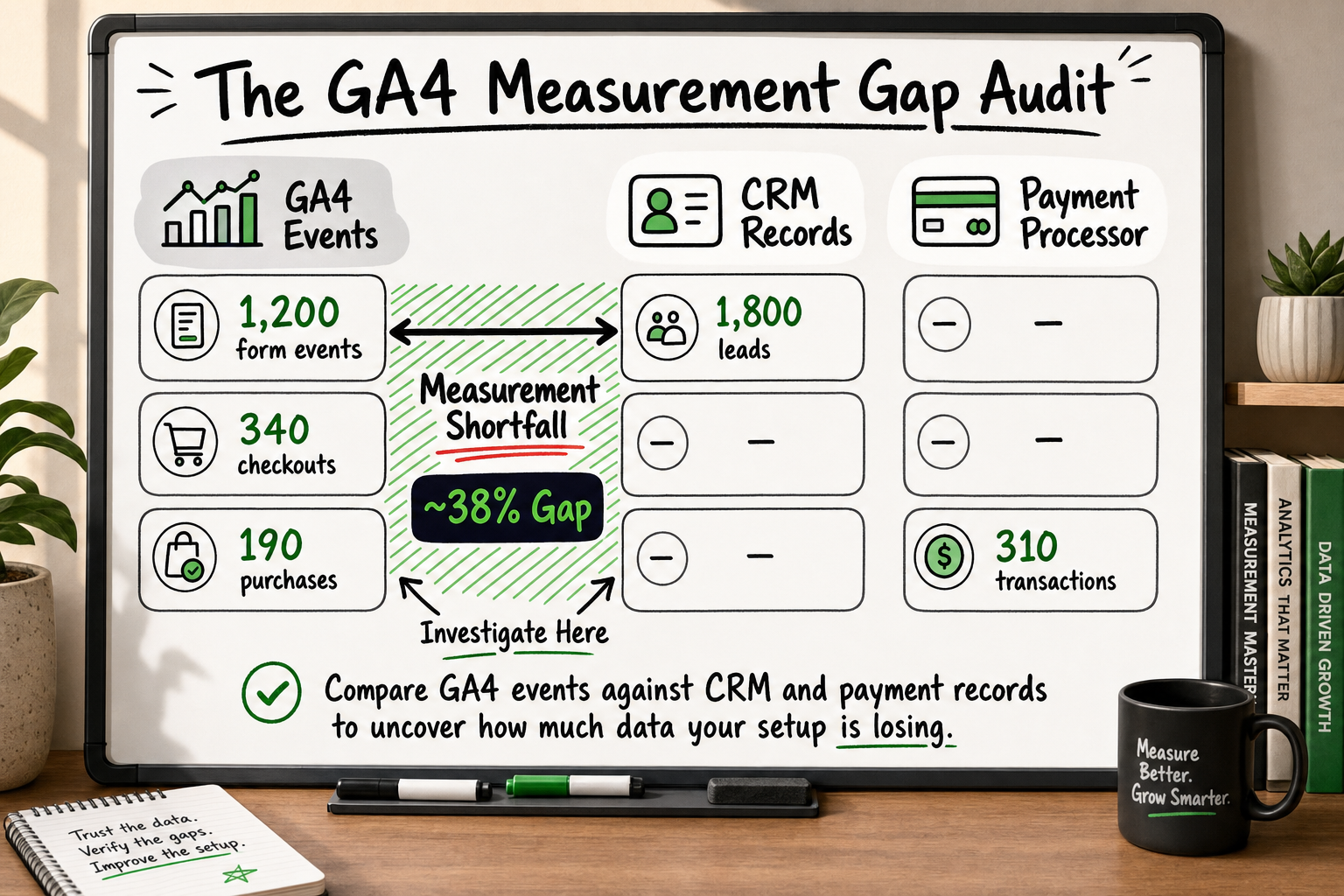
This is the most reliable comparison. Take GA4's reported purchase or lead conversion events for a given week and stack them against confirmed transactions in Stripe, your CRM, or your payment processor for the same period. The server-side transaction record is ground truth. Every confirmed transaction that does not have a corresponding GA4 event is a measurement gap.
If your GA4 reports 80 purchases and your payment processor confirms 130, you have a 38% data gap. That means your reported cost-per-acquisition is 62% higher than your actual CPA — and every media buying decision you make based on that figure is systematically wrong.
Step 3: Use GA4 DebugView and GTM Preview to catch silent failures
Complete a test conversion on your site — submit a form, complete a checkout, trigger a key event — while GTM Preview and GA4 DebugView are both open. Confirm that:
- The expected GTM tags fire in the correct order
- The events appear in GA4 DebugView with the correct parameters
- No duplicate events are present
- The
itemsarray (for ecommerce) contains product-level data
Any discrepancy between what GTM fires and what GA4 receives is a network-level block. Any discrepancy between what GA4 receives and what your server records indicates a tag-firing failure.
Why fixing the gap matters more than most founders realise
Bad data makes paid media expensive
Every paid media platform — Meta, Google Ads, LinkedIn — uses your reported conversion data to optimise its bidding algorithms. If GA4 is reporting 50% of your actual conversions, the algorithm is optimising on an incomplete signal. It may suppress spend on ad sets that are actually performing well because the conversions are not being reported. It may over-invest in segments that look strong in GA4 but are only appearing strong because their users happen to use blockers less frequently.
The consequence is not just inaccurate reporting. It is active misallocation of your media budget, compounding over every day you leave the tracking gap in place.
Product decisions built on incomplete data compound the problem
If your product analytics are based on GA4 client-side data and 40% of user interactions are invisible, your funnel analysis is structurally misleading. You may be optimising the wrong step in your onboarding flow, investing engineering time in a feature that appears popular but is actually being used more than GA4 shows, or deprioritising a segment of users whose behaviour is disproportionately blocked from your view.
For funded startups running on a defined runway, every engineering sprint that is directed by inaccurate data is a sprint that moves you away from product-market fit rather than toward it.
How Decyb Technology LLP approaches accurate analytics infrastructure
Every root cause covered in this article — ad blockers, ITP, consent refusals, configuration errors, JavaScript failures — has a corresponding fix. Some fixes are configuration changes you can make today. Others require a structural shift from client-side to server-side data collection.
Server-side tracking as the structural fix
Server-side tracking moves the measurement logic off the user's browser and onto infrastructure you control. Instead of relying on a JavaScript tag that can be blocked by an extension, intercepted by ITP, or silenced by a JS error, your server sends event data directly to GA4 via the Measurement Protocol and to Meta via the Conversions API (CAPI). Ad blockers cannot intercept server-to-server requests. ITP cannot shorten a server-side cookie. JavaScript errors on the client do not affect server-side event dispatch.
The result is not perfect data — users who refuse consent are still excluded by law, and that gap is genuinely irreducible — but the recoverable loss from blockers, ITP, and tag failures is addressed at the root. In practice, server-side implementations typically recover 30–50% of previously lost signal [VERIFY: corroborate with Meta CAPI implementation case data or industry benchmark].
Decyb's Meta Conversions API implementation — delivered ahead of schedule with full event deduplication to prevent double-counting between browser and server signals — received a ★ 5.0 client review. [INTERNAL LINK: server-side tracking services] The deduplication step is often overlooked: without it, server-side and client-side events both fire for the same user action, inflating your reported conversions in the opposite direction.
What a Decyb analytics engagement looks like in practice
We start every analytics engagement with the same audit framework: compare GA4 events against server-confirmed records, identify which root causes are active for that specific product and audience, and then address them in order of impact. For most funded startups, the highest-impact fix is a server-side GA4 and Meta CAPI setup with proper event deduplication — combined with a GTM configuration review to eliminate the silent failures already in place.
Jatinder Kumar has led analytics infrastructure projects across SaaS, fintech, healthcare, and eCommerce over 16+ years, and the consistent finding is the same: the gap exists on almost every client-side-only setup, and the founders who fix it earliest make better decisions faster.
If you want to know exactly how large your own data gap is before committing to any implementation work, start with the audit. [INTERNAL LINK: analytics audit checklist]
Read the case study to see how server-side tracking was implemented end-to-end for a funded client — including the before-and-after data completeness comparison. [INTERNAL LINK: /portfolio]
Frequently asked questions
Why does GA4 show fewer conversions than my payment processor?
Your payment processor records every server-confirmed transaction. GA4's client-side tag fires from the user's browser, where it can be blocked by ad-blocking software, prevented from firing by a JavaScript error, or restricted by Apple's ITP. Any of these conditions causes the GA4 event to be silently dropped while the transaction still completes. The gap between the two figures is your measurement loss.
Do ad blockers really affect GA4 that much?
Yes. uBlock Origin, Brave's built-in shields, and Firefox's enhanced tracking protection all block requests to googletagmanager.com and google-analytics.com by default — the same endpoints that standard GA4 client-side tracking uses. Among tech-forward consumer audiences and developer communities, ad-blocker penetration can exceed 40%, meaning more than four in ten users are invisible to a standard GA4 setup.
Is Google Consent Mode V2 enough to fix GDPR-related data loss?
Consent Mode V2 fills the gap with modelled, machine-learning-estimated data rather than real events. It reduces the visible gap in GA4's conversion reports and helps maintain some signal for Smart Bidding in Google Ads, but modelled data is not equivalent to measured data. It is a partial mitigation, not a solution to the underlying measurement problem.
What is the difference between client-side and server-side GA4 tracking?
Client-side tracking fires from the user's browser via a JavaScript tag. It is subject to ad blockers, ITP cookie restrictions, consent refusals, and JavaScript errors. Server-side tracking fires from your own server infrastructure directly to GA4's Measurement Protocol or Meta's Conversions API. Server-to-server requests bypass ad blockers and ITP entirely, recovering the majority of the data loss that client-side tracking incurs.
How do I know if my GA4 is configured correctly?
Compare GA4 goal completions against confirmed records in your CRM or payment processor for the same time period. A gap greater than 15% indicates a systemic tracking problem. Then use GTM Preview mode and GA4 DebugView to walk through a test conversion and confirm that every expected event fires with the correct parameters and no duplicates.
Can server-side tracking fix all GA4 data loss?
No — and it is important to be honest about this. Server-side tracking addresses loss caused by ad blockers, ITP, and JavaScript failures, which together account for the majority of recoverable signal. It cannot track users who have legally refused consent under GDPR or equivalent legislation. That portion of the gap is irreducible by design. A well-implemented server-side setup typically recovers 30–50% of previously lost signal — a significant improvement, but not a claim of 100% data completeness.
All project timelines and delivery estimates are indicative and subject to scope confirmation. Third-party service costs — hosting, domains, SaaS tools — are billed separately at cost. Decyb Technology LLP is registered in India; engagements are subject to terms of service available at decyb.com/terms.