
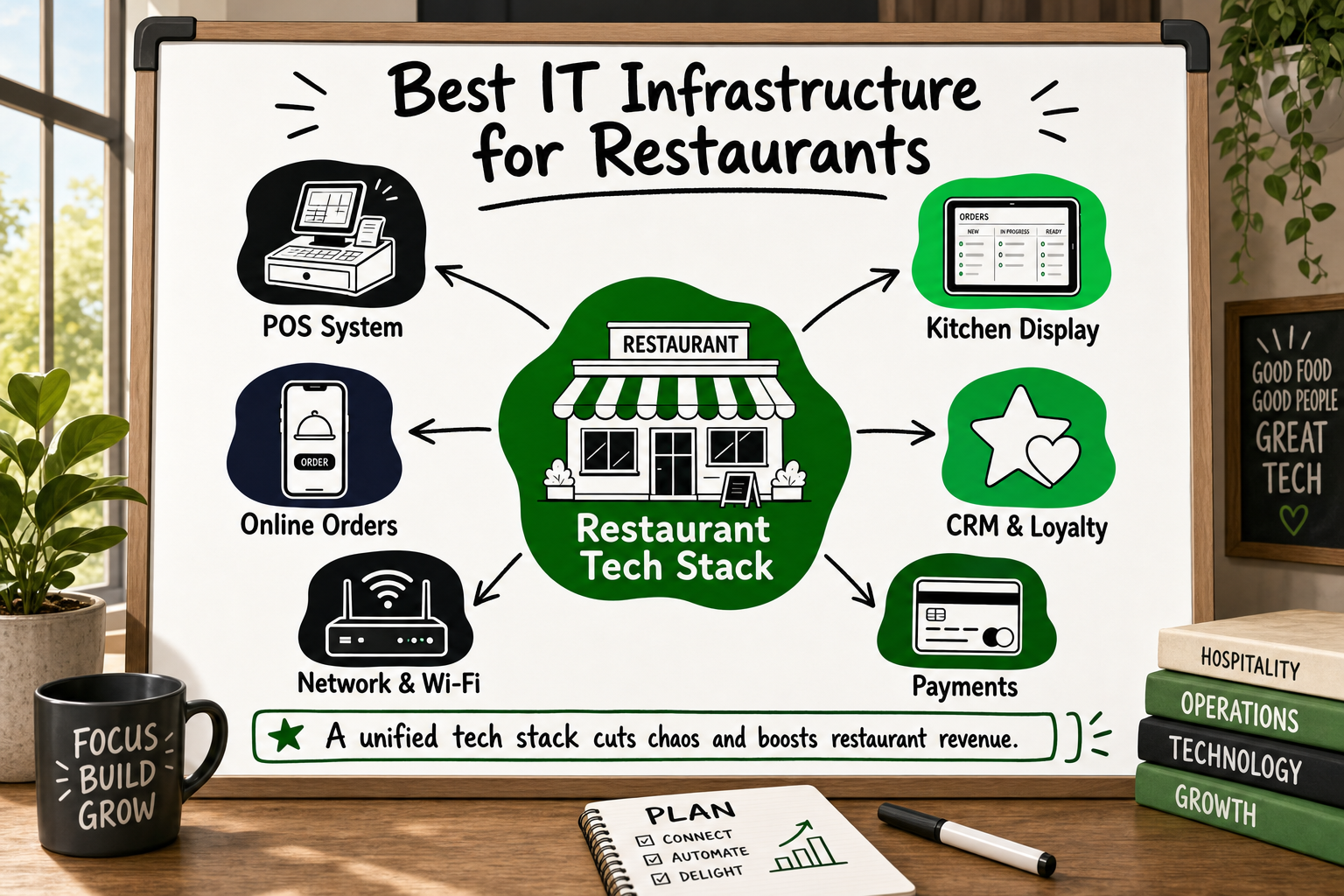
If you run a restaurant — or a chain of them — the technology decisions you make today will determine whether your operation scales smoothly or buckles under growth. The best IT infrastructure for restaurants is no longer just about taking payments and printing tickets. It is a connected system of hardware, software, and data that drives revenue, reduces waste, and keeps guests coming back.
This guide covers every layer of a modern restaurant tech stack: POS, KDS, self-order kiosks, CRM, analytics, networking, and online ordering integration. Whether you are opening your first site or standardising technology across fifty locations, you will find a clear, practical framework here.
Why Restaurant IT Infrastructure Is Now a Revenue Decision, Not Just an Ops One
For most of the industry's history, restaurant technology was invisible when it worked and catastrophic when it did not. A POS was a glorified cash register. A printer was a printer. Today, that framing is dangerously out of date.
The Hidden Cost of Disconnected Restaurant Systems
When your POS does not talk to your inventory system, your kitchen, or your customer database, you are paying for the same information to be entered manually in three different places. Staff time, transcription errors, and decision delays add up every service. Operators running disconnected tools routinely discover that they are carrying 10–15% dead menu weight — items that look profitable on paper but slow the kitchen and drag margin [VERIFY].
More critically, data that lives in silos cannot be acted on. If your CRM does not know what a guest ordered last visit, every interaction starts from zero. If your online ordering platform does not feed into your central POS report, you are managing the business from an incomplete picture.
How Technology Now Drives Covers, Average Spend, and Repeat Visits
Think of your IT stack as a flywheel. A well-configured kiosk upsells a dessert. The CRM captures that guest's email. An automated message three weeks later brings them back. Your analytics surface the fact that Tuesday evenings are under-performing, so you run a targeted offer to loyalty members and fill twenty covers that would have been empty. Each layer compounds the one before it.
The restaurants growing fastest right now are not the ones with the best chefs alone — they are the ones treating technology as a revenue management tool alongside great food.
The Core Layer: Choosing the Right Restaurant POS System
The POS is the heartbeat of any restaurant's IT infrastructure. Every other system either feeds data into it or pulls data from it. Getting this decision right early saves enormous cost and pain later.
Cloud POS vs Legacy On-Premise POS: The Real Trade-offs
Legacy on-premise POS systems store data locally. They are resilient during internet outages but expensive to maintain, slow to update, and nearly impossible to manage centrally across multiple sites. Each location becomes its own island of data.
Cloud POS systems sync to a central server in real time. A restaurant owner in Sydney can check last night's takings at their Melbourne site before getting out of bed. Menu updates push to every terminal in seconds. Staff permissions, sales reports, and inventory figures are all accessible from one dashboard.
For single-site independent restaurants, either can work. For anyone planning to grow beyond one location, cloud is the only defensible architecture choice.
Key POS Features Every Restaurant Chain Needs
- Central menu management with per-site price overrides
- Role-based access (floor staff see orders; managers see reports; owners see everything)
- Real-time sales dashboards across all sites
- Integrated payment processing with split-bill and multi-tender support
- Open API so you can connect inventory, CRM, and loyalty tools without custom workarounds
- Offline mode that queues transactions when the connection drops and syncs on restore
POS Hardware: Tablets, Terminals, and Handheld Devices
Most modern cloud POS platforms run on standard iPad or Android hardware, which keeps replacement costs low. Dedicated terminals remain the right call for high-volume quick-service environments where speed and durability matter more than flexibility. Handheld ordering devices carried by floor staff reduce table turn time and eliminate the walk back to a fixed terminal — particularly valuable in high-cover full-service restaurants.
Kitchen Operations: How a Kitchen Display System (KDS) Replaces Chaos With Clarity
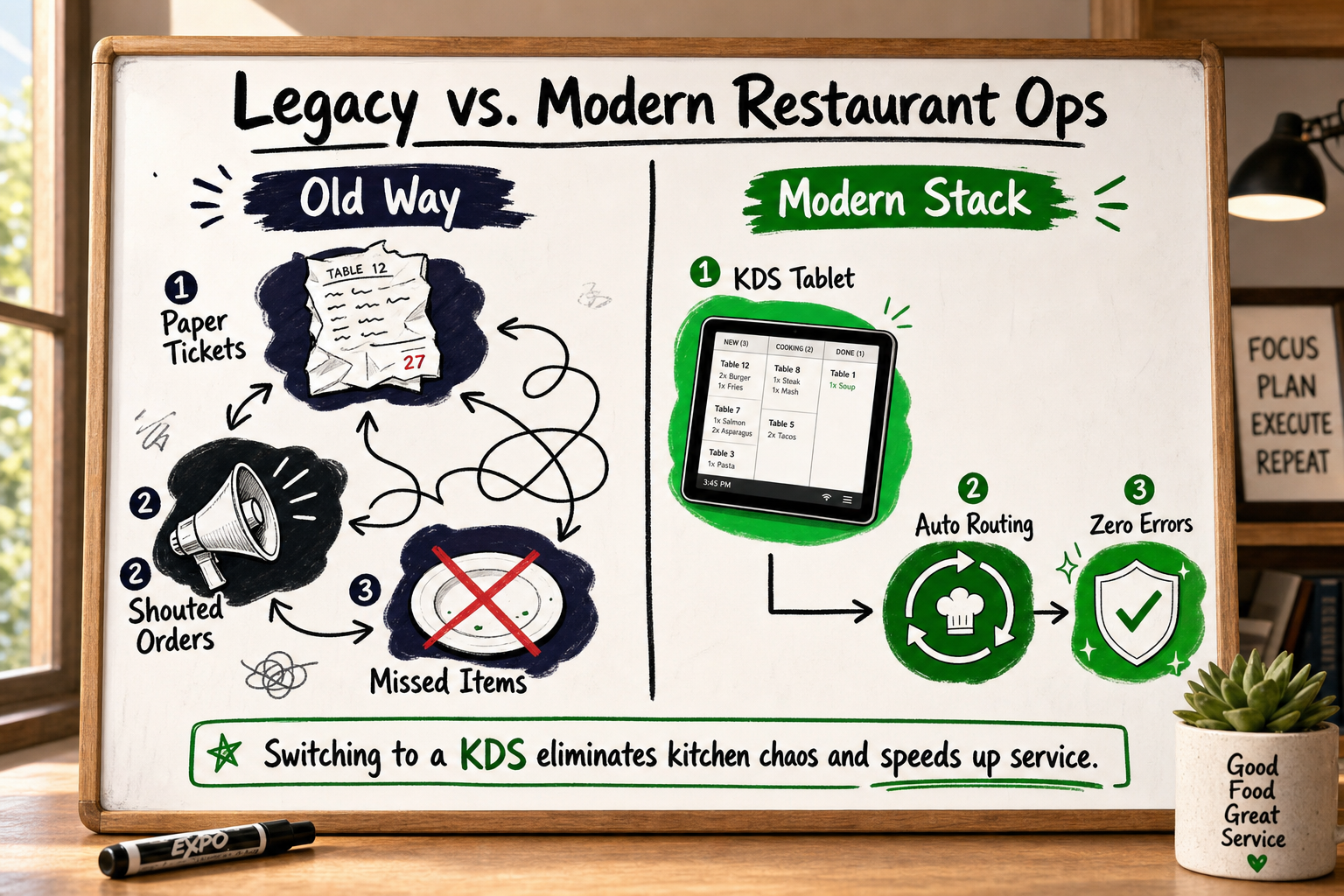
A kitchen display system (KDS) is a screen mounted in the kitchen — or at each station — that displays live orders, prioritises them by time, and confirms completion back to the front of house. It replaces paper tickets and verbal shouting, and it is one of the highest-ROI investments a growing restaurant can make.
How a KDS Routes Orders From Every Channel in Real Time
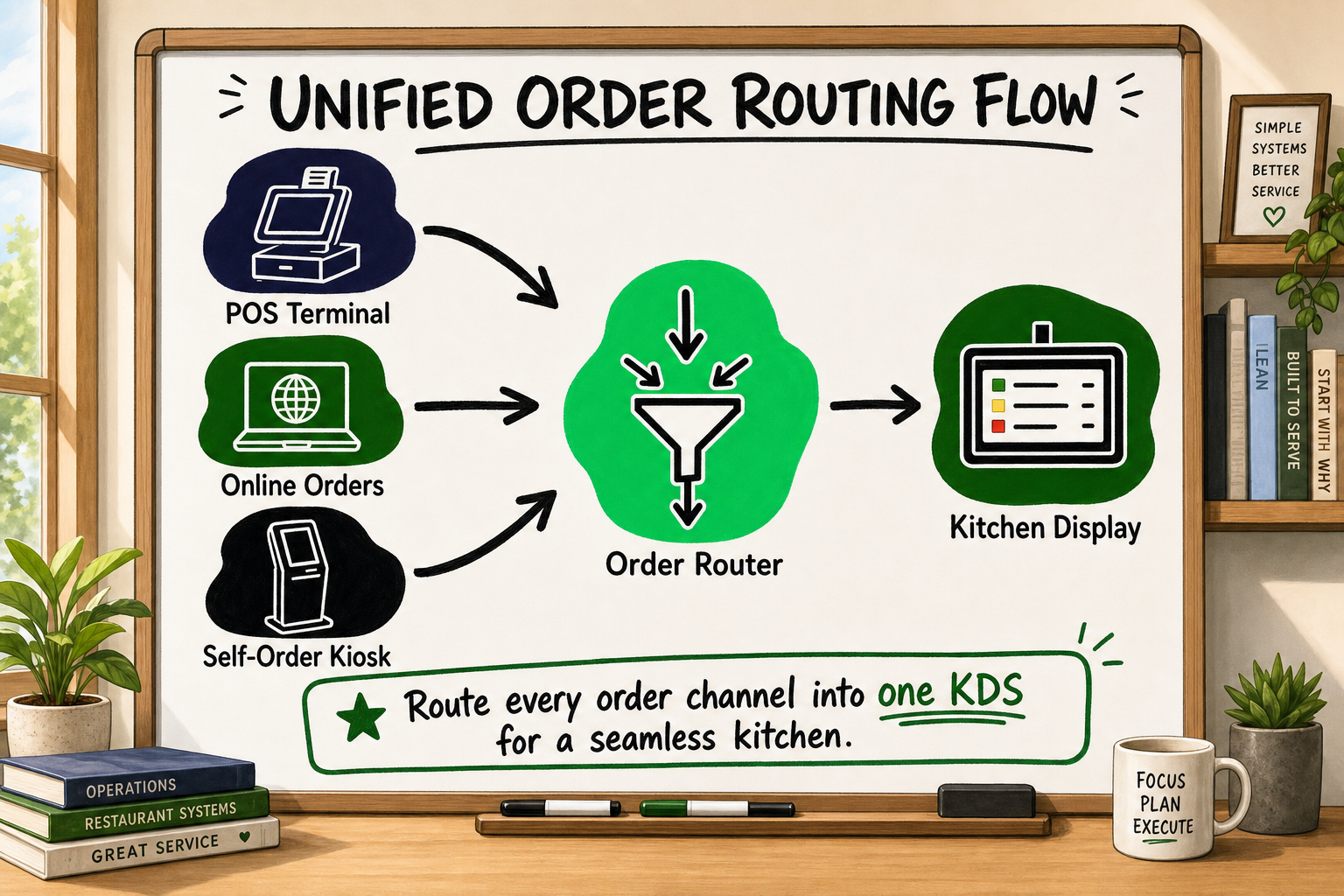
The real power of a KDS is not just replacing paper — it is aggregating orders from every channel into one view. A diner at the table places an order via the waiter's handset. A delivery order arrives from an aggregator platform. A kiosk order is submitted at the entrance. A well-integrated KDS collects all three and routes each item to the right station — grill, fryer, cold prep — with one unified priority queue.
In building the Multiverse multi-tenant restaurant management system, our team at Decyb handled exactly this routing challenge: POS orders, online orders, and back-office modifications all needed to reach the right kitchen station without duplication or confusion. The solution was a stateful order engine that treated every channel as an input into a single, authoritative order queue. Real kitchen teams working this way make fewer errors and close more covers per service.
Reducing Ticket Times and Error Rates With KDS
Paper tickets can be lost, mis-read, or ignored. A KDS timestamps every order, alerts the kitchen when a ticket is running over target time, and gives the expo station a live view of what is ready to plate. Kitchens using a KDS typically see measurable reductions in wrong orders reaching the pass [VERIFY]. Fewer re-fires means lower food cost and faster table turns.
Integrating KDS With Your POS and Online Ordering Platform
A KDS that only sees POS orders is only solving half the problem. The integration between your KDS, POS, and online ordering middleware is where most of the complexity lies. Choose a KDS that exposes an open API or connects natively to your POS. If your POS does not support a direct KDS integration, a middleware layer can bridge the gap — but this adds maintenance overhead that should be factored into the decision.
Self-Order Kiosks: Reducing Queue Time and Increasing Average Order Value
Self-order kiosks have moved from novelty to standard equipment in quick-service and fast-casual restaurants. The business case is well established.
The Upsell Logic Built Into Kiosk Order Flows
When a human cashier asks "do you want fries with that?", roughly 20–30% of customers say yes [VERIFY]. When a kiosk prompts the same question with a full-colour image of the item and a one-tap add button, the conversion rate is consistently higher . Kiosk orders average a higher spend per transaction than counter orders largely because the prompted upsell logic is systematic and never forgets to ask.
Customers also report less social pressure at a kiosk. They take more time to browse, customise orders exactly as they want them, and are more likely to add premium items.
Kiosk Hardware and Software Considerations
For hardware, you need a durable touchscreen (typically 21–32 inch), a card payment terminal, a receipt printer, and optionally a camera for age-verification or loyalty recognition. The software layer needs to sync with your central POS in real time so that sold-out items disappear immediately and price changes apply instantly.
Kiosk software should share the same menu management system as your POS — not run a separate database you maintain in parallel.
Accessibility, Localisation, and Payment Compliance for Kiosks
Accessibility is not optional. A compliant kiosk must offer screen height adjustment, audio guidance, and sufficient contrast ratios. For multi-location chains serving diverse communities, multi-language support is increasingly a baseline expectation. On payments, the kiosk must meet PCI-DSS requirements and, where relevant, local accessibility standards.
Restaurant CRM: Turning One-Time Diners Into Loyal Regulars
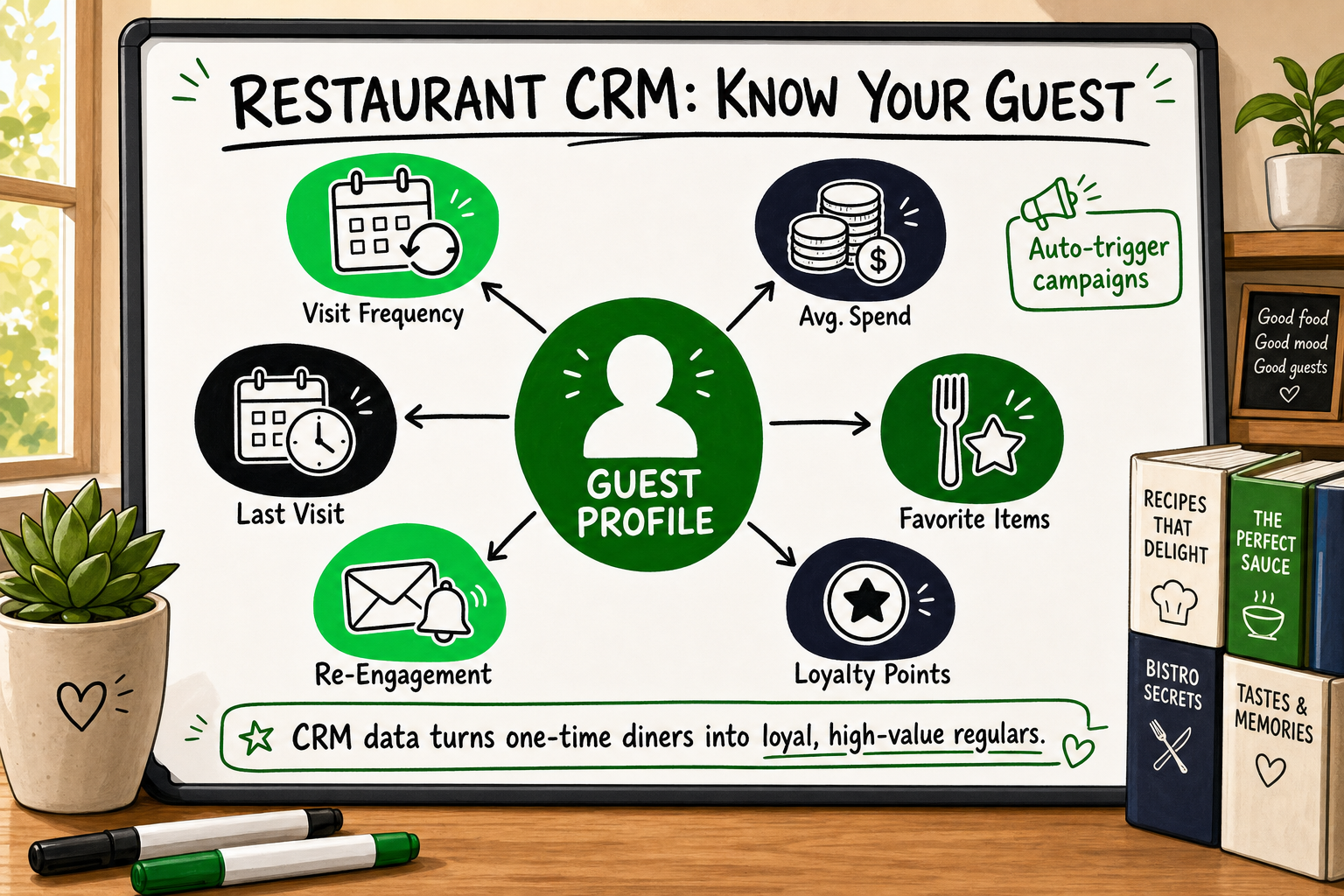
A restaurant CRM is the system that remembers your guests so your staff do not have to. It captures transactional data, powers loyalty programmes, and enables the kind of personalised re-engagement that keeps tables full without increasing your marketing spend proportionally.
What Data a Restaurant CRM Should Capture and Why
At minimum, a restaurant CRM should record:
- Guest identity: name, contact details, communication preferences
- Visit history: date, covers, total spend, items ordered
- Channel: dine-in, delivery, kiosk, or direct online order
- Feedback and reviews: NPS scores, complaints, compliments
When this data is linked to a unique guest profile that spans every visit and every channel, you shift from managing transactions to managing relationships. A guest who dines once a quarter and spends £45 per visit is worth roughly £180 per year. If a targeted re-engagement campaign converts them to once a month, that guest is worth £540 per year. The CRM is the tool that makes that calculation visible and actionable.
Loyalty Programmes, Automated Re-engagement, and Review Requests
The most effective restaurant loyalty programmes are simple: visit-based rewards or spend-based points that a guest can track on their phone. Complexity kills adoption. The CRM should automate the mechanics: send a welcome message when a guest joins, a reward notification when they qualify, and a win-back message if they haven't visited in 30 days.
Automated post-visit review requests — sent by SMS or email two hours after a visit — consistently improve a restaurant's public rating over time because satisfied guests who would have said nothing are prompted to share their experience.
Connecting CRM to Your POS for a Single Guest Profile
This integration is where most restaurant CRM setups fall short. If the CRM is a standalone loyalty app that does not talk to the POS, guest data is partial and the picture is incomplete. The right architecture pipes every POS transaction into the CRM in real time, so the guest profile is updated automatically on every visit — no manual data entry, no lag.
Analytics and Reporting: Making Decisions on Real Data
Data that lives in your systems but never reaches a decision-maker is waste. A good restaurant analytics layer turns raw transaction data into operational intelligence.
The Metrics Every Restaurant Operator Should Track Daily
| Metric | Why It Matters | |---|---| | Revenue per cover | Tracks average spend trend over time | | Table turn time | Measures floor efficiency during service | | Item-level sales mix | Identifies best and worst performers on the menu | | Void and refund rate | Early warning signal for staff issues or product problems | | Labour-to-revenue ratio | Indicates whether staffing matches demand | | Channel split (dine-in vs delivery vs kiosk) | Shows where growth is coming from |
Menu Engineering: Using Data to Retire Underperformers and Promote Winners
Menu engineering is the discipline of classifying every item on your menu by popularity and profit margin, then making deliberate decisions about placement, pricing, and promotion based on that data. Items that are both popular and profitable are your stars — they belong in prominent menu positions. Items that are neither popular nor profitable are dead weight that consumes kitchen time and customer attention without return.
Running this analysis monthly on real POS data is one of the highest-leverage activities a restaurant operator can do. The data is already there — it just needs to be surfaced.
Labour-to-Revenue Ratio and How Live Data Changes Scheduling Decisions
Labour is typically the largest controllable cost in a restaurant. A dashboard that shows live revenue alongside current clock-in data lets a manager make a call at 2pm on a slow Tuesday: send one team member home early or bring in an extra hand for a busier-than-expected Friday dinner. Without live data, that decision is a guess. With it, it is a calculated operational move.
Networking, Security, and Compliance: The Infrastructure Layer No One Talks About Until Something Breaks
The network is the foundation that everything else runs on. It is also the layer most operators underinvest in until a breach, a hardware failure, or a failed PCI audit forces the issue.
Network Architecture for a Single Site vs a Multi-Location Chain
For a single site, the minimum requirement is a business-grade router with at least two segregated networks: one for POS and back-office operations, one for guest Wi-Fi. These should never share the same segment. A guest on your free Wi-Fi should have no path to your payment hardware.
For a multi-location chain, a site-to-site VPN or SD-WAN solution lets head office push updates, access reports, and support staff remotely without exposing internal systems to the public internet. Each site still needs a local failover so a dropped internet connection does not take down the POS.
PCI-DSS Compliance Basics for Restaurant IT
PCI-DSS (Payment Card Industry Data Security Standard) applies to any business that stores, processes, or transmits card data. For restaurants, the key obligations are:
- Use a PCI-compliant payment processor — do not handle raw card data yourself
- Segment your POS network from all other traffic
- Keep software and firmware updated on all POS terminals
- Use strong, unique passwords on all network hardware
- Log and monitor access to payment systems
Most cloud POS providers handle much of this on your behalf, but the network architecture around them remains the restaurant operator's responsibility.
Cybersecurity Risks Specific to Hospitality Environments
Hospitality environments face specific risks: high staff turnover creates credential management problems; guest-facing Wi-Fi creates an attack surface; and integrated third-party delivery tablets expand the number of devices that need managing. The OWASP Top 10 remains the authoritative checklist for any web-facing ordering system [Source: OWASP]. Regular penetration testing, staff security training, and a documented incident response plan are not enterprise-only practices — they are table stakes for any restaurant handling guest data.
Online Ordering and Third-Party Aggregator Integration
For most restaurants, a significant portion of revenue now arrives through delivery platforms. Managing that cleanly is a genuine infrastructure challenge.
The Tablet Farm Problem and How Middleware Solves It
The classic aggregator setup is a separate tablet for each platform: one for Uber Eats, one for DoorDash, one for Deliveroo. Each tablet lives on the counter, each needs updating, each generates orders that a staff member manually re-enters into the main POS. This is the "tablet farm" problem — and it is as inefficient as it sounds.
Middleware platforms (such as Deliverect, Otter, or a custom integration layer) connect every aggregator to your central POS via API. An online order arrives and appears on the KDS exactly as a dine-in order would. No re-entry, no separate tablet, no confusion about which system holds the authoritative order record.
Direct Ordering vs Aggregator Dependency: Finding the Right Balance
Aggregator platforms charge commissions of 15–35% per order [VERIFY]. A restaurant that derives most of its delivery revenue from aggregators is handing a large margin slice to a third party. A direct ordering channel — whether a branded app, a website with integrated ordering, or a QR-code-based table ordering system — keeps that margin in-house and builds first-party guest data that no aggregator will share with you.
The strategic goal is not to abandon aggregators but to treat them as customer acquisition channels while converting repeat guests to direct order habits.
Keeping Menus and Pricing Consistent Across Every Channel
When your menu lives in five separate places — your POS, your website, Uber Eats, Deliveroo, and your kiosk software — a price change requires five separate updates and one of them will always be missed. A central menu management system that pushes to every channel simultaneously is the only scalable solution at any meaningful volume.
Frequently Asked Questions
What is the minimum IT setup a new restaurant needs on opening day?
At a minimum: a cloud POS with integrated card payments, a stable business-grade router with a guest Wi-Fi network segmented from your POS, and a direct online ordering or booking tool. A KDS is strongly recommended if you have a meaningful kitchen operation. Everything else — CRM, analytics, kiosks — can follow as volume and complexity grow.
How much does a full restaurant IT stack typically cost?
Costs vary widely. A cloud POS for a single site typically runs from a few hundred to a few thousand pounds per year including hardware. A full custom-built restaurant management system covering POS, KDS, CRM, and reporting for a multi-site chain is a bespoke investment that depends entirely on scope and integration complexity. The most expensive option in the long run is usually a series of disconnected off-the-shelf tools that never fully integrate.
Can a small independent restaurant afford a KDS?
Yes. Cloud-based KDS solutions have come down significantly in cost and many operate on monthly subscriptions. The break-even calculation is straightforward: if a KDS prevents two re-fired dishes per service and saves 20 minutes of kitchen staff time per night, the maths typically work within weeks rather than months.
How do restaurant chains keep menus consistent across locations?
Through a central menu management system — either built into the cloud POS or a custom back-office tool — that holds the master menu and pushes approved updates to every site simultaneously. Price overrides by location are handled as exceptions within the same system.
What is the best way to collect customer data in a restaurant without being intrusive?
The most effective and least intrusive methods are: Wi-Fi login with an opt-in to marketing, loyalty programme sign-up at the kiosk or POS checkout, receipt email capture, and account creation on a direct online ordering platform. All collection must be GDPR/privacy-law compliant with clear consent language and an easy opt-out.
Do I need a custom-built restaurant system or will off-the-shelf software be enough?
Off-the-shelf cloud POS and KDS tools work well for standard single-site or small-chain operations with conventional workflows. Custom development becomes the right answer when you have complex multi-tenant requirements, unique operational workflows that existing tools cannot accommodate, large-scale integrations (such as 40,000+ product SKUs across a wholesale or franchise network), or when the total cost of licensing and workarounds exceeds the cost of building something that fits precisely.
How Decyb Technology LLP Builds Restaurant IT Systems That Scale
Most technology partners will sell you a product. What restaurant operators at growth stage actually need is someone who understands the full stack — from database architecture to front-of-house UX — and can make decisions that hold up when you double in size.
What We Built for Multiverse: A Real-World Restaurant Tech Stack
Decyb built Multiverse, a multi-tenant restaurant management system covering POS, inventory, online orders, and back-office operations — delivered in React, Node.js, and Express. The challenge was not just building each module; it was ensuring that a single POS transaction could simultaneously update inventory, trigger the KDS, record to the CRM, and surface in the central analytics dashboard — without any of those writes blocking the others.
That kind of architecture requires careful decisions about data flow, state management, and API design from day one. It is the kind of work that looks invisible when it is done well, and becomes an expensive rebuild project when it is skipped.
Jatinder Kumar, Founder of Decyb, has 16+ years of full-stack software engineering across SaaS, fintech, healthcare, and eCommerce — with a consistent ★ 5.0 delivery record across international client engagements. Every engagement at Decyb is led directly by a senior partner, not delegated to a junior team after the sales call.
Why Restaurant Operators Choose a Custom Approach Over Off-the-Shelf
The operators who come to Decyb have usually already tried the off-the-shelf route. They are not choosing custom because it sounds exciting — they are choosing it because they have hit a specific wall: a POS that cannot handle their franchise model, an inventory system that does not talk to their supplier portal, or an analytics layer that gives them last week's data when they need last night's.
Decyb works from a fixed-price, outcome-first model. The scope is agreed before a line of code is written. Architecture decisions are documented so they can be handed to a future CTO, an investor, or an acquirer without ambiguity.
Start With a Free Strategy Call
If you are planning a restaurant technology build — whether that is a full custom system, a complex integration, or a replacement for a stack that has become a liability — the most useful first step is a clear-eyed conversation about what you actually need.
Book a free 24-hour technology strategy call with a senior Decyb partner. No sales pitch. A genuine assessment of your options, the trade-offs involved, and whether custom development is the right call for your situation at all.
Book your free strategy call — get a plan in 24 hours
All project timelines and delivery estimates are indicative and subject to scope confirmation. Third-party service costs (hosting, domains, SaaS tools) are billed separately at cost. Decyb Technology LLP is registered in India; engagements are subject to terms of service available at decyb.com/terms.